

Plugin info
Maintenance & Compatibility
Maintenance score
Possibly abandoned • Last updated 450 days ago
Is PlayMe abandoned?
Possibly abandoned (last update 450 days ago).
Compatibility
Similar & Alternatives
Explore plugins with similar tags, and compare key metrics like downloads, ratings, updates, support, and WP/PHP compatibility.
Description
Embeddable Song Request Form for Radio Stations
Designed for Radio Stations
PlayMe was requested by a radio station deejay and built to best serve both the studio and the listeners.
- Listeners may provide their name, the artist/song name, and a dedication (or comments), to make realtime requests to Radio Stations and Deejays.
- The form is easily embeddable using the shortcode [playme] and can optionally require Google’s reCAPTCHA to verify requests before they’re submitted. Put “[playme]” on its own line in the page content (using Text View) to position the PlayMe form where you want it to appear on your page.
- On the backend, requests are shown in a list that refreshes passively every minute, and can be dismissed/hidden once the request has been addressed.
- For privacy, the only information captured (apart from what’s entered in the submission form) is an IP Address, to offer some insight to site owners about those who are submitting song requests.
3rd Party Services
Be advised about the 3rd Party services used by this plugin.
- Google reCAPTCHA: Optionally, site owners may configure PlayMe to use Google’s reCAPTCHA service to help minimize abuse of the Song Request form. More information about this service can be found on Google’s privacy policy and terms of service of use.
- WhatIsMyIPAddress.com: PlayMe offers a link for site owners to quickly discover/review the geographic location on record associated with the IP address of the submitter of the Song Request (IP-to-Location). This service is provided by a 3rd Party. More information about WhatIsMyIPAddress.com can be found on its website, its privacy policy, and its terms of use.
Installation
- Install PlayMe either via the WordPress.org plugin directory, or by uploading the files to your server (in the
/wp-content/plugins/directory). - Activate the plugin.
- Embed the form in any WordPress page using the shortcode: [playme]
Frequently Asked Questions
Not at this time.
If you wish. Sure.
Please make your requests via the ERA404 Contact Form to obtain a quote for custom development.
Review feed
Screenshots
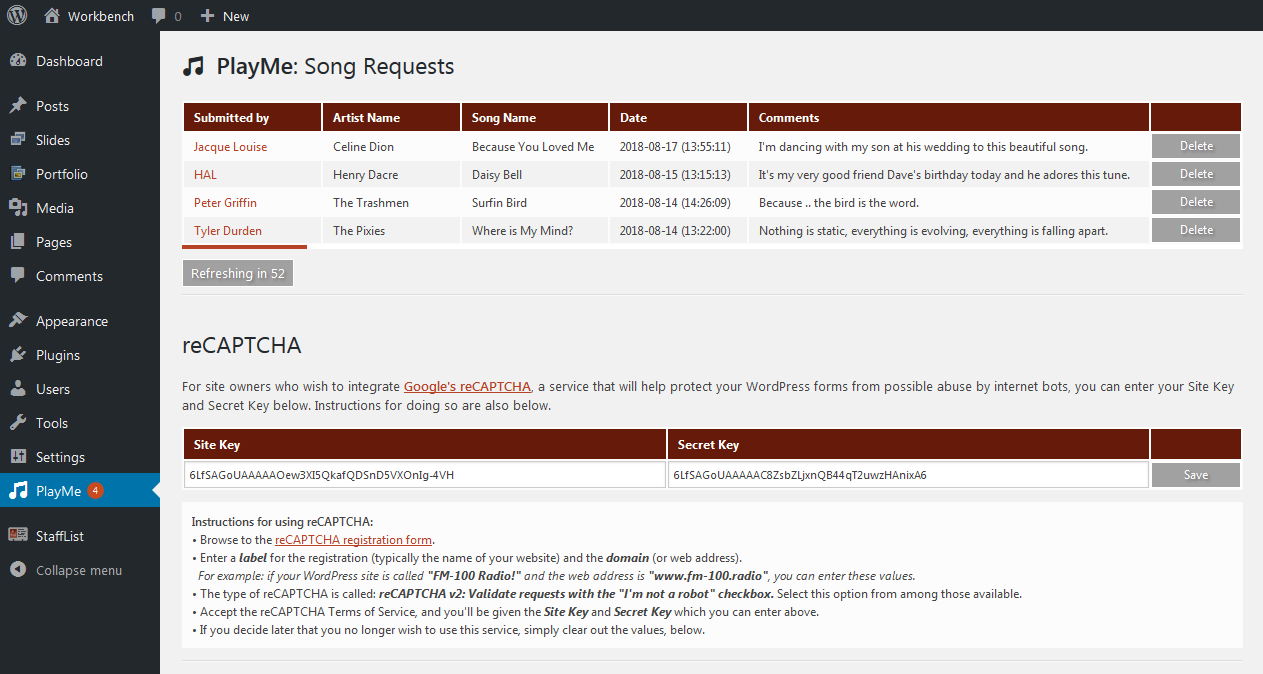
The back-end shows the currently requested songs, the newest at the top, and a button to hide/dismiss each
![The front-end form can be easily be dropped into any WordPress page using the shortcode <strong>[playme]</strong>](https://ps.w.org/playme/assets/screenshot-2.png?rev=1929841)
The front-end form can be easily be dropped into any WordPress page using the shortcode [playme]
Changelog
0.2.8
- Tested with WordPress 6.7.1;
0.2.7
- Updated documentation and tested with WordPress 5.9;
0.2.6
- Updated styles and tested with WordPress 5.7.2;
0.2.5
- Added new role “PlayMe Requests Viewer”;
- Added new capability “View PlayMe Requests”;
0.2.3
- Adjusted styles to work better with WordPress 5.3.2
0.2.2
- Updated the ReadMe.txt with notice about 3rd Party services: Google reCAPTCHA and WhatIsMyIPAddress.com
0.2.1
- WordPress requested fixes.
0.1.0
- Beta Release