

Plugin Organizer
Change plugin order and selectively enable/disable plugins on each post/page.
Plugin info
Maintenance & Compatibility
Maintenance score
Maintained • Last updated 125 days ago • Support resolved 0% • 227 reviews
Is Plugin Organizer abandoned?
Likely maintained (last update 125 days ago).
Compatibility
Similar & Alternatives
Explore plugins with similar tags, and compare key metrics like downloads, ratings, updates, support, and WP/PHP compatibility.
Description
This plugin allows you to do the following:
1. Change the order that your plugins are loaded.
2. Selectively disable plugins by any post type or wordpress managed URL.
3. Adds grouping to the plugin admin age.
WARNING: Reordering or disabling plugins can have catastrophic affects on your site. It can cause issues with plugins and can render your site inaccessible.
Installation
- Extract the downloaded Zip file.
- Upload the ‘plugin-organizer’ directory to the
/wp-content/plugins/directory - Activate the plugin through the ‘Plugins’ menu in WordPress
- Use the menu item under settings in the WordPress admin called Plugin Organizer to get the plugin set up.
IMPORTANT: To enable selective plugin loading you must move the /wp-content/plugins/plugin-organizer/lib/PluginOrganizerMU.class.php file to /wp-content/mu-plugins or wherever your mu-plugins folder is located. If the mu-plugins directory does not exist you can create it. The plugin will attempt to create this directory and move the file itself when activated. Depending on your file permissions it may not be successful.
Note: If you are having troubles you can view the documentation by going to https://www.sterup.com/wordpress-plugins/plugin-organizer/documentation/
Frequently Asked Questions
You can find a full FAQ list at https://www.sterupdesign.com/dev/wordpress/plugins/plugin-organizer/faq/
The simple answer. Yes. But you must understand how your caching plugin and Plugin Organizer do what they do. If your caching plugin creates a minified version of the javascript files loaded on a page then there is the potential that Plugin Organizer will cause the caching plugin to constantly recreate the minified javascript files.
Let?s say you have plugins A, B, C, and D active on your site and D is disabled globally. All 4 plugins add javascript to the site. On http://www.yourdomainnameyouuse.com/post-1/ you have plugin B disabled with Plugin Organizer. On http://www.yourdomainnameyouuse.com/post-2/ you have nothing disabled by Plugin Organizer and plugin D has been enabled, overriding the global setting. When someone visits http://www.yourdomainnameyouuse.com/post-1/ a minified javascript file has to be generated containing the scripts for plugins A and C. Then someone visits http://www.yourdomainnameyouuse.com/post-2/. The minified javascript file has to be recreated because the javascript for plugins A, B, C, and D need to be loaded. Then someone visits http://www.yourdomainnameyouuse.com/post-3/ and the minified javascript file has to be created again because the file has to contain the scripts for plugins A, B, and C but not D.
The above example explains how load time and caching can be affected with a caching plugin that creates minified javascript files. It basically renders the caching plugin useless.
Another example would be a caching plugin that creates a static version of pieces of the page. Again lets say we have the same plugins and the same posts. When someone visits http://www.yourdomainnameyouuse.com/post-1/ static pages are created with the content from plugins A and C. This cache has a lifetime of 300 seconds for example. When someone visits http://www.yourdomainnameyouuse.com/post-2/ it has the content for plugins A and C but it is missing Plugins B and D because the cache hasn?t expired. This can cause unexpected content and errors.
There are different ways that caching plugins work and they can work together with Plugin Organizer. These are only 2 examples to give an idea. But you have to understand how they work and how you are affecting your cache by disabling plugins.
Yes. A malicious plugin named WP Spamshield targets the settings used by Plugin Organizer to disable it. It also targets various other plugins and changes how they behave or disables them entirely. All of this is done without the users knowledge or consent. This plugin was removed from the WordPress Plugin Directory because of this malicious code but it may still exist on some users sites. It will also likely be released from a different repository in the future and start targeting plugins again. You should remove WP Spamshield not only to make sure that Plugin Organizer runs correctly but to ensure the security of your website is not compromised. Find out more at https://www.sterupdesign.com/blog/malware/wp-spamshield/.
Follow the documentation page for disable plugins on wp-admin.
Go to the Plugin Organizer settings page and click the button under selective plugin loading to turn it on. During the upgrade process selective plugin loading got turned off.
Go to the Plugin Organizer settings page and click the button under selective plugin loading to turn it on. Then visit your homepage. Finally return to the Plugin Organizer settings page and see if the button is still set to on. If it is not then you are running an old version of the MU component. Copy the PluginOrganizerMU.class.php file to the mu-plugins folder then deactivate and reactivate the plugin. Repeat these steps to ensure that the plugin is working. Remember that you will need to update the PluginOrganizerMU.class.php file whenever the plugin is updated and check your settings afterward.
Yes it has been tested on several multi-site installs. Both subdomain and sub folder types.
Yes it has been tested with custom post types. You can add support for your custom post types on the settings page.
“IMPORTANT: To enable selective plugin loading you must move the /wp-content/plugins/plugin-organizer/lib/PluginOrganizerMU.class.php file to /wp-content/mu-plugins or wherever your mu-plugins folder is located. If the mu-plugins directory does not exist you can create it. The plugin will attempt to create this directory and move the file itself when activated. Depending on your file permissions it may not be successful.”
The mu-plugins folder contains “Must Use” plugins that are loaded before regular plugins. The mu is not related to WordPress MU. This was added to regular WordPress in 3.0 I believe. I only placed this one class in the MU folder because I wanted to have my plugin run as a normal plugin so it could be disabled if needed.
Example 1: If you have a large number of plugins and don’t want them all to load for every page you can disable the unneeded plugins for each individual page. Or you can globally disable them and enable them for each post or page you will need them on.
Example 2: If you have plugins that conflict with eachother then you can disable the plugins that are conflicting for each indivdual post or page.
Example 3: If you have plugins that conflict with eachother then you can disable the plugins globally and activate them only on posts or pages where they will be used.
Note: If you are having troubles you can view the documentation by going to https://www.sterupdesign.com/dev/wordpress/plugins/plugin-organizer/documentation/
Create a plugin filter with your home page url. Like https://www.sterupdesign.com/. Then enable or disable the plugins you want with that filter.
Yes. You can use limited wildcards in the permalink structure. For instance you can match the url https://www.sterupdesign.com/some/pretty/permalink/ by entering https://www.sterupdesign.com/some//permalink/. You can also match the url by entering https://www.sterupdesign.com//pretty/permalink/ as the permalink. The only character that is recognized is the * character. It can only replace one piece of the url in between the / characters.
Yes. Go to the Post Type Plugins page under Plugin Organizer in the admin menu. Here you can select the post type you want to change and disable/enable plugins for that post type as long as the setting hasn’t been overridden on the individual posts.
To load a plugin only in the admin you need to enable selective plugin loading for the admin areas and fuzzy url matching. Then globally disable the plugin you want to turn off on the front end. Next create a plugin filter with the permalink set to your admin url. Like https://www.sterupdesign.com/wp-admin/. Then enable the plugin for that plugin filter and select also affect children. Now the plugin should only be loaded in the admin.
Yes. Go to the Plugin Organizer settings page and check the box next to each of the roles you want to be able to disable/enable plugins with. THen a separate container will appear on the post edit screen for you to disable/enable plugins with.
When the form is submitted it is not submitting to the page you are viewing. It is submitting to an ajax endpoint. Which is a different URL. You need to enable the plugin on that URL to get the form working. Here are 2 examples of how to do that.
Caldera Forms:
https://wordpress.org/support/topic/conflict-w-caldera-forms-like-emilybkk-posted/
Contact Form 7:
https://wordpress.org/support/topic/conflict-with-contact-form-7-4/
Review feed
Why I didn't use it before? (best performance plugin)
Screenshots
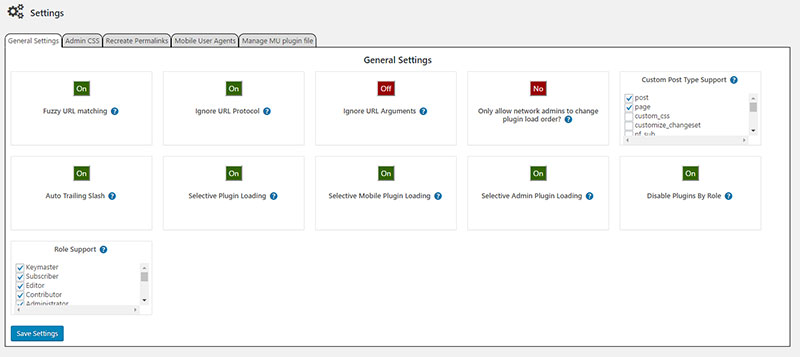
Settings page example.
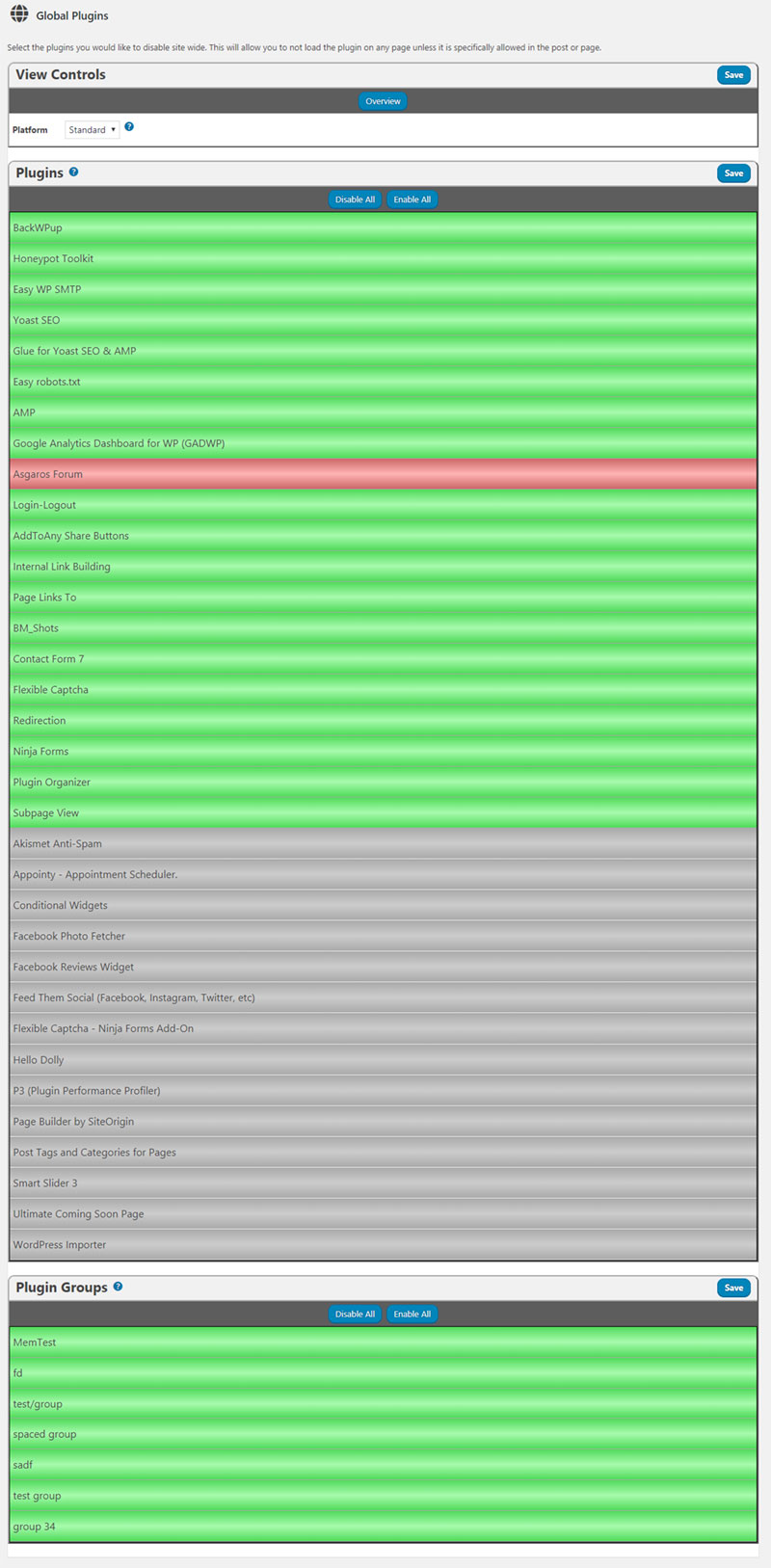
Global plugins page.
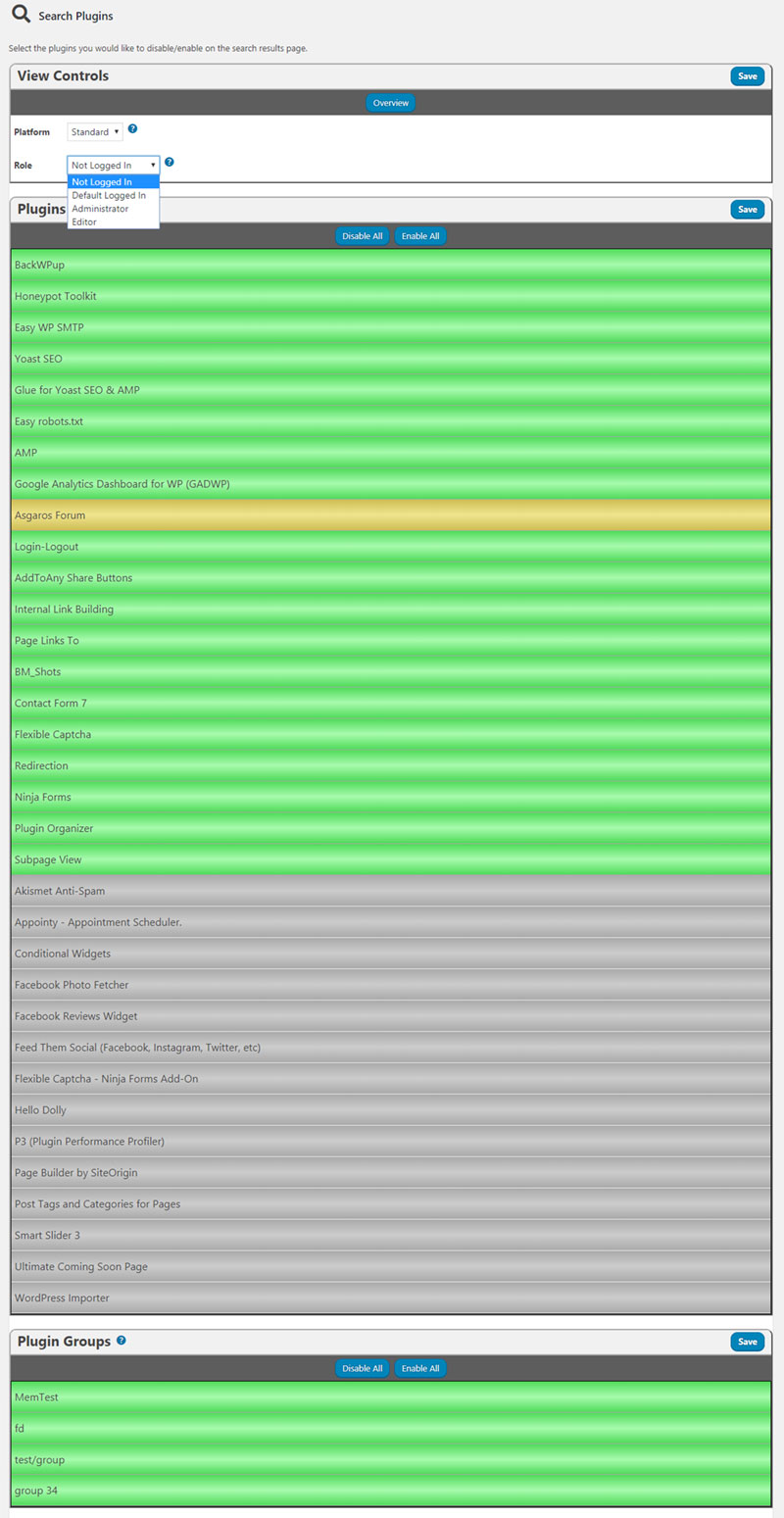
Search plugins page.
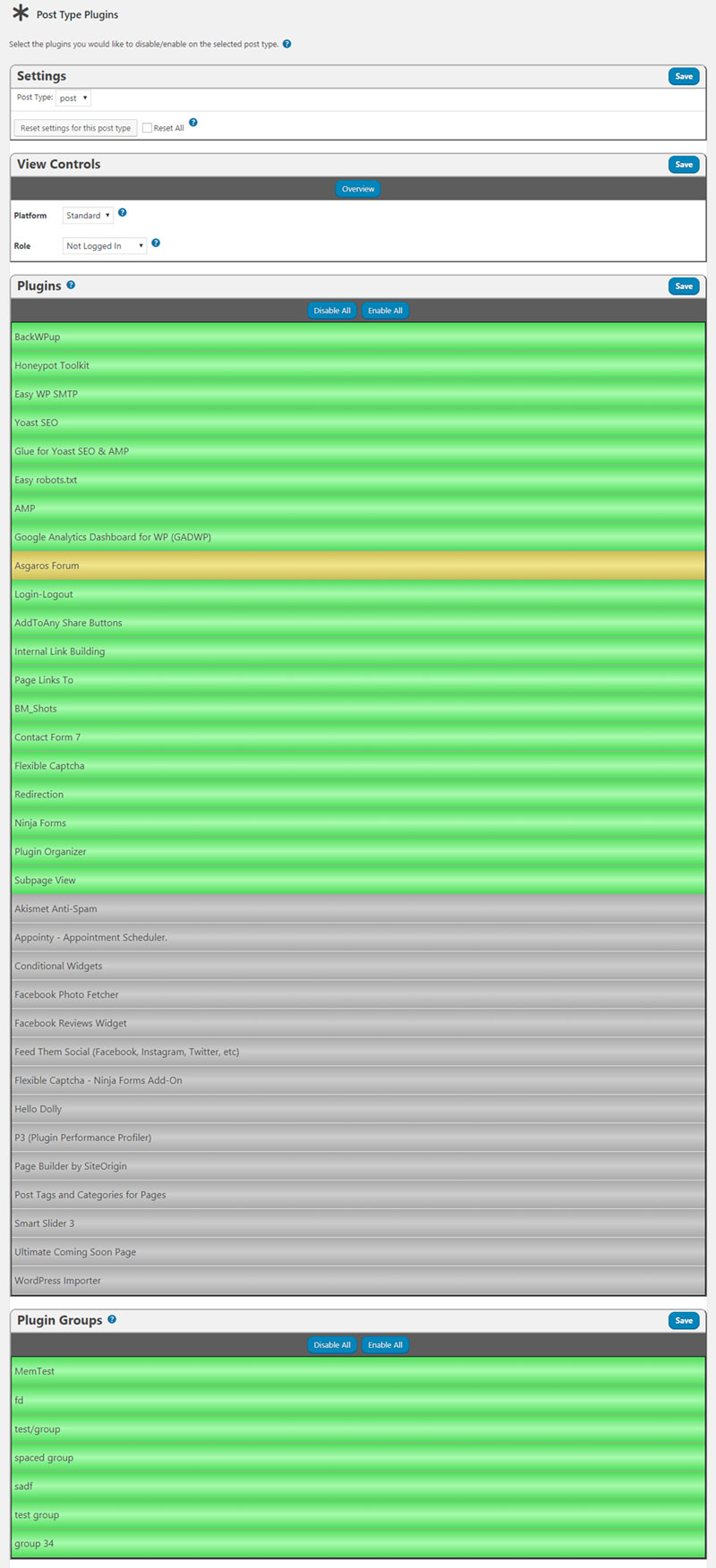
Post type page.
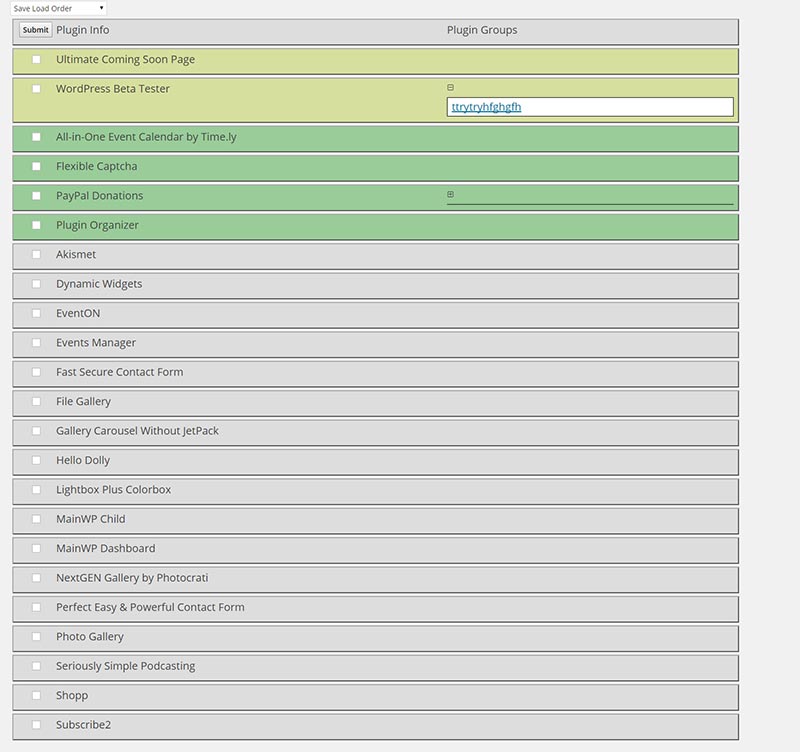
Group and order plugins page.
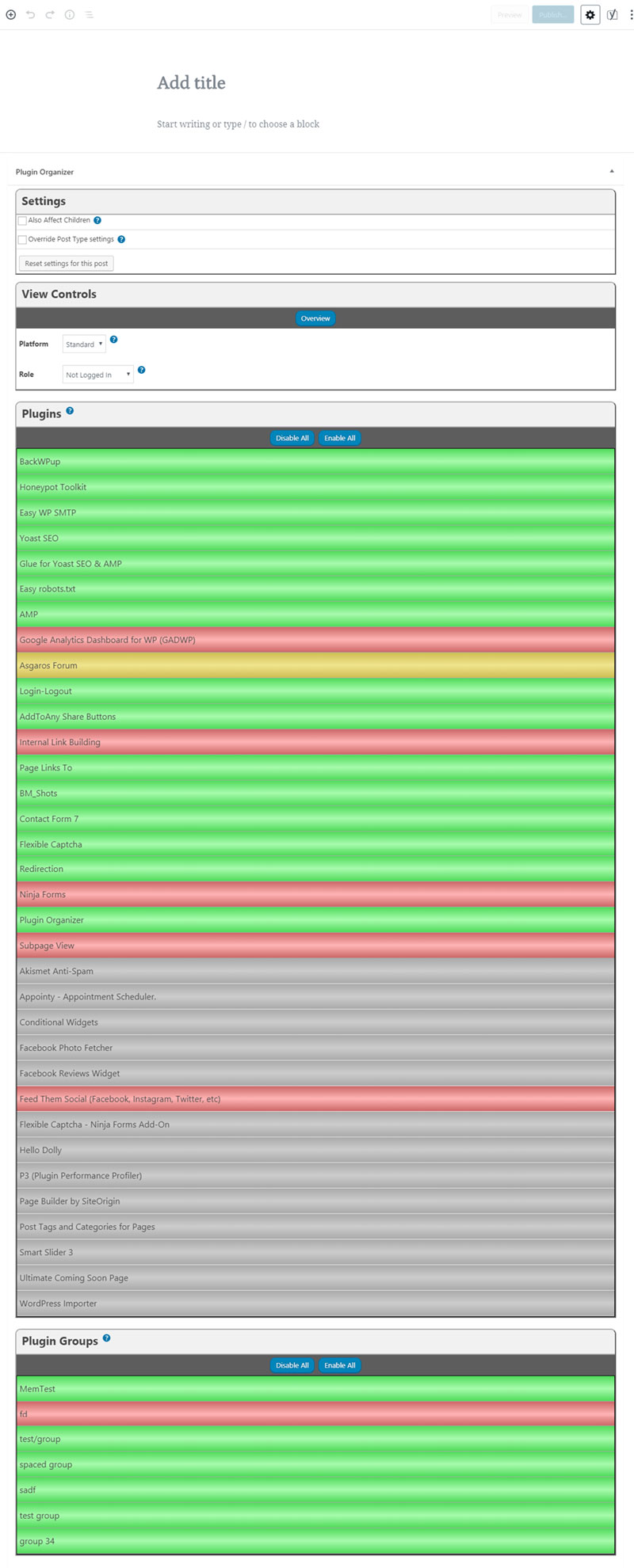
Page edit screen.
Changelog
10.2.4
Fixed possible SQL injection on the plugin search page.
10.2.3
Removed all references to WP Spamshield since the plugin no longer exists and is no longer a threat to Plugin Organizer users
Fixed a few typos in the settings help text
Moved debug messages to the browser console to prevent display problems
Removed custom CSS settings because they are no longer needed with console debug messages
10.2.2
Fixing plugin update, activation, and deactivation issue that causes plugin order to be reset.
10.2.1
Replacing missing PO-admn-global.css file that was missing from last update
Fixing deprecation warning on global plugins page if no global plugins are set.
10.2
Updating URLs in readme to point to new site.
Bumped tested version of WordPress
10.1.10
Fixed PHP warning about array offset when the database returns a bad result in MU plugin
10.1.9
Restored code to use the $_SERVER array for the siteURL value if the right values are set and added in a fallback to use the wpurl option if they aren’t.
10.1.8
Fixed PHP warnings in tpl/settings.php and lib/PluginOrganizerMU.class.php
Changed the base URL to use the setting for the WordPress install instead of a server variable
Fixed ajax message container text being pushed to the side.
10.1.7
Fixed some PHP warnings for unset variables.
Fixed fatal error when a site doesn’t have the plugin order saved on a mutlisite install and a plugin is deleted.
10.1.6
Fixed unset variable warnings.
10.1.5
Fixed unset variable warnings.
10.1.4
Fixed check for MU plugin class that throws warning in mu_plugin_notices class.
10.1.3
Changed the way the load order is maintained to use the directory name like the WordPress core does instead of the plugin name.
10.1.2
Added check to see if active sites column has been hidden on the plugin admin page for network sites. If it’s hidden the checks will not be performed.
10.1.1
Fixed a bug with the post type plugins page where the list of disabled plugins was not refreshed when changing to a different post type.
10.1
Added column to supported post types that indicates whether the post type settings have been overridden and also added a filter to only see posts of that type that have overridden those settings.
Fixed the also affect children and wildcard functionality so that they can be used together instead of only using one or the other on a plugin filter.
Added an admin alert that tells the user when selective plugin loading gets disabled due to the version numbers of the standard and MU plugins not matching.
Made the MU plugin only show an alert and bypass selective plugin loading rather than disabling it in the database when version numbers don’t match.
Added a warning when more than one wildcard is entered in a plugin filter to let the user know that it is not supported.
10.0.1
Removing images that aren’t used anymore.
Updating screenshots.
10.0
Created new interface to make managing plugins less confusing and get rid of the drag and drop interface.
Cleaned up CSS left over from older versions of the plugin.
Removed the custom CSS for the admin because it was becoming hard to maintain and can be achieved by adding CSS styles to your theme if needed.
Fixed missing nonce for the front end debug container ajax call.
9.7
Added column to network plugins page to indicate which sites a plugin is active on.
Fixed the recreate permalinks functionality so it will find plugin filters that need to be updated with new hashes or to indicate that the site uses a secure protocol.
Added better help text to the recreate permalinks tab on the settings page.
Changed the add_hooks function to only add admin hooks on the admin pages.
Fixed functionality to find and remove old plugin filters that are tied to posts that no longer exist.
9.6.4
Updating scripts to use my new domain name for documentation links so plugins like wordfence don’t alert users.
Updating readme to reflect compatibility with WP 5.1.
.= 9.6.3 =
Added list of enabled plugins to the debug message for each page.
9.6.2
Fixed issue with visual editors not loading the Plugin Organizer meta box so post type plugins were not correctly applied.
9.6.1
Fixed a CSS issue where the jQuery UI styles were being loaded after the PO admin style so some styles were not being overridden properly.
Fixed the jQuery UI dialog header styling.
9.6
Changed from using wp_get_sites to get_sites to remove a deprecated message and stop using a deprecated function.
Added action calls to display the admin notices and debug messages in the Plugin Organizer meta box when on the post edit screen to ensure compatibility with the Gutenberg editor.
9.5.1
Added warning for users running Woocommerce and Woocommerce Smart Coupons.
Added ability to set the style of the debug messages container so it will work better with any site.
9.5
Changed all ajax functions to accept json objects in the response.
Changed footer action call for debug messages to use get_footer instead of wp_footer.
9.4
Added debug messages to see how the MU plugin is affecting the page a user is viewing. Messages can be restricted by role.
Changed the way settings are sent from the settings page to the ajax endpoint.
9.3.6
Fixed a problem with custom post types not applying the custom post type settings when they are created off of the edit screen.
9.3.5
Fixed colorpicker popup on settings page.
Added better string sanitization for input variables.
9.3.4
Changed the settings page to use Jquery UI Tabs instead of my custom code.
Cleaned up some of the CSS.
9.3.3
Added code to prevent the recreate_plugin_order function from saving active plugins if the array does not contain the same number of plugins as when it was called.
Added a filter call to remove the active_plugins filters before any plugins are loaded.
9.3.2
Fixed bug where an error is thrown if the load order has not already been set in the database.
9.3.1
Moved the function call to maintain the load order to the init function.
Added functionality to insert a newly activated plugin into the load order earlier.
9.3
Added a function to remove the active_plugins and active_sitewide_plugins filters after plugins are loaded to prevent other plugins from saving a bad list of plugins to the database.
Plugins can now be disabled on the update-core and plugins admin pages without deactivating them.
Changed the priority of the active_plugins and active_sitewide_plugins filters to 1 so they will load before anything else.
Changed the way new plugins are added to the load order after being activated so they are closer to where they would be normally and not always added to the front.
Fixed a bug where the role cookies are not created or deleted on login/logout if Plugin Organizer has been disabled.
9.2.6
Changed various option names in the database to prevent WP Spamshield from disabling Plugin Organizer
Adding a warning about WP Spamshields malicious behavior.
Changed the way roles where a plugin has been disabled as well as plugin members are displayed in the Plugin Organizer meta box.
Fixed a bug in the SQL like statements used by the plugin search on the PO settings page introduced with a change made in wordpress 4.8.3.
9.2.5
Adding admin notices to warn users of what could happen when using Plugin Organizer.
9.2.4
Removing code that deactivates WP-Spamshield as it is pointless to keep releasing countermeasures to prevent their malicious code.
9.2.3
Added code to prevent a malicious plugin from disabling Plugin Organizer by deactivating it at load time.
9.2.2
Fixed a bug with the gettext hook being called mutiple times to change the page title on a group view.
Added code to prevent other plugins from altering posted data.
9.2.1
Set the tolerance of the droppable elements on the right side of the plugin organizer meta box to pointer so the drag elements aren’t dropped in the wrong place.
9.2
Added functionality to move multiple plugins while disabling.
Fixed conflict with plugins setting the z-index of the ui-dialog popup.
Fixed problem with wp_login action hook only sending one argument in some circumstances.
9.1.4
Changed the post_type varchar length back to 20 in last version which causied a problem with custom post type page. Changed the size to 50 to allow for longer post_types.
9.1.3
Changing database statements to modify post_type and user_role to the new sizes for existing installs.
9.1.2
Changed the length of 2 fields in the po_plugins database table. The index on these fields was causing problems with some collation settings.
9.1.1
Missed 2 files in release 9.1 so the plugin search tool always returned no results. Releasing the missing file changes.
9.1
Fixed a problem with disabled roles not being displayed on post type page.
Added a tool to search the datbase to see where a plugin is disabled.
9.0.6
Fixed problem with post_type column in po_plugins table being limited to 20 characters and causing an uncaught database error.
Removed a console.log dbug statement from PT plugins page.
9.0.5
Fixed SQL error in the find_duplicate_permalinks function.
9.0.4
Fixed php notice from stored post types array not being set on activation.
Fixed php notice from HTTP_USER_AGENT not being set on in the server array.
Fixed javascript error from role support help icon that prevented the pop up from working.
Put red and blue icons back for users who haven’t enabled disable by role.
9.0.3
Fixed query in MU plugin for affect children. Removed quotes around column name that were causing the query to fail.
9.0.2
Fixed problem with query that selects the base settings for a post in the post metabox.
Fixed a problem where logged in users where being given the logged out user set of plugins.
Full Changelog
https://www.sterup.com/wordpress-plugins/plugin-organizer/changelog/