

Plugins Garbage Collector (Database Cleanup)
Find unused database tables from deactivated or deleted plugins. You can delete unused database tables to reduce database volume and enhance site perf …
Plugin info
Maintenance & Compatibility
Maintenance score
Possibly abandoned • Last updated 1460 days ago • 91 reviews
Is Plugins Garbage Collector (Database Cleanup) abandoned?
Possibly abandoned (last update 1460 days ago).
Compatibility
Similar & Alternatives
Explore plugins with similar tags, and compare key metrics like downloads, ratings, updates, support, and WP/PHP compatibility.
Description
Database Cleanup plugin scans the database and shows the tables beyond of core WordPress installation. Some WordPress plugins create and use its own database tables.
Those tables are left in your database after plugin deactivation and deletion often.
With the help of this plugin you can check your database and discover if it is clean or not.
Extra columns added to the core WordPress tables could be shown also.
To read more about ‘Plugins Garbage Collector’ visit this link at shinephp.com
Additional Documentation
You can find more information about “Plugins Garbage Collector” plugin at this page
http://www.shinephp.com/plugins-garbage-collector-wordpress-plugin/
I am ready to answer on your questions about this plugin usage. Use plugin page comments or site contact form for that please.
Installation
Installation procedure:
- Deactivate plugin if you have the previous version installed.
- Extract “plugins-garbage-collector.x.x.x.zip” archive content to the “/wp-content/plugins/plugins-garbage-collector” directory.
- Activate “Plugins Garbage Collector” plugin via ‘Plugins’ menu in WordPress admin menu.
- Go to the “Tools”-“Plugins Garbage Collector” menu item and scan your WordPress database if it has some forgotten tables from old plugins.
Frequently Asked Questions
Comming soon. Just ask it. I will search the answer.
Review feed
Very slow support than usual.
Does the job as it should!
Great plugin without upsells/ads
Screenshots
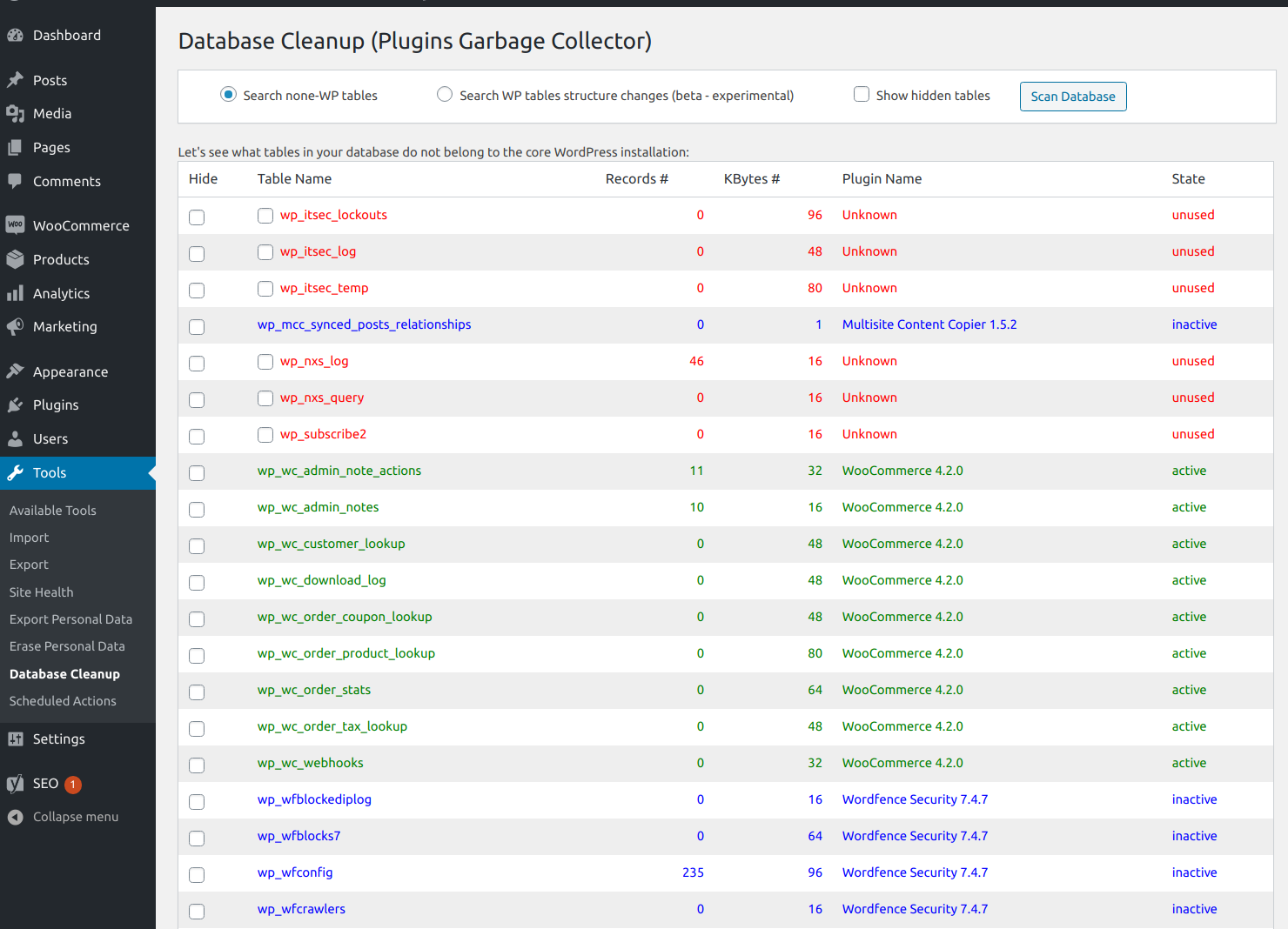
screenshot-1.png Plugins Garbage Collector scan action results.
Changelog
0.14 [03.04.2022]
- Update: “Known plugins” JSON data files were moved from Amazon Web Services S3 to Yandex Cloud Object Storage.
- Update: “Delete Tables” button label was replaced with “Delete Selected Tables”.
- Update: Additional confirmation request was added before database tables deletion. It contains the list of tables selected for deletion.
Read changelog.txt for the full list of changes.