

PlugVersions – Easily roll back to previous versions of your plugins.
Retains up to three versions when you update a plugin. It works with premium and custom plugins too.
Plugin info
Maintenance & Compatibility
Maintenance score
Maintained • Last updated 154 days ago • Support resolved 0% • 7 reviews
Is PlugVersions – Easily roll back to previous versions of your plugins. abandoned?
Likely maintained (last update 154 days ago).
Compatibility
Similar & Alternatives
Explore plugins with similar tags, and compare key metrics like downloads, ratings, updates, support, and WP/PHP compatibility.
Description
PlugVersions lets you retain up to three versions each time you update a plugin, including premium and custom plugins.
If a new version doesn’t work as expected, you can easily roll back by selecting a previous version with a single click. It works similarly to post revisions, but for plugins.
While WP Rollback is a great solution for plugins hosted on the WordPress repository, PlugVersions supports all plugins, including those not available on the repo.
This broader compatibility is currently the key difference between PlugVersions and other rollback plugins.
Additional features, such as version previews, are on the roadmap.
How to roll back to a previous version of a plugin
- Install and activate PlugVersions.
- Go to the Plugins page in your WordPress dashboard.
- For any plugin that has been updated, you’ll see a “Revisions” action link. Hover over it to view the list of previously stored versions.
- Click on the version you want to restore.
- That’s it. Your plugin is rolled back!
There are no settings to configure.
This free version allows you to retain up to three previous plugin versions.
You’ll find them listed under the “Revisions” link on the Plugins page.
How to Safely Update a WordPress Plugin
To learn how to safely update a WordPress plugin, please read the detailed guide here:
How to Safely Update a WordPress Plugin
Help in case of issues after a plugin update
Want peace of mind when updating your plugins? Check out our Plugin Update Rescue – Annual Protection Plan
If something breaks after an update, we’ll step in and fix it.
Installation
Frequently Asked Questions
Review feed
From the author
Screenshots
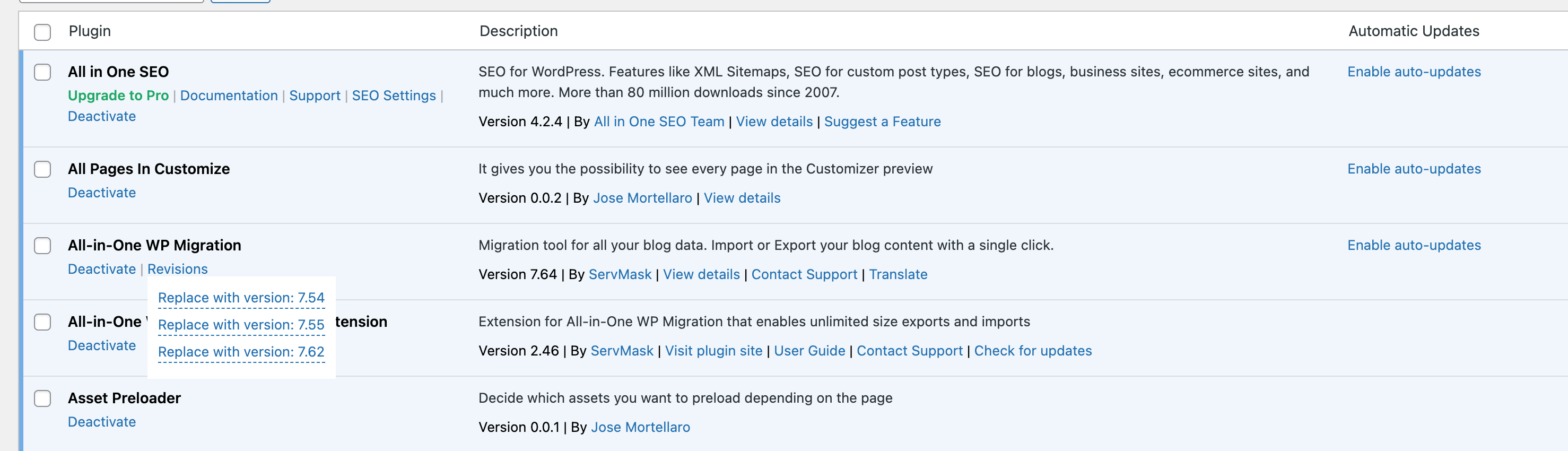
How to restore the previous version of a plugin
Changelog
0.2.1
- Added: Link to the Annual Protection Plan for the plugin updates in the plugins page
0.2.0
- Fixed: Extra version entry added during plugin backup
0.1.0
- Added: Replaced the PlugVersions backup filter to handle all updates, including manual plugin updates. A big thank you to Vincenzo Casu for providing the code!
0.0.8
- Fix: Vulnerability when a new version is restored. Thanks to Arkadiusz Hydzik for finding the vulnerability.
- Fix: Revisions list not working in the page of plugins.
0.0.7
- Fix: PHP warning
0.0.6
- Enhanced: Replaced unzipped versions with zipped versions
0.0.5
- Fix: Fatal error on plugin deletion
0.0.4
- Fix: Plugin updates counter in the admin top bar on frontend
0.0.3
- Fixed: not possible to delete the plugin from the page of plugins
0.0.2
- ixed: plugin old versions were considered in the update notifications
0.0.1
- Initial release