

Plutus Recipe Pro
Plutus Recipe Pro plugin is a user friendly plugin for adding recipes to any of your posts and pages. Beautiful SEO friendly recipes, print versions, …
Plugin info
Maintenance & Compatibility
Maintenance score
Possibly abandoned • Last updated 2486 days ago
Is Plutus Recipe Pro abandoned?
Possibly abandoned (last update 2486 days ago).
Compatibility
Similar & Alternatives
Explore plugins with similar tags, and compare key metrics like downloads, ratings, updates, support, and WP/PHP compatibility.
Description
The plugin is a user friendly plugin for adding recipes to any of your posts and pages.
Demo : http://plutusdesign.com/recipepro
They will be able to adjust the servings, print the recipe, find other recipes using a specific ingredient, share your recipe, … Try it out today and you’ll never want another recipe plugin again!. No Coding Knowledge Required
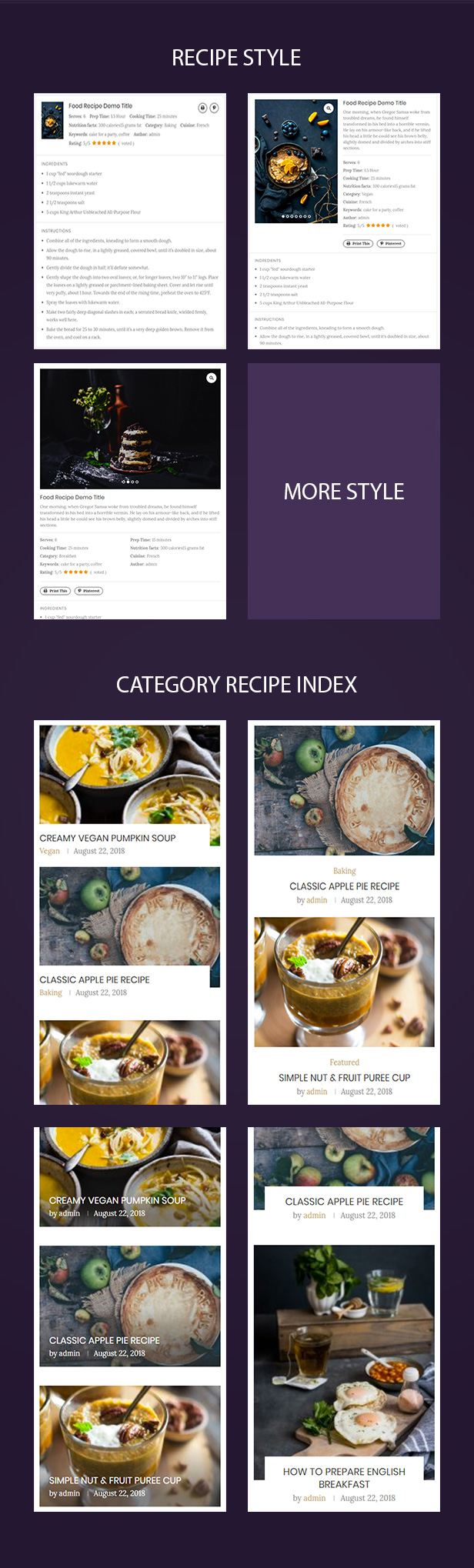
Plugin suports a lot of different recipe templates with great designs.You can create recipes in your WordPress posts, pages and custom post types with this new responsive and easy to use plugin.
Every wanted to create an image recipe or category index for your blog. The plugin will help you an easy way to create an image index. Recipe index creates an automatically updating recipe index with pictures. It uses the recipes that you already have on your blog, and the categories that you have defined.
Want to use your recipe shortcode with Page Builder ? No problems, you only need to install Page Builder plugin then show recipe to any position you want show. List of page builder plugin supported:
Features
RECIPE SHORTCODE
- Compatible with both the Classic Editor and new Gutenberg editor
- Easy workflow to add recipes to any post or page
- Uses schema.org/Recipe JSON-LD metadata optimised
- Compatible with Pinterest Rich Pins
RECIPE INDEX SHORTCODE
- Change font size, color, font type for element you want
- 4+ styles with perfect designs
- Elementor Page Builder supported
- WPBakery Page Builder supported
- Multiple recipe styles with different columns
Detailed Documentation
See more documentation here.
Installation
From within WordPress
- Visit Plugins > Add New
- Search for Plutus Recipe Pro
- Click the Install Now button to install the plugin
- Click the Activate button to activate the plugin
Manually
- Unzip the download package
- Upload
plutus-recipe-proto the/wp-content/plugins/directory - Activate the plugin through the ‘Plugins’ menu in WordPress
To getting started with the plugin, please read this tutorial.
Frequently Asked Questions
Review feed
Screenshots
Description
Changelog
0.1.0 – 2016-06-01
- Initial Public Release