

Podamibe Twitter Feed Widget
Display your twitter feeds of your twitter with more easier, quicker and with more settings.
Plugin info
Maintenance & Compatibility
Maintenance score
Possibly abandoned • Last updated 3017 days ago • 1 reviews
Is Podamibe Twitter Feed Widget abandoned?
Possibly abandoned (last update 3017 days ago).
Compatibility
Similar & Alternatives
Explore plugins with similar tags, and compare key metrics like downloads, ratings, updates, support, and WP/PHP compatibility.
Description
Podamibe Twitter Feed Widget is a Free WordPress plugin to allow anyone easily share their twitter feeds with the most easier way with user friendly settings on your website!
Installation
- Upload the plugin ‘podamibe-twitter’ to the
/wp-content/plugins/directory, or install the plugin through the WordPress plugins screen directly. - Activate the plugin through the ‘Plugins’ menu in WordPress
- Go to Appearance->Widgets->Podamibe Twitter Feeds
- Drag the widget to your desired sidebar and fill the fields and save
Frequently Asked Questions
Installation Instructions
- Upload the plugin ‘podamibe-twitter’ to the
/wp-content/plugins/directory, or install the plugin through the WordPress plugins screen directly. - Activate the plugin through the ‘Plugins’ menu in WordPress
- Go to Appearance->Widgets->Podamibe Twitter Feeds
- Drag the widget to your desired sidebar and fill the fields and save
How to insert the main icon?
Click the link provided below the field. Then enter name like ‘twitter’ only for twitter icon.
What is main title?
This is the title to be displayed nearby the icon.
What is twitter username ?
This is field to insert your twitter username.
What is twitter widget id?
This is the id generated on your twitter developer mode.
What is link color?
The custom color for the links displayed on feeds.
What is theme color option?
This is the option to provide the theme color of feed on frontend.
What is the numbers of feeds to display?
This is the field to display the number of feeds on frontend.
What is border option?
This is the option to display the border on the feeds.
What is header option?
This is the option to display the header on the feeds.
What is footer option?
This is the option to display the footer on the feeds.
Review feed
Widget
Screenshots
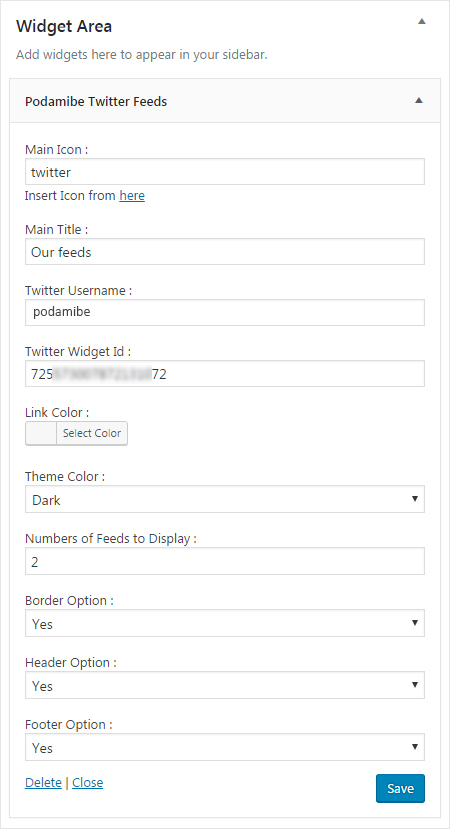
Backend setting of plugin
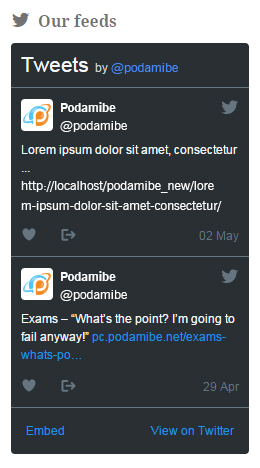
Frontend display
Changelog
1.0.3
- Minor bug fixes
1.0.2
- Small bug fixes
1.0.1
- Default feed number to display
1.0.0
- Initial release