

Podio Webforms
Easily add your Podio Webforms anywhere in WordPress via shortcode.
Plugin info
Maintenance & Compatibility
Maintenance score
Possibly abandoned • Last updated 2585 days ago • 1 reviews
Is Podio Webforms abandoned?
Possibly abandoned (last update 2585 days ago).
Compatibility
Similar & Alternatives
Explore plugins with similar tags, and compare key metrics like downloads, ratings, updates, support, and WP/PHP compatibility.
Description
Easily add your Podio Webforms anywhere in WordPress via shortcode. Don’t worry about all that Podio Webform code, and you don’t have to switch to the HTML Editor to paste anything.
Just go to your Podio app’s webform page and find your code (no need to copy and paste). Look at the “Sharable Link” (e.g. https…podio.com/webforms/9876543/123456), and create a shortcode like this: [podioform appid=’9876543′ formid=’123456′]. That’s it.
Optionally, can add [podioform … showfooter=’no’].
List of Examples
- [podioform appid=’9876543′ formid=’123456′]
- [podioform appid=’9876543′ formid=’123456′ showfooter=’no’]
- [podioform appid=’9876543′ formid=’123456′ footerlink=’https://podio.com/r/enlaREvfxo9M-sl8uX4EtA’]
Don’t forget to whitelist your allowed domains in your Podio settings, otherwise your forms won’t show up.
Podio Webform Tips
- Sign up for Podio (it’s free!)
- How to create a Podio Webform
- Podio Apps Market (all apps are free, some come pre-configured as Webforms)
- Zapier Podio Integrations
FYI: This is a third-party plugin, not officially from the Podio company.
Developers may contribute at https://github.com/cliffordp/podio-webforms
Installation
Automatically or manually install to wp-content/plugins/
Frequently Asked Questions
Why?
Because Podio is free, cool, and very flexible. One example is webforms, which is what this shortcode plugin makes even easier. Don’t have Podio yet? Sign up now at my referral link: https://podio.com/r/enlaREvfxo9M-sl8uX4EtA
MultiSite?
It’s a simple shortcode plugin with no network admin level settings. Works fine as a regular plugin within Multisite.
How can I give back?
No need. Just enjoy. If you don’t have a Podio account yet, I’d appreciate you signing up for your free or paid account via my referral link: https://podio.com/r/enlaREvfxo9M-sl8uX4EtA
Review feed
Screenshots

1) From within your Podio app, go to the app's settings and click "Webform"

2) Make sure your domains are whitelisted
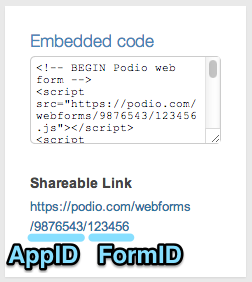
3) Find your AppID and FormID (if you don't need advanced customization, skip to screenshot #7)

4) Configure the Webform settings as desired

5) For example, customize the form's look and feel, possibly with custom CSS

6) Custom CSS is loaded via the form, not via WordPress, so read Podio's documentation if you want to customize to this extent

7) Insert shortcode using your Podio AppID and FormID (from screenshot #3, above)
Changelog
- Changelog DIFFs for all versions are available at WordPress SVN.
1.2
- March 6, 2019
- License changed from GPLv2+ to GPLv3+.
- Now passes the shortcode name to
shortcode_atts()to allow filtering this plugin’s shortcode. - Text within
<noscript>is now translatable. - Now requires WordPress version 4.6 or newer.
- Readme compatibility changed to WordPress version 5.1
1.1
- April 28, 2015
- Readme compatibility changed to WordPress version 4.2.1
1.0
- October 30, 2013
- Initial release