

Poly Pin Manager
Easily pin plugins, themes, categories, and posts to the top of the admin list, with added notes for better management and quick access.
Plugin info
Maintenance & Compatibility
Maintenance score
Stale • Last updated 319 days ago
Is Poly Pin Manager abandoned?
Likely maintained (last update 319 days ago).
Compatibility
Similar & Alternatives
Explore plugins with similar tags, and compare key metrics like downloads, ratings, updates, support, and WP/PHP compatibility.
Description
Pin Manager provides a feature that supports pinning plugins, themes, categories, posts, pages, and tags to the top of the list for easy handling. Additionally, the note feature corresponding to each pinned element will make it easier for you to manage them on the site.
Try a Live Demo
Watch a Tutorial
Current Features
- Pin/ Unpin: Pin Plugins, Themes, Tags, and Categories.
- Code Editor: Quick Access to Code Editor.
- Note: Attach Notes and Descriptions.
- Quick Access Menu: Create Custom Menu Lists.
- Language Switcher: Language Menu on the Top Bar.
Support
For support, please visit https://wikipoly.com/en/poly-pin-manager/
Installation
Minimum Requirements
- PHP 7.4 or greater is required (PHP 8.0 or greater is recommended)
- MySQL 5.6 or greater, OR MariaDB version 10.1 or greater, is required
- Upload the plugin files to the
/wp-content/plugins/poly-pin-managerdirectory, or install the plugin through the WordPress plugins screen directly. - Activate the plugin through the ‘Plugins’ screen in WordPress. Then, in the display section for plugins, themes, categories, tags, etc., you will see a pin button next to its name.
- Use the Settings->Pin Manager screen to configure the plugin.
- Refer to the feature guide list here: https://wikipoly.com/en/poly-pin-manager/
Frequently Asked Questions
-
First-time users should read https://wikipoly.com/en/poly-pin-manager/, which explains the basics and includes a lot of screenshots and shortcodes.
-
Update to the new plugin version at: https://wikipoly.com/en/poly-pin-manager/ and WordPress.org https://wordpress.org/plugins/poly-pin-manager, where we share and provide free support or sell our products.
- Yes, you can pin any product category to the top of the list. Additionally, post categories and other custom taxonomies are also supported.
- No, the pin feature only works on the admin side. The display of categories, products, and posts on your site will not be affected.
- No, since this feature supports developers, the notes will not be deleted when you unpin a plugin. However, if you delete or reset the Pin Manager data beforehand, the note information will be lost.
- Yes, as a developer aiming to support customer work, integrating new features is always considered. For useful and suitable features, we will definitely integrate them.
Review feed
Screenshots

Poly Pin Manager

Pin/unpin/add notes for plugins.

Pin/unpin/add notes for posts, pages, products, and custom post types.

Pin/unpin/add notes for post categories, product categories, and custom taxonomies.

Pin/unpin/add notes for themes.

Edit notes for posts.

Manage and edit the Quick Access Menu list.
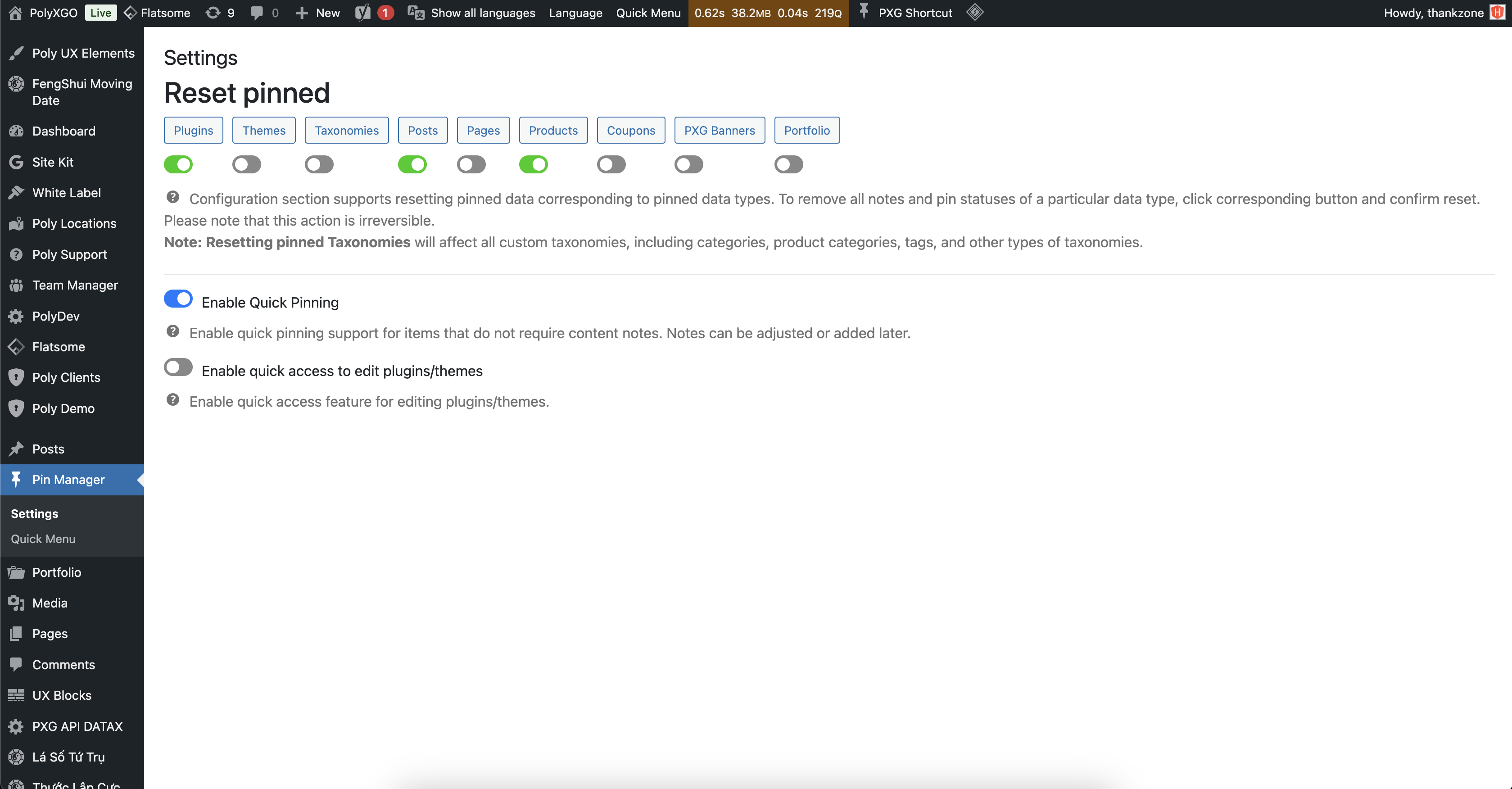
General settings.
Changelog
Version 2.4.0 (May 19, 2025)
NEW
- Enable quick access feature for editing plugins/themes.
- Support enabling/disabling pin feature per post type, category, taxonomy.
CHANGED
- Convert setting features from checkbox to toggle button.
Version 2.3.2 (March 04, 2025)
FIXED
- Fix issue where posts, pages, categories, etc., do not display when in Trash status.
Version 2.3.1 (February 12, 2025)
FIXED
- Fixed the issue where the Quick Access Menu list was not being saved.
Version 2.3.0 (February 5, 2025)
NEW
- Integrate tooltips for quick preview of note content when hovering over note icon.
- Integrate scroll bar when note content is too long on popup.
CHANGED
- Adjust pinning tool for Theme to appear before Theme name, avoiding conflicts with WordPress styles.
FIXED
- Fixed note issue for Pages format.
Version 2.2.1 (February 1, 2025)
UPDATED
– Added and adjusted translations.
– Modified the logic for handling notes on plugins and themes.
CHANGED
– Adjusted issues based on the recommendations from the WordPress.org Team Guidelines.
FIXED
– Fixed missing nonce errors in POST data operations.
– Fixed the issue in WooCommerce product category lists where pinned categories caused subcategories to be hidden.
Version 1.0.0 (September 06, 2024)
NEW
– Release version.