

Plugin info
Maintenance & Compatibility
Maintenance score
Possibly abandoned • Last updated 5685 days ago
Is Ponticlaro Media Settings abandoned?
Possibly abandoned (last update 5685 days ago).
Compatibility
Similar & Alternatives
Explore plugins with similar tags, and compare key metrics like downloads, ratings, updates, support, and WP/PHP compatibility.
Description
Keep your media insert code consistent site-wide.
- Customize image and media HTML code site-wide
- Use the [media] shortcode to display images from the gallery at particular sizes
- Remove overbearing WordPress auto-code like class=””
- Force WordPress to insert relative URLs to make testing on a dev server easier
Shortcode Documentation
Use the [media] shortcode to easily display images from the gallery. Here are some example uses:
Display 3 images from the gallery. The order is determined in the WordPress media gallery:
[media] [media] [media]
Display an image with id 123:
[media id=”123″]
Display a thumbnail, medium, or large sized image:
[media size=”small”]
[media size=”medium”]
[media size=”large”]
Display a clickable image. The click through URL will default to the WordPress “view page” for that image.
[media link=true]
Display a clickable image, linking to an arbitrary URL:
[media link=true url=”http://www.your-custom.url”]
Examples for setting custom class, title, width, or height attributes. These can be used to customzie the attributes on the generated HTML image tag
[media class=”custom-class” title=”title text” width=”100″ height=”100″]
Installation
- Upload the entire folder “ponticlaro-media-settings” to your plugin’s directory.
- Activate the plugin.
- Click “Ponticlaro Media” under the “Settings” menu to configure the plugin.
Frequently Asked Questions
Review feed
Screenshots
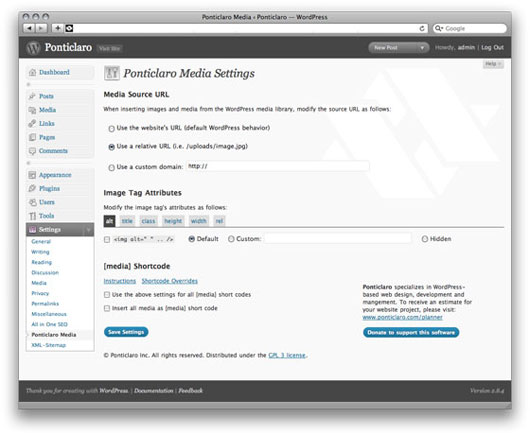
Main settings screen
Changelog
- Version 1.0: Initial release
- Version 1.1: PHP4 compatibility
- Version 1.2: Minor bug fix
- Version 1.3: Fix shortcode bug
- Version 1.4: Fix issue with RSS feeds