

Porsline
Porsline | Build eye-catching forms, surveys & quizzes that everybody is willing to engage!
Plugin info
Maintenance & Compatibility
Maintenance score
Stale • Last updated 240 days ago • 9 reviews
Is Porsline abandoned?
Likely maintained (last update 240 days ago).
Compatibility
Similar & Alternatives
Explore plugins with similar tags, and compare key metrics like downloads, ratings, updates, support, and WP/PHP compatibility.
Description
Before Using Porlsine plugin:
First, simply register in Porsline. It is free, no credit card is required.
After that, install the plugin. Each user of Porsline has an API key. With the help of plugins and using the API key, you can call the forms and surveys that you have created in Porsline and embed them on every page of your WordPress website.
With a simple drag & drop and installation of Porsline WordPress plugin, you can benefit from these features:
- Use ready-made, fully customized form templates.
- Apply your desired design or your company brand identity to the form.
- Create an unlimited number of forms.
- Add Logic to personalize and segment your audience.
- Gather unlimited responses.
- Add score, set answer key, and auto-grading to create engaging quizzes.
- Randomize questions & choices in online quizzes.
- Show people customized endings based on their answers
- Export responses as Excel-supported formats.
- Real-time interactive statistical reports and chats.
- Slice & dice your data to make customized reports.
- Create multilingual forms: Arabic, Turkish, Spanish, Russian, English, and Persian.
- Set auto-start, auto-terminate, and response duration of the forms.
- Authenticate respondents via email, code, and OTP.
- Use RESTful API to seamlessly integrate with external software.
If you have an online store:
Use the registration form, contact us form, order registration form, customer survey form, and other forms related to WordPress.
If you are a digital marketer:
Use a variety of marketing research surveys such as buyer persona surveys, demographic questionnaires, brand name surveys, pricing surveys, or other questionnaires and surveys related to this area.
If you are in charge of human resources:
Use a variety of forms to better manage the hiring process and surveys managers and employees of departments related to your clients, such as the hiring form, pre-hiring test, post-hiring survey, 360-degree survey, and performance appraisal forms.
If you are interested in holding different types of events:
Use the Pre-Event Needs Assessment, Event Registration, Post-Event Surveys, and other related forms to organize your events, collect audience information, and register.
If you are a doctor or working in the treatment department and healthcare:
On your WordPress site, you can use the admission form, patient registration form, monthly or seasonal check-up form, and other such forms to reduce the time of your work.
If you have a WordPress site with any title:
You can use a variety of forms, surveys, contests, and quizzes on your site to make a unique experience for visitors and users.
Enjoy Porsline!
Installation
Frequently Asked Questions
Making glorious forms is only a simple drag & drop away! Just log in to your account, select Create new survey or pick from more than 300 templates. Drag & drop question types and write down your questions.
Watch “How Porsline Works?“
Using Porsline you can create contact forms, surveys, lead generation forms, order forms, event registration forms, signup forms, feedback forms, booking forms, polls, petition forms, upload forms and appointment forms. There are over 300 ready-to-use form templates on Porsline. You can find one and save time creating your form.
Porsline have a free forever plan. Porsline is free up to 100 form submissions per month. If you go over that limit and also need more advanced features you will need to upgrade to a paid plan.
Visit pricing page.
Review feed
Screenshots

Create and add forms in porsline plugin

Customize display settings in porsline plugin

Set API key in porsline plugin

List of forms in porsline plugin

Porsline eklentisinde formlar oluşturun ve ekleyin

Porsline eklentisinde ekran ayarlarını özelleştirin

API anahtarını porsline eklentisinde ayarla

Porsline eklentisindeki formların listesi
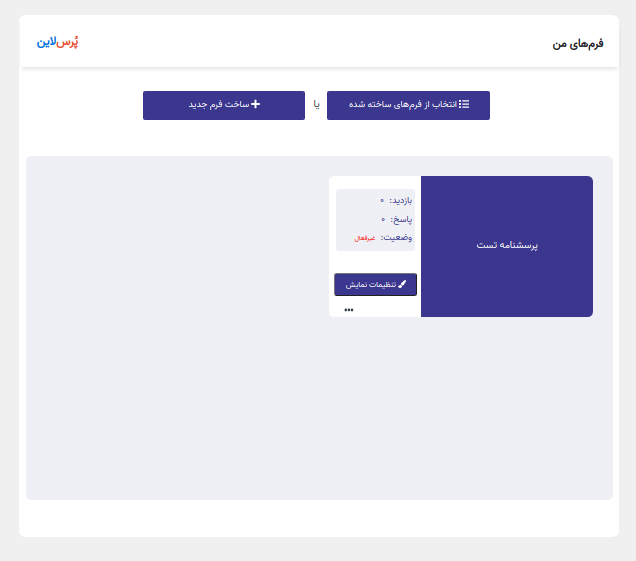
افزودن و انتخاب پرسشنامه در افزونه پُرسلاین

سفارشی سازی نحوه نمایش پرسشنامه در افزونه پُرسلاین

وارد کردن کلید API در افزونه پُرسلاین

لیست پرسشنامه های ساخته شده در پُرسلاین

إنشاء وإضافة النماذج في البرنامج المساعد بُرس لاين

تخصيص إعدادات العرض في البرنامج المساعد بُرس لاين

تعيين مفتاح API في البرنامج المساعد بُرس لاين

قائمة النماذج في البرنامج المساعد بُرس لاين