

Post Formats for Block Themes
Bring post formats to block themes with auto-detection, format-specific patterns, and Chat Log block for displaying conversation transcripts.
Plugin info
Maintenance & Compatibility
Maintenance score
Maintained • Last updated 116 days ago
Is Post Formats for Block Themes abandoned?
Likely maintained (last update 116 days ago).
Compatibility
Similar & Alternatives
Explore plugins with similar tags, and compare key metrics like downloads, ratings, updates, support, and WP/PHP compatibility.
Description
Post Formats for Block Themes brings the beloved post format functionality from classic WordPress themes to modern block themes, with intelligent pattern insertion, automatic format detection, and a streamlined editing experience that makes creating formatted content effortless.
Why Post Formats Matter for Block Themes
WordPress post formats have been a powerful feature since WordPress 3.1, allowing content creators to style different types of posts distinctively—quotes appear with enhanced typography, galleries showcase images prominently, status updates feel like social media, and chat transcripts display conversations beautifully. However, with the shift to block themes and Full Site Editing, this functionality was left behind.
Post Formats for Block Themes solves this problem. This plugin brings post formats into the block editor era with format-specific block patterns, automatic content detection, and accessibility-first design. Whether you’re building a personal blog, portfolio, news site, or creative magazine, post formats help your content stand out.
Who This Plugin Is For
- Bloggers who want variety in their post presentations without creating custom templates
- Content creators who publish different types of content (articles, quotes, galleries, status updates)
- News sites migrating from classic themes and want to preserve post format functionality
- Designers and developers building block themes who need format support built-in
- Accessibility advocates who require WCAG 2.2 AA compliant content tools
- Anyone moving from classic themes who misses the post format features they relied on
Key Features
10 Format-Specific Block Patterns
Each WordPress post format gets a professionally-designed block pattern optimized for its content type. Patterns include locked first blocks to maintain format consistency while giving you complete creative freedom for additional content:
- Standard – Traditional blog post with full title, featured image, and content blocks
- Aside – Short note or update displayed in a styled bubble container without title requirement
- Status – Twitter-style status update with 280-character validation and real-time counter
- Link – Link sharing with automatic Bookmark Card integration when available, with graceful fallback to standard linked paragraphs
- Gallery – Photo gallery starting with a locked gallery block for image collections
- Image – Single image post with prominent image display and caption support
- Quote – Quotation or citation with enhanced pullquote styling and attribution
- Video – Video content using native video blocks or popular embed services. Integrates with Able Player for enhanced accessible playback when available.
- Audio – Audio file or podcast embed with native player styling. Integrates with Podlove Podcasting Plugin for podcasts and Able Player for accessible playback when available.
- Chat – Conversation transcript using the integrated Chat Log block
Integrated Chat Log Block
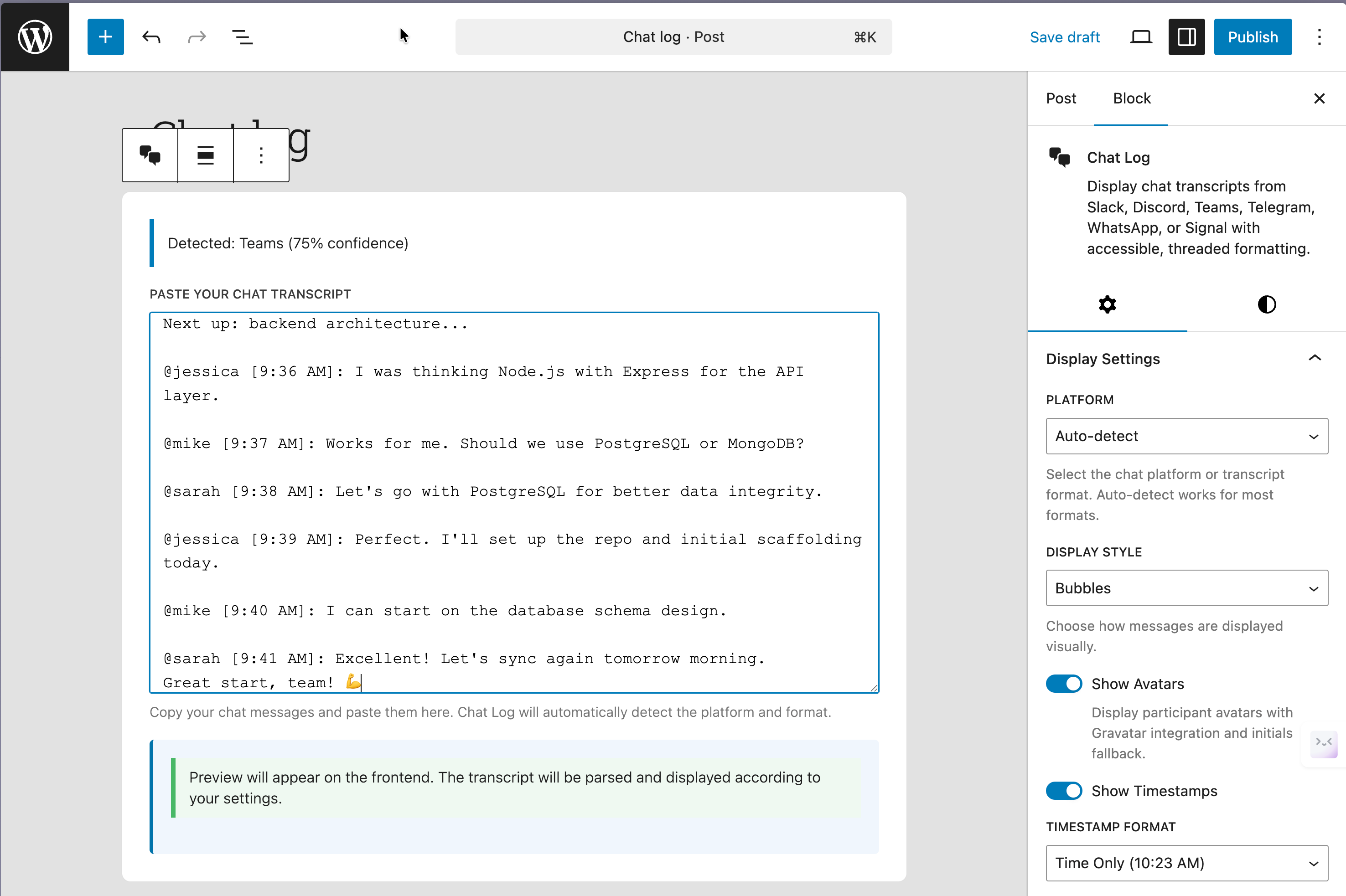
No separate plugin needed! Post Formats for Block Themes includes a full-featured Chat Log block for displaying conversation transcripts. Perfect for interviews, customer support examples, team discussions, or any dialogue format.
Supported platforms: Slack, Discord, Microsoft Teams, WhatsApp, Telegram, Signal, and generic chat transcripts. Additional text format support: SRT subtitles, VTT captions, and plain text exports from any chat application.
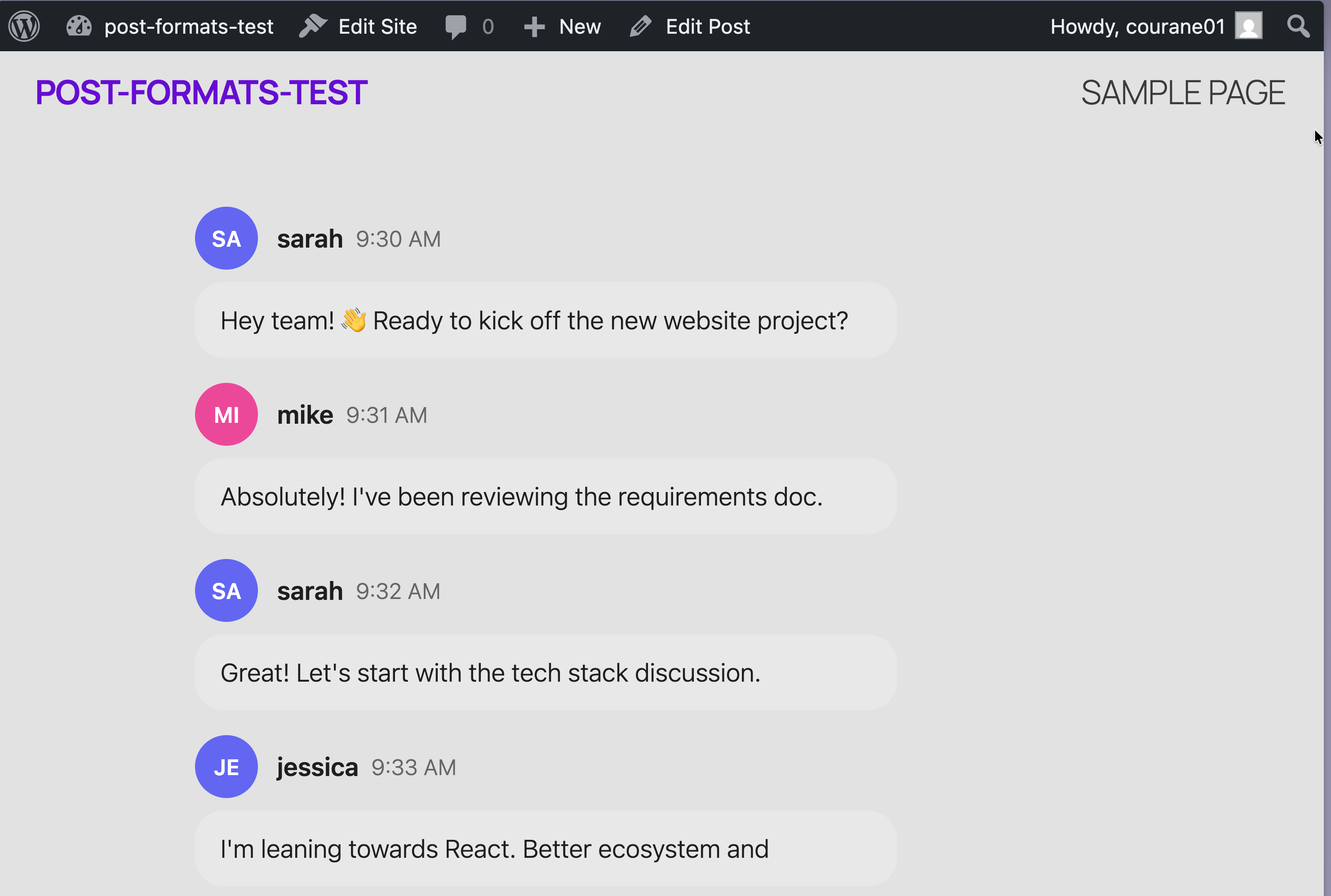
Chat Log features: automatic platform detection, avatar display, timestamp formatting (relative, absolute, time-only), multiple display styles (bubbles, IRC, transcript, timeline), thread collapsing, participant lists, device frames, full accessibility, and RTL support.
Automatic Format Detection
Save time with intelligent format detection. The plugin analyzes your post’s first block and automatically assigns the appropriate format. Gallery block becomes Gallery format, video block becomes Video format, quote block becomes Quote format, and so on. Detection runs on post save and respects manual format selections.
Format Selection Modal
When creating a new post, a visual format selection modal appears with all 10 formats displayed as cards showing icons, names, descriptions, and use cases. Fully keyboard accessible and screen reader friendly.
Format Switcher Sidebar Panel
Change formats mid-edit with the Format Switcher in the post sidebar. View current format, see auto-detection suggestions, choose to replace content or keep existing blocks. Perfect for when you change your mind about post type.
Status Format Validation
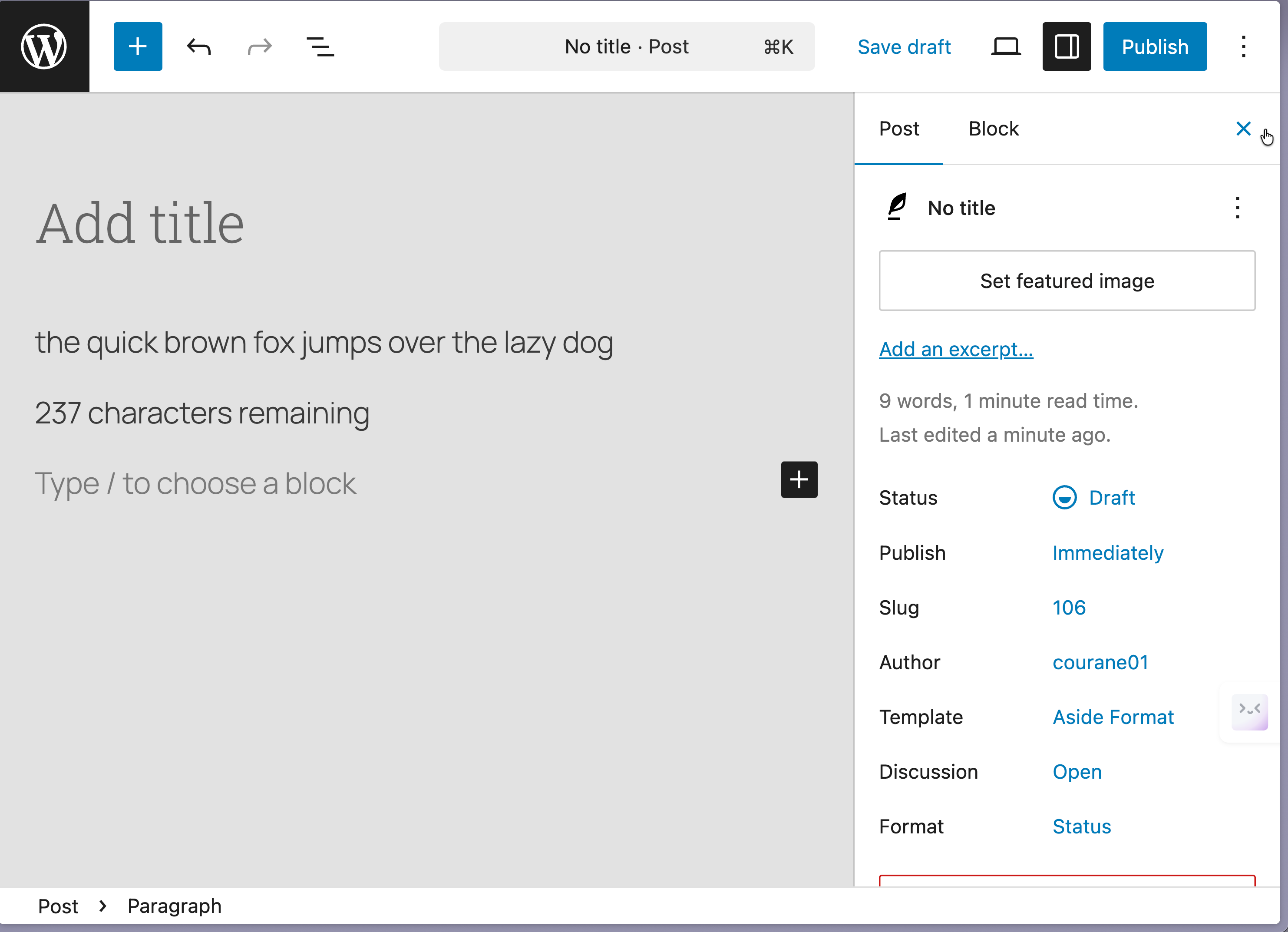
The Status format includes Twitter-style character validation with real-time counter, 280-character soft limit, visual feedback, accessibility announcements, and mobile-friendly composition.
Post Format Repair Tool
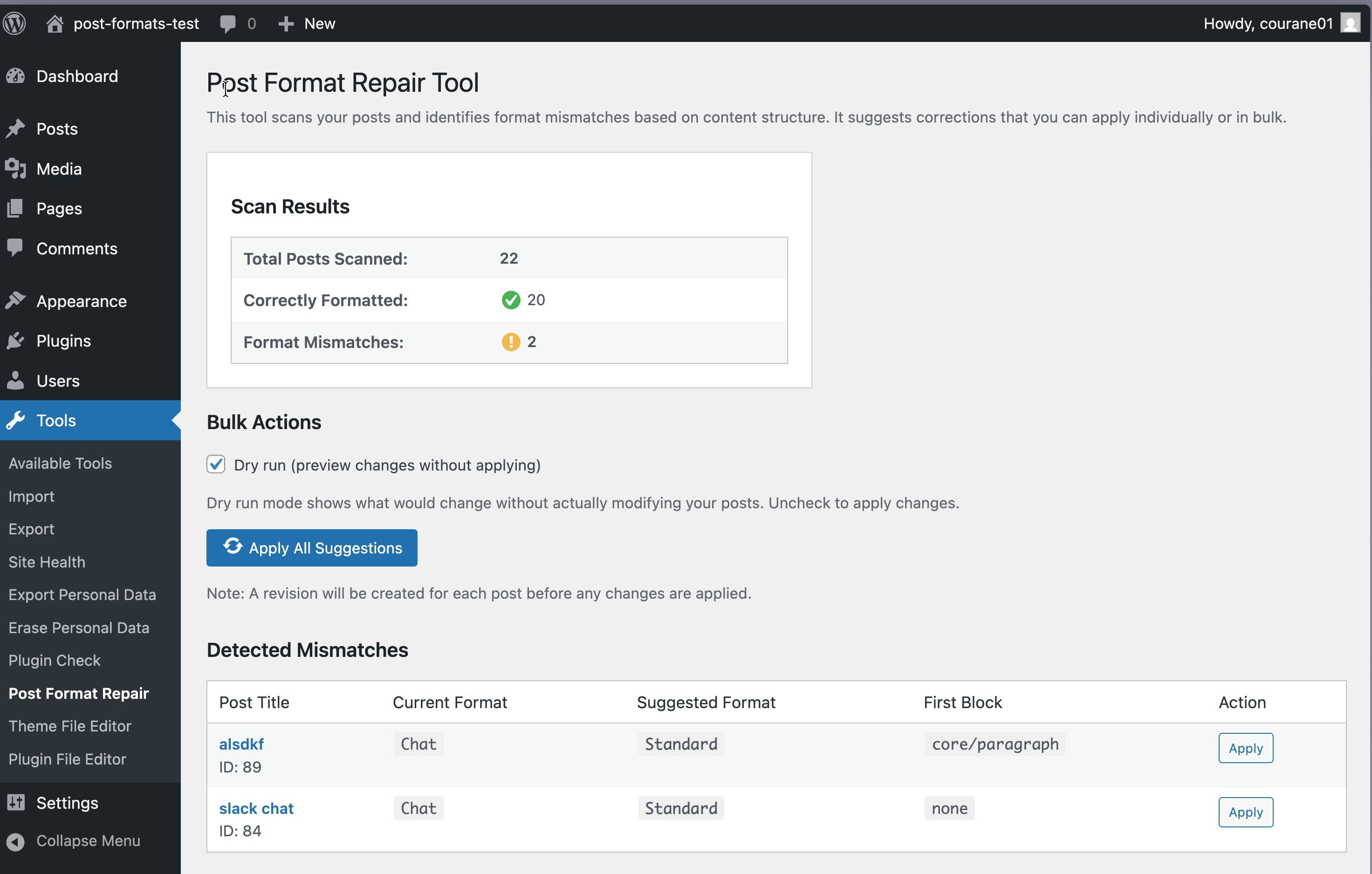
Scan existing posts and fix format mismatches with the built-in repair tool (Tools Post Format Repair). Detects content/format mismatches, bulk or individual repairs, preview suggestions, one-click fixes. Perfect for migrating from classic themes.
Theme-Agnostic Styling
Format styles integrate seamlessly with any block theme using CSS custom properties from your theme.json. Respects your theme’s colors, typography, spacing. No styling conflicts. Works with Global Styles.
How to Use Post Formats in Block Themes
Creating Your First Formatted Post:
1. Navigate to Posts Add New
2. Format selection modal appears automatically
3. Click your desired format (e.g., “Quote”)
4. Pattern is inserted with locked first block
5. Add content within the pattern
6. Publish your formatted post
Mid-Edit Format Switching:
1. Open the right sidebar while editing
2. Find the “Format Switcher” panel
3. Choose a new format from dropdown
4. Decide to replace or keep content
5. Format updates instantly
Using Auto-Detection:
1. Start a new post without selecting a format
2. Add content (e.g., insert a gallery block)
3. Save as draft or publish
4. Plugin automatically detects Gallery format
5. Format is assigned without manual action
How to Create a Quote Post
Showcase quotations and citations beautifully:
- Select Quote format from the modal
- The pullquote pattern loads with locked Quote block
- Type or paste your quote
- Add attribution in citation field
- Optional: Add commentary below the quote
- Customize styling via Global Styles
- Publish your enhanced quote post
The locked pullquote maintains format integrity while allowing unlimited additional content blocks.
How to Display Chat Conversations
Turn conversation transcripts into readable, attractive content:
- Select Chat format when creating new post
- Chat Log block inserts automatically
- Copy conversation text from Slack, Discord, Teams, WhatsApp, etc.
- Paste into Chat Log block—platform detection is automatic
- Configure display options: style, avatars, timestamps, threads, device frame
- Preview the formatted conversation
- Publish your beautiful chat transcript
Platform-specific features: Slack preserves channels, threads, reactions; Discord maintains server structure and roles; Teams retains meeting context; WhatsApp shows message status and reply chains; Telegram preserves stickers; Signal maintains message indicators.
How to Automatically Detect Post Formats
Let the plugin handle format assignment:
- Create new post without selecting format
- Add content normally (gallery, video, quote, etc.)
- Save draft or publish—detection runs on save
- Check Format Switcher panel for detected format
- Accept or manually override
Detection rules: first block determines format. Gallery block = Gallery format, Video block = Video format, Quote block = Quote format, and so on. Detection only runs on posts without manual format selection.
How to Repair Mismatched Formats
Fix format assignments across your entire site:
- Navigate to Tools Post Format Repair
- Click “Scan All Posts”—analyzes content vs. formats
- Review mismatch report
- Preview suggestions for each post
- Bulk repair all or fix individually
- Verify changes
Common scenarios: migrating from classic themes, imported content, incorrect manual assignments, exploring your format distribution. The repair tool is safe—changes only format meta, never modifies post content.
Migrating from Classic Theme Post Formats
Preserve post format styling when switching to block themes:
Before Migration:
1. Install plugin on classic theme site
2. Leave classic theme active
3. Test repair tool with scan (don’t apply yet)
4. Review the report
During Migration:
1. Switch to block theme
2. Activate Post Formats for Block Themes
3. Visit Tools Post Format Repair
4. Run full scan
5. Review suggestions
6. Apply bulk repair
After Migration:
1. Check frontend display
2. Customize styling in theme.json
3. Create new posts with format patterns
4. Optional: update old posts to use patterns
What transfers: format assignments, post content, featured images, post meta. What changes: theme template styling becomes pattern styling, classic PHP templates become block templates. Tips: test on staging first, take database backup, check one post per format, customize theme.json colors, use patterns for new content.
Block Theme Compatibility Guide
What Makes a “Block Theme”:
Block themes use block templates (.html files) and theme.json instead of PHP templates. Key characteristics: templates/ folder with .html files, theme.json file, Full Site Editing support, activated via Appearance Themes. Learn more in the WordPress Block Theme documentation.
Why Classic Themes Aren’t Supported:
Classic themes use PHP template files which conflict with block-based patterns. This plugin requires block pattern support, block templates, theme.json styling, and block editor integration. If you prefer using a classic theme with post format support, consider using the Twenty Thirteen theme which includes excellent built-in post format styling.
Recommended Compatible Block Themes:
Twenty Twenty-Five, Twenty Twenty-Four, Twenty Twenty-Three, Block themes from Automattic (Blank Canvas, Pendant), most modern block themes on WordPress.org.
Theme.json Integration:
The plugin reads color palette, typography, spacing, and border styles from your theme.json. Format styles automatically adapt. To customize, edit your theme.json color and typography settings.
Developer Guide: Extending Post Formats
Add Custom Format:
php

add_filter( 'pfbt_registered_formats', function( $formats ) {

    $formats['review'] = [

        'name'         => 'Review',

        'description'  => 'Product review',

        'icon'         => 'star-filled',

        'pattern_slug' => 'my-theme/review-pattern',

    ];

    return $formats;

} );
Custom Detection Logic:
php

add_filter( 'pfbt_detected_format', function( $format, $first_block, $all_blocks ) {

    if ( $first_block['blockName'] === 'my-plugin/custom-block' ) {

        return 'gallery';

    }

    return $format;

}, 10, 3 );
Run Code After Detection:
php

add_action( 'pfbt_format_detected', function( $post_id, $format, $post ) {

    error_log( "Post {$post_id} detected as {$format}" );

}, 10, 3 );
Track Format Changes:
php

add_action( 'pfbt_format_changed', function( $post_id, $old_format, $new_format ) {

    // Analytics tracking

}, 10, 3 );
More filters and actions available for pattern content modification, post-repair actions, and format definition customization.
Additional Information
Performance
Post Formats for Block Themes is built for performance: JavaScript loads only in block editor (never on frontend), CSS uses minimal native custom properties, auto-detection runs only on save, no frontend database queries, properly enqueued versioned assets for browser caching, no external dependencies or CDN requests.
Privacy
This plugin respects user privacy: does not collect or store user data, does not make external API calls, does not set cookies, does not track users, does not share data with third parties. Format selections and post meta stored only in your WordPress database using standard functions.
Browser Compatibility
Tested and fully functional in: Chrome 90+, Firefox 88+, Safari 14+, iOS Safari 14+, Chrome for Android 90+. Uses modern JavaScript (ES6+) with polyfills for wider compatibility.
Support
For support: check FAQ section, read format descriptions, visit WordPress.org support forums, search existing threads, create new topic with details (WordPress version, PHP version, theme name, active plugins, issue description, reproduction steps, screenshots).
For bug reports and feature requests: visit GitHub repository.
Contributing
Contributions welcome! Report bugs on GitHub, submit pull requests, translate via WordPress.org, write tutorials, answer support questions, share with others. Development: follows WordPress Coding Standards, includes comprehensive test suite (PHPUnit + Playwright), CI/CD pipeline with automated testing, accessibility tested with axe-core.
Credits
Inspired by WordPress Twenty Thirteen theme’s post format treatments. Built with WordPress Gutenberg components. Icons by Dashicons. Developed by Courtney Robertson. License: GPL v2 or later.
External Services
This plugin does not connect to or rely on any external services. All functionality runs entirely on your WordPress installation using core WordPress APIs. The Chat Log block specifically: does NOT send conversation data to external services, does NOT make API calls, processes all transcript text locally using JavaScript, stores formatted conversations in post content only. Your conversations never leave your server.
Installation
Minimum Requirements
- WordPress 6.8 or higher
- PHP 7.4 or higher
- A block theme (Classic themes not supported)
- JavaScript enabled in browser
Automatic Installation
- Log in to WordPress admin
- Navigate to Plugins Add New
- Search for “Post Formats for Block Themes”
- Click “Install Now” then “Activate”
- Create a new post—format selection modal will appear
Manual Installation
- Download plugin ZIP from WordPress.org
- Go to Plugins Add New Upload Plugin
- Choose ZIP file and click “Install Now”
- Click “Activate Plugin”
- Create a new post to start using formats
After Activation
- Create test post (Posts Add New)
- See format modal with all 10 formats
- Choose a format to insert its pattern
- Add content within pattern structure
- Publish your formatted post
- Optional: Run repair tool (Tools Post Format Repair)
Frequently Asked Questions
No, this plugin requires block themes with Full Site Editing. Classic themes use PHP templates incompatible with block patterns. This plugin requires block theme with theme.json, block templates in templates/ folder, and WordPress 6.8+. Consider migrating to a modern block theme like Twenty Twenty-Five.
Yes! Use Post Format Repair Tool (Tools Post Format Repair) to scan existing posts and automatically detect appropriate formats based on content. Tool analyzes first block and suggests matching format. Review before applying repairs. Tool only changes format assignments—never modifies actual content.
Content remains safe: format assignments stay in database, pattern blocks remain as standard blocks, Chat Log blocks show as “unsupported block” (content preserved), no data lost. If you reactivate, all functionality returns immediately.
Yes, multiple ways:
– Use filters in functions.php to modify pattern HTML
– Register custom patterns to override defaults
– Edit blocks after insertion (locked first block maintains consistency)
– Use Global Styles to change colors, typography, spacing
No, 280-character limit is a soft suggestion, not a hard block. Shows real-time counter, visual warning when approaching limit, accessibility announcements, but you CAN publish longer status updates if needed.
Link format checks if the Bookmark Card plugin is installed. If active, uses bookmark-card blocks with rich previews, images, descriptions, automatic metadata fetching. If not installed, uses standard linked paragraphs. Both work perfectly—integration just enhances experience.
Yes! The Audio format integrates with the Podlove Podcasting Plugin for WordPress when installed. If Podlove is active, Audio format patterns can utilize Podlove’s enhanced audio player and podcast metadata. Without Podlove, the plugin uses WordPress core audio blocks which work perfectly for standard audio content.
The Video and Audio formats integrate with Able Player when installed. Able Player provides an accessible HTML5 media player with captions, audio descriptions, interactive transcripts, and full keyboard support. When Able Player is active, format patterns can utilize its enhanced accessible playback features. Without Able Player, the plugin uses WordPress core media blocks.
You don’t need a separate plugin! Post Formats for Block Themes includes integrated Chat Log block (chatlog/conversation). Chat format works out of the box, no additional plugins required. Just select Chat format and paste conversation transcripts from Slack, Discord, Teams, WhatsApp, Signal, or Telegram.
Absolutely! Use Format Switcher in post sidebar. Open post in block editor, find Format Switcher panel in right sidebar, click format dropdown, choose new format, decide to replace or keep content, click Switch Format. Format updates immediately.
Auto-detection respects manual choices. Detection WILL run on: new posts without format selection, posts never explicitly formatted, programmatically created posts. Detection WON’T run on: manually selected formats, Format Switcher changes, posts with internal user-selected flag, Quick Edit manual formats. Once you choose manually, auto-detection defers to you.
Yes! Register post format support for custom post types:
php

add_post_type_support( 'product', 'post-formats' );  // WooCommerce

add_post_type_support( 'portfolio', 'post-formats' );  // Custom type
Then formats and plugin features work for those types. Patterns and modal only appear in block editor.
Yes! Fully multisite compatible. Install network-wide or per-site, each site has independent format settings, repair tool scans only current site’s posts, no database conflicts, pattern registration respects site context. For large networks, consider network activation.
Review feed
Screenshots
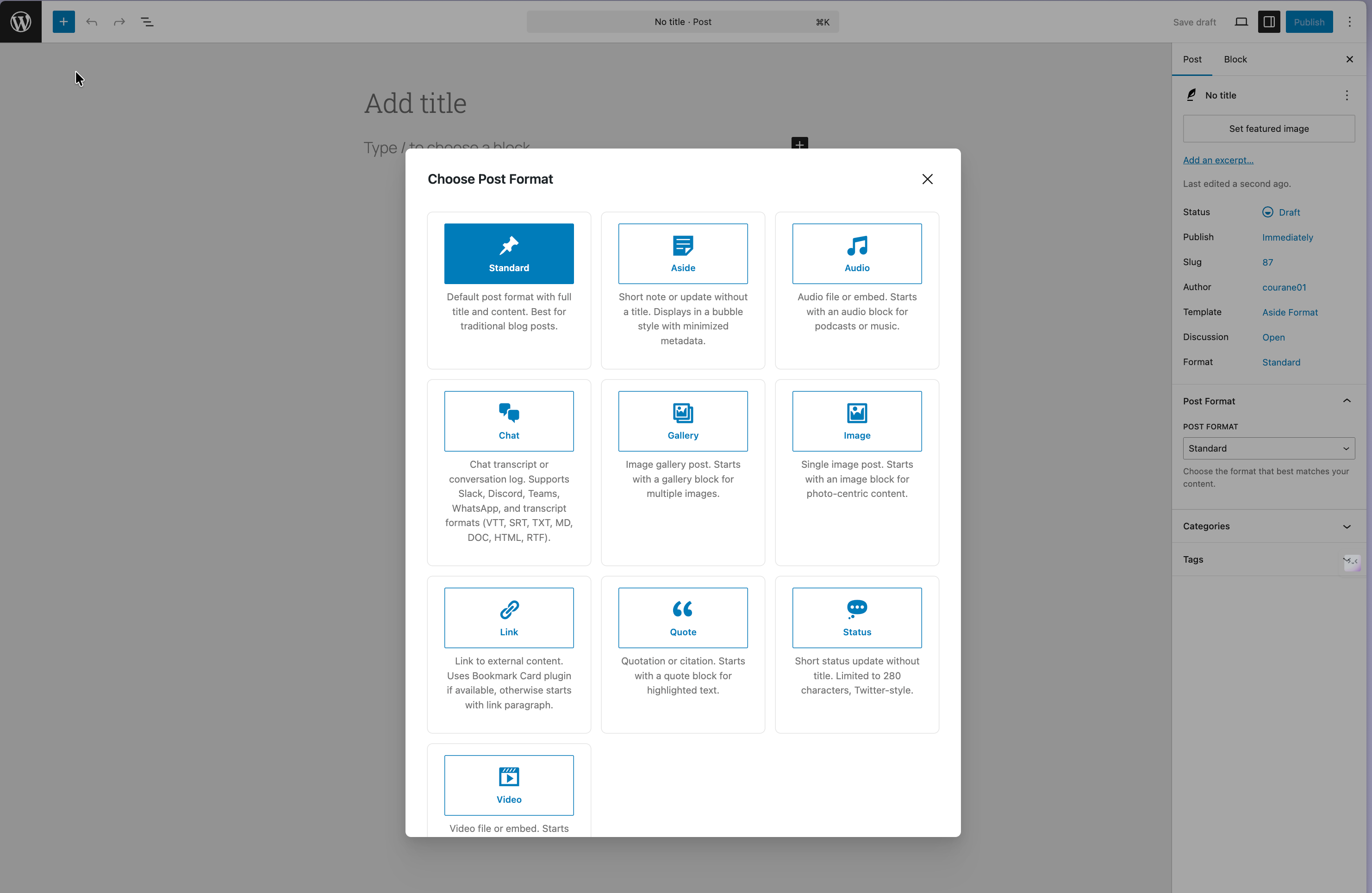
Format selection modal displaying all 10 post formats with descriptive icons and labels when creating a new post
Format Switcher sidebar panel showing current format, auto-detection status, and dropdown to switch formats mid-edit
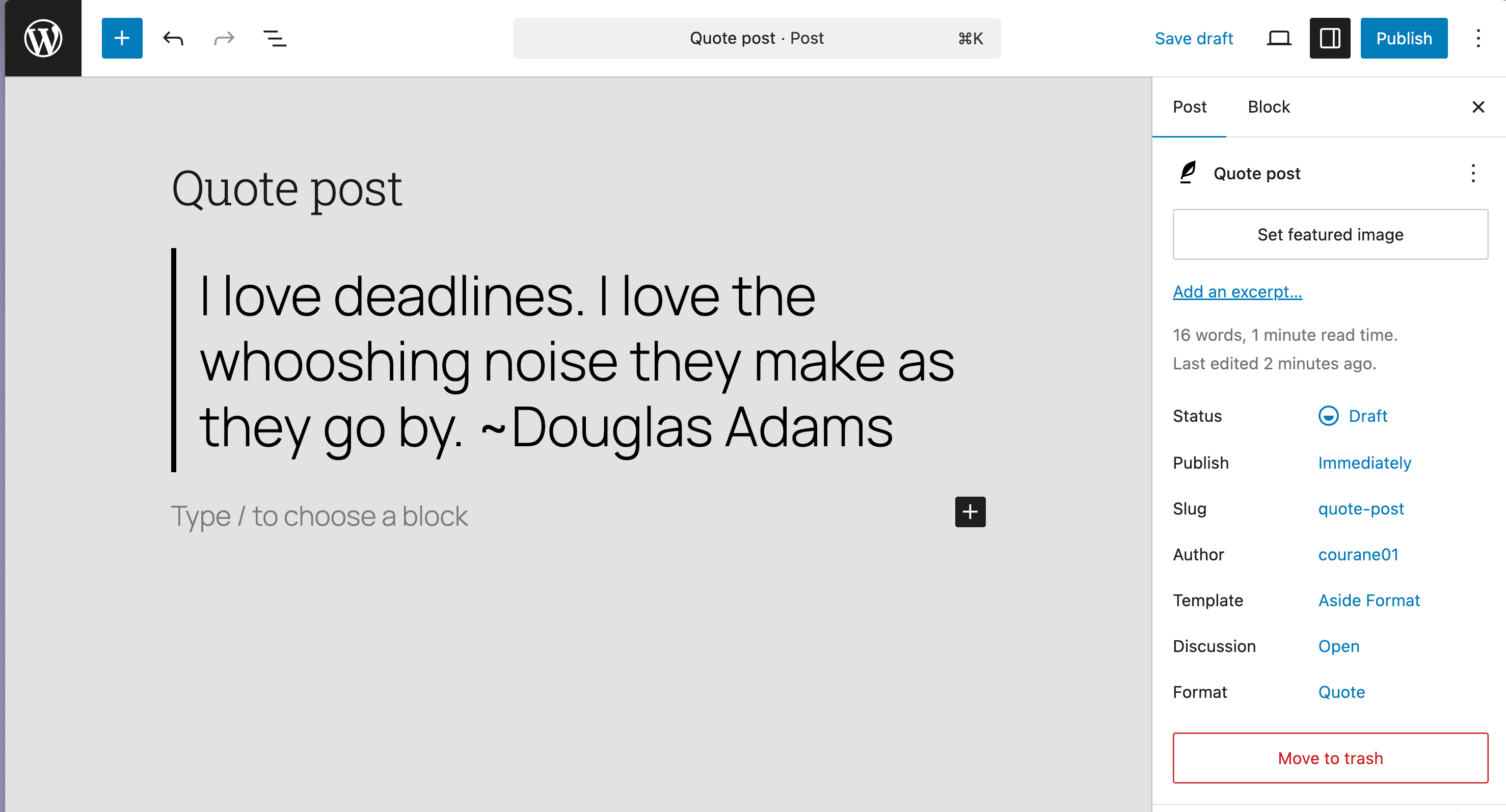
Quote format pattern with locked pullquote block, attribution field, and enhanced typography adapting to theme
Chat Log block displaying Slack conversation with avatars, usernames, timestamps, and bubble-style formatting
Post Format Repair tool showing scan results, detected mismatches, suggested format changes, and one-click repair
Status format editor with real-time 280-character counter, validation, and visual feedback like social media
Changelog
1.1.0 – 2025-12-08
New Features
- Added: Post Format Block – Display block for showing post formats on the frontend (forked from Post Format Block by Aaron Jorbin)
- Added: Post format column in Posts admin list with clickable filtering (similar to categories/tags display)
- Added: Screen Options toggle for post format column visibility in admin
- Added: Post format taxonomy display in all 9 format templates (categories, tags, and format shown together)
- Added: Sortable post format column in admin list for easy organization
- Added: Dashicons for each post format in admin column for visual identification
Improvements
- Improved: Template assignment system now uses slug-only format (not full theme ID) for better compatibility
- Improved: All 9 format templates now display categories, tags, and post format in a horizontal flex group
- Improved: Consistent spacing added before taxonomy display across all templates
- Improved: Post format taxonomy now available in REST API for block editor integration
- Improved: Template dropdown now correctly displays format-specific template names
- Improved: Post format support now properly merges with theme’s existing format support (no override)
Bug Fixes
- Fixed: Template assignment dropdown showing “Aside Format” for all post types
- Fixed: Post format support conflicting with theme-defined formats (now merges safely)
- Fixed: Duplicate post format registration from Chat Log block
- Fixed: Template storage format causing UI mismatch in editor sidebar
- Fixed: Plugin check errors for WordPress.org submission compliance
Code Quality
- Removed: All debug error_log() statements from production code
- Removed: Development files, test scripts, and backup files
- Improved: Variable naming to follow WordPress coding standards (all prefixed with pfbt_)
- Improved: Output escaping in admin columns for security compliance
- Improved: File naming (removed spaces from image filenames)
Developer
- Added: Comprehensive test suite with 15 validation categories
- Added: PHPCS, PHPStan, and PHPUnit configuration files
- Added: Security scanning (SAST) and vulnerability checking
- Added: PHP compatibility checks (7.4 – 8.4)
- Added: Accessibility testing infrastructure
- Added: Complete testing documentation (TESTING.md, TEST-REPORT.md)
1.0.0 – 2025-01-XX
Initial Release
- Added: Format selection modal on new post creation with visual cards for all 10 post formats
- Added: 10 format-specific block patterns optimized for each post type (Standard, Aside, Status, Link, Gallery, Image, Quote, Video, Audio, Chat)
- Added: Locked first blocks in patterns to maintain format consistency while allowing full content freedom
- Added: Automatic post format detection on save analyzing first block content structure
- Added: Format Switcher sidebar panel for mid-edit format changes with content preservation options
- Added: Status format 280-character validation with real-time counter and visual feedback
- Added: Post format repair tool (Tools Post Format Repair) for scanning and fixing format mismatches
- Added: Integrated Chat Log block (chatlog/conversation) for conversation transcripts—no separate plugin needed
- Added: Chat Log platform support: Slack, Discord, Teams, Telegram, WhatsApp, Signal with automatic detection
- Added: Chat Log display styles: bubbles, IRC, transcript, timeline with full customization options
- Added: Bookmark Card plugin integration for Link format with graceful fallback to standard linked paragraphs
- Added: Theme-agnostic styling using CSS custom properties from theme.json for seamless integration
- Added: Complete keyboard navigation for all interactive elements (modals, switcher, patterns)
- Added: Screen reader support with ARIA labels, live regions, and semantic HTML structure
- Added: RTL language support for international WordPress sites
- Added: Complete internationalization with translation-ready strings and JavaScript translation support
- Added: Developer filters:
pfbt_registered_formats,pfbt_detected_format,pfbt_pattern_content - Added: Developer actions:
pfbt_format_detected,pfbt_format_repaired,pfbt_format_changed - Added: Comprehensive format detection rules for gallery, image, video, audio, quote, link, chat blocks
- Added: Block theme requirement validation on activation with helpful error messages
- Security: All user input escaped and sanitized following WordPress security standards
- Performance: JavaScript only loads in block editor, not on frontend for optimal site speed
- Performance: CSS uses native custom properties, no JavaScript-generated styles for better performance
- Performance: Auto-detection runs only on post save, not on every page load to prevent overhead
- Privacy: No data collection, external API calls, cookies, or user tracking