

Post Submissions for Elementor Forms
Allow users to submit WordPress posts directly from Elementor Forms. Easy setup, flexible, and developer-friendly.
Plugin info
Maintenance & Compatibility
Maintenance score
Maintained • Last updated 125 days ago
Is Post Submissions for Elementor Forms abandoned?
Likely maintained (last update 125 days ago).
Compatibility
Similar & Alternatives
Explore plugins with similar tags, and compare key metrics like downloads, ratings, updates, support, and WP/PHP compatibility.
Description
Post Submissions for Elementor Forms lets you turn any Elementor form into a frontend post submission form.
Demo: https://demo.add-ons.org/demo-post-submissions/
Document: https://add-ons.org/document-post-submissions-for-elementor-forms/
Pro Version: https://add-ons.org/plugin/post-submissions-for-elementor-forms/
Perfect for guest posts, job listings, product reviews, testimonials, or any custom post type.
Features
- Create WordPress posts from Elementor form submissions.
- Map form fields to post title, content, excerpt, featured image, categories, and tags.
- Support for all post types (custom post types included).
- Choose post status: draft, pending review, or publish.
- Assign author automatically or allow user selection.
- Developer-friendly with hooks and filters for customization.
Pro Version Features
- Unlimited meta_key and meta_value: save form data to any
meta_keywithmeta_value. - Conditional Logic: Create a post or not depending on the condition.
- Advanced control over post type, taxonomy, and author assignment.
This plugin helps site owners collect user-generated content easily, while keeping full control over submissions.
Installation
- Upload the plugin files to the
/wp-content/plugins/post-submissions-for-elementor-formsdirectory, or install the plugin directly through the WordPress plugins screen. - Activate the plugin through the “Plugins” screen in WordPress.
- Create a form with Elementor Forms.
- Go to Form Actions enable Post Submission.
- Map your form fields to post fields (title, content, featured image, etc).
- Done! Submissions will automatically create new posts in WordPress.
Frequently Asked Questions
Yes. The plugin works with Elementor Free (Forms widget is required).
Yes. You can select any registered post type, including WooCommerce products, events, or your own custom post type.
Yes. File upload fields can be mapped to the post featured image.
Yes. You can set the default post status to pending review or draft.
Review feed
Screenshots
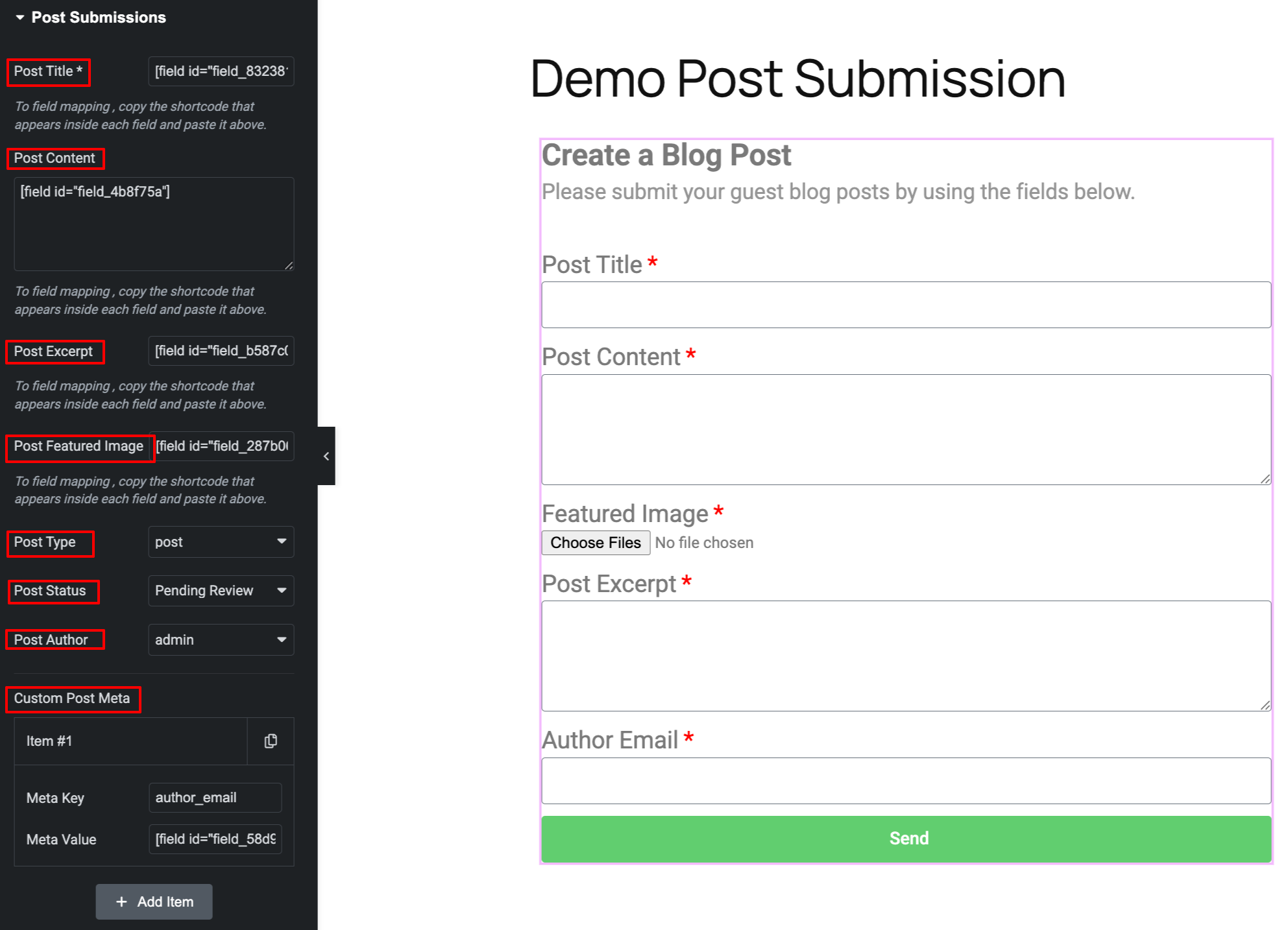
Enable "Post Submission" action in Elementor form.
Changelog
1.0.0
- Initial release.