

Post/Page Copying Tool to Export and Import post/page for Cross site Migration
This plugin adds Export and Import buttons for posts/pages, enabling JSON exports of post details and simplifying content addition.
Plugin info
Maintenance & Compatibility
Maintenance score
Possibly abandoned • Last updated 405 days ago • 2 reviews
Is Post/Page Copying Tool to Export and Import post/page for Cross site Migration abandoned?
Possibly abandoned (last update 405 days ago).
Compatibility
Similar & Alternatives
Explore plugins with similar tags, and compare key metrics like downloads, ratings, updates, support, and WP/PHP compatibility.
Description
This plugin streamlines content management across different versions of a WordPress site by enabling the export and import of post/page content in JSON format.
It eliminates the need for manual copying by allowing you to download post details—including content, title, categories, and featured image—into a JSON file.
This file can then be uploaded to another post, automatically updating its content, custom fields, taxonomies, and featured image. The plugin supports:
- Post Title
- Post Content
- Featured Image
- Taxonomies: Tag, Category, and Custom Taxonomy
- PostMeta / Custom Fields
Designed to work with major page builders and ACF fields, the plugin offers flexibility to selectively duplicate posts, avoiding the need for full database migration.
Installation
- Upload the plugin folder to the /wp-content/plugins/ directory.
- Activate the plugin through the ‘Plugins’ menu in the WordPress Dashboard.
Frequently Asked Questions
Export your post or page data effortlessly. Simply navigate to the “Export current post information” section and click the “Export Data” button to instantly export your content as JSON.
To successfully import JSON files, ensure that the Advance Custom Fields plugin is installed and a Field Group has been created beforehand. On the page or post add/edit screen, simply select the exported JSON file and click on the Publish or Update button.
Yes, Our plugin works perfectly with Elementor! Install our user-friendly plugin and easily import your preferred JSON file. Edit and save your page/post with Elementor. Don’t miss out on this game-changing tool for effortless website migration!
Review feed
Screenshots

How to export a JSON file

Import button
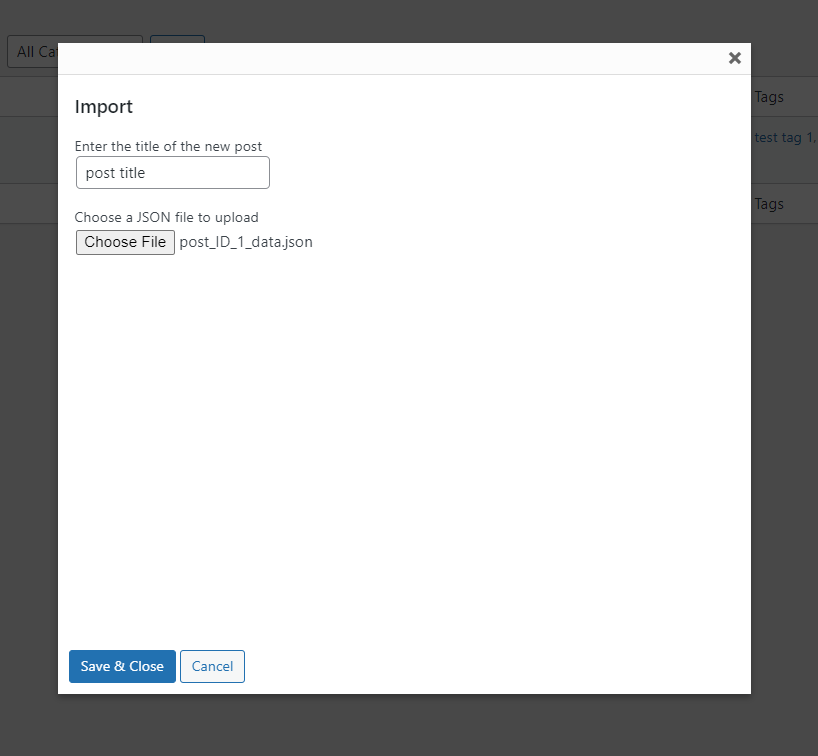
Import popup

Changelog
1.0.0
- First version of the plugin.
1.0.1
- Check compatible with WordPress 6.0.1.
1.1.0
- Fix enqueue of CSS & JS files.
- Test with WordPress version 6.1.1
1.2.0
- Showing import button when new page screen
- Fix import file path
1.2.1
- Test with wp 6.2
1.3.0
- Fix broken templates that have complex ACF Fields.
- Test compatibility with WordPress 6.3.1.
2.0.0
- Enhance the way the plugin works
2.0.1
- Security patch
2.0.2
- Security patch
2.0.3
- Security patch
2.0.4
- Security patch
2.0.5
- Fix export file format