

Powerhouse Museum Collection Image Grid
Plugin to allow embedding of object thumbnails and descriptions from the Powerhouse Museum collection of technology, design and social history.
Plugin info
Maintenance & Compatibility
Maintenance score
Possibly abandoned • Last updated 5547 days ago
Is Powerhouse Museum Collection Image Grid abandoned?
Possibly abandoned (last update 5547 days ago).
Compatibility
Similar & Alternatives
Explore plugins with similar tags, and compare key metrics like downloads, ratings, updates, support, and WP/PHP compatibility.
Description
Plugin to make it easy to embed thumbnails and popup descriptions of thousands of objects from the Powerhouse Museum collection of technology, design and social history in your WordPress blog. The plugin supports both in-post and sidebar widget implementations and a variety of filtering and display methods.
The Powerhouse Museum’s online collection is full of objects that you may want to incorporate into your blog. This plugin uses the Powerhouse API and a jQuery popup for displaying the objects in summary view.
Using the plugin you can display a grid of objects in a post or as a sidebar widget. The size and number of objects as well as the grid layout can be easily customised as well as the search variables.
Installation
GENERAL STEPS
- Download and extract the zip file, upload the phm-image-grid.X.X.zip to your wp-content/mu-plugins directory
- Activate the plugin through the ‘Plugins’ menu in WordPress
- Sign up for an account here. Next create an API Key.
- Enter this key value in the ‘API key’ field of the Powerhouse Museum Image Grid admin page accessible from the left menu.
Widget
- In Appearance/Widgets, drag the widget to a sidebar.
- Change configuration and add filters.
- Save
Shortcode
Place the shortcode [phm-grid ] anywhere in any post or page. The basic parameters are ‘cols’, ‘rows’, ‘thumb_width’, ‘thumb_height’, and ‘parameters’. You can use as many parameters you need. For further information please go to the Powerhouse Museum API documentation
eg. [phm-grid cols=4 rows=4 v_space=1 h_space=1 thumb_width=120 thumb_height=120 random=true parameters=”title:chair|description:New South Wales”]
Frequently Asked Questions
How can I get an API Key?
Please sign up for an account here and then create an API Key for you application.
Review feed
Screenshots

Widget sidebar configuration UI: the options in this menu are the same as the shortcode.
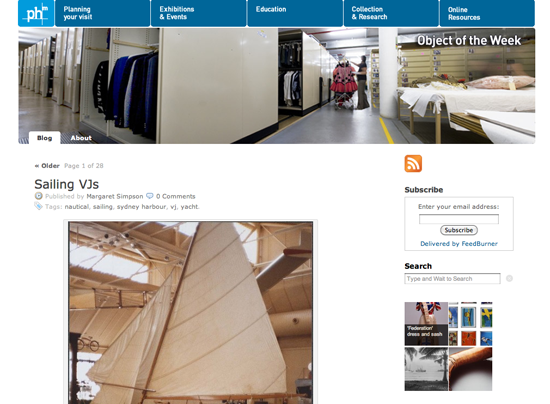
Use of the widget in the sidebar, pulling in four objects from the Powerhouse Museum collection.

You need to get a free API key to use this plugin.

You can use the shortcode editor to insert a grid of Powerhouse Museum objects within a post.

Example of shortcode use.
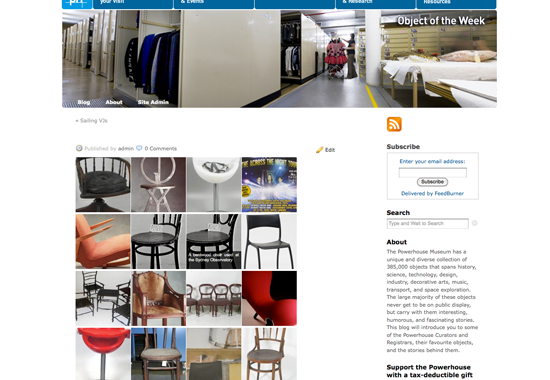
Grid of images pulled from the Powerhouse Museum Collection.

Extra information when you rollover each object.
Changelog
0.9
- First implementation
0.9.1
- Fix wrong CSS and JS paths
0.9.1.1
- Fix missing objects when title was null or empty