
Preload Featured Images
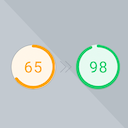
Preload Featured Images automatically in posts to increase the PageSpeed Score.
Plugin info
Maintenance & Compatibility
Maintenance score
Possibly abandoned • Last updated 625 days ago • 3 reviews
Is Preload Featured Images abandoned?
Possibly abandoned (last update 625 days ago).
Compatibility
Languages
Similar & Alternatives
Explore plugins with similar tags, and compare key metrics like downloads, ratings, updates, support, and WP/PHP compatibility.
Description
Preload Featured Images automatically in posts to increase the PageSpeed Score.
This plugin is a “must-have” for websites using themes that display the Featured Image automatically at the top in single post pages.
Why was this plugin created?
Suppose your theme displays the Featured Image at the top in posts automatically. In that case, the chances that the image is the LCP (Largest Contentful Paint) are very high, so the PageSpeed tool will highly recommend you to preload it.
Are you getting the following recommendation when testing the PageSpeed score of a single post: “Preload Largest Contentful Paint image”? Then this plugin will help you!
How it works?
Go to the Settings > Preload Featured Images page and choose the image size used by your theme to make sure the right image size is preloaded.
Compatible Themes
The plugin supports all themes, but it’s very important to choose the right Image Size on the settings page.
If you are not sure which is the image size used by your theme, simply get in touch with your theme’s developer and they will be able to help you with that.
If you’re using one of the following popular themes, then the plugin will automatically pick the right Image Size, so you don’t have to configure anything:
- Foodica
- Foodica PRO
- Gourmand
- Cookely
- Astra
- Neve
- OceanWP
- GeneratePress
- BlossomRecipe
- Divi
- Ashe
Installation
-
Install Preload Featured Images either via the Plugins > Add New page in your WordPress Dashboard, or by downloading the plugin and uploading the file in Plugins > Add New.
-
After activating Preload Featured Images, a new settings page will appear under the “Settings” section in the admin menu.
Frequently Asked Questions
If you have tested your website on PageSpeed Insights or GTmetrix and you got the message “Preload Largest Contentful Paint image”, it means that the image in question is being lazy loaded.
You can fix this problem by installing this plugin.
Yes, this plugin supports Image CDNs like Jetpack and other providers, so you can be sure that the right images will be preloaded.
Review feed
Screenshots

Settings Page
Changelog
1.0
- Initial release