

WooCommerce Product Carousel Slider
It allows you to easily create responsive WooCommerce product carousel/slider that comes with lots of features including advanced Shortcode Generator.
Plugin info
Maintenance & Compatibility
Maintenance score
Possibly abandoned • Last updated 1626 days ago • Support resolved 0% • 26 reviews
Is WooCommerce Product Carousel Slider abandoned?
Possibly abandoned (last update 1626 days ago).
Compatibility
Similar & Alternatives
Explore plugins with similar tags, and compare key metrics like downloads, ratings, updates, support, and WP/PHP compatibility.
Description
It allows you to easily create responsive WooCommerce product carousel/slider that comes with lots of features including advanced Shortcode Generator.
We have discontinued the development of Post Slider and continue to focus on our existing solutions that you love as well as developing new features to escalate your experience to a greater level.
Our “WooCommerce Product Carousel Slider” plugin shares the same set of functionalities as the WooCommerce Product Carousel, Slider & Grid Ultimate.
Live demo: https://demo.wpwax.com/plugin/woocommerce-product-carousel-slider-and-grid-ultimate-demo-slider/
WooCommerce Product Carousel Slider displays products of your shop anywhere you like easily in an elegant and professional way using carousel slider that would make customers interested and increase sales. It comes with lots of features including advanced Shortcode Generator. Its a must have plugin for WooCommerce shop!
All of your products with this plugin will display perfectly fine on any devices. It is also touch devices friendly. So, your customers from any devices can view your products nicely. Thus, more chances for more sale.
Features of this plugin
- 100% Responsive and mobile friendly.
- Latest/recent, older and featured products carousel/slider.
- Unlimited products display.
- Unlimited carousel/slider.
- Unique settings for each carousel/slider.
- Advanced shortcode generator.
- Advanced settings panel.
- Control number of products to display on desktop, tablet and mobile devices.
- Auto images resize and crop option.
- Image upscaling enable/disable.
- Autoplay control.
- Slide speed control.
- Mouse over stop option.
- Navigation arrows.
- Pagination.
- Display/hide Product Title, Price, Star Ratings and Cart button.
- Navigational arrow color and background color change options.
- Product title font size, color, hover color change options.
- Price font size and color change options.
- Product Star Ratings size and color change options.
- Cart button background color, font size, font color change options.
- Touch and Swipe enabled.
- Support all modern browsers.
- Very lightweight.
- Translation ready.
- Many more…
More amazing features available in Pro version.
Features of the Pro version
- On sale, best selling, top rated and featured products display.
- Display by ID, sku, tags, category, month and year.
- Display products randomly
- Product excerpt and option to limit excerpt words
- Display/hide excerpt with font size and color change options
- Enable/disable hover effect on product image
- Ribbon/badge for on sale, featured and out of stock products.
- Customize ribbon/badge
- Edit “read more” and ribbon/badge text
- Display/hide out of stock products
- 5 different themes
- 4 different header styles
- 2 different styles for navigation
- Scroll by per item or page
- Specify the scrolling direction
- And many more…
Installation
- Unzip the downloaded zip file and upload the plugin folder into the
wp-content/plugins/directory. Alternatively, upload from Plugins >> Add New >> Upload Plugin. - Activate the plugin from Plugins page.
Usage
After successfully installing and activating the plugin, you will find “Woo Carousel” menu on left column of WordPress dashboard. Go to Woo Carousel >> Add New and configure any options as desired. Then copy the shortcode which is at the bottom of the Settings panel on the “Shortcode” section and paste it wherever you want to display the carousel slider.
Frequently Asked Questions
Review feed
Finally!
Screenshots

General Settings
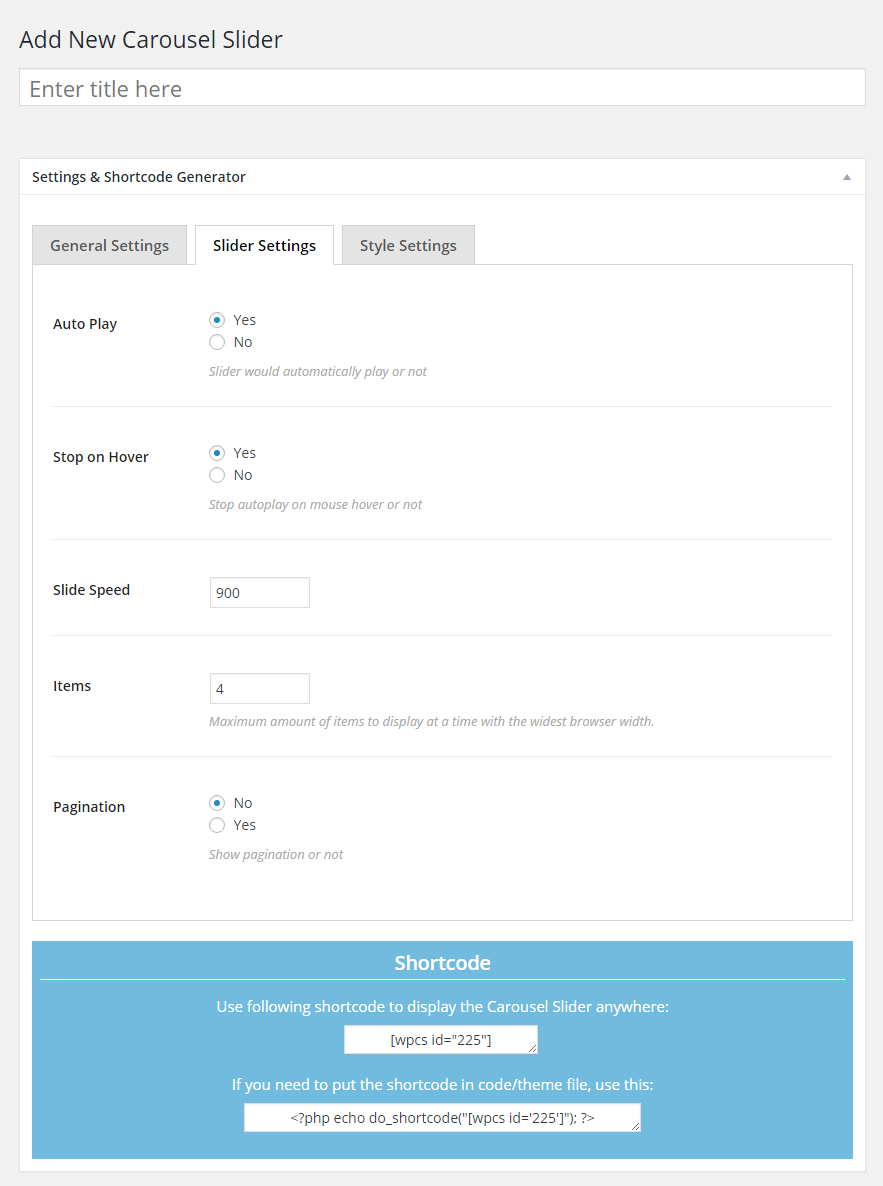
Slider Settings

Style Settings

frontend
Changelog
3.3.5
- Add: WordPress 5.6 compatibility
- Add: WooCommerce 4.8 compatibility
3.3.4
- Add: WordPress 5.5 compatibility
- Add: WooCommerce 4.3 compatibility
3.3.3
- Fixed image cropping issue
- Fixed language issue
3.3.2
- Fixed column issue for Desktop, Laptop, Tablet & Mobile
3.3.1
- Fixed product repeating/continuous looping issue
3.3.0
- Added product repeating/continuous looping on/off feature
3.2.0
- Added option to display full title
3.1.0
- Added the feature of controlling number of products to display on desktop, tablet and mobile devices.
3.0.2
- Fixed auto play issue
3.0.1
- Fixed pagination issue
3.0.0
- Updated JavaScript code
- Completely rewrote the plugin using Object Oriented PHP
- Added Image Upscaling feature
- Added Custom Columns on the carousel listing page for copying shortcode easily
- Optimized the display of settings
2.1
- Made WooCommerce 3.0.0 compatible
2.0
- Added features of displaying Product Star Ratings and options of changing its color and size.
- Added Product Title, Price, Star Ratings and Cart button display/hide options.
1.9
- Fixed a bug
1.8
- Fixed margin and padding related issue of product title
- Reduced opacity of navigation arrows
1.7
- Fixed another cart button related issue
1.6
- Fixed cart button issue with WooCommerce 2.5.0 version
1.5
- Made some changes in navigational arrow. Added feature to change navigational arrow color and its background color.
1.4
- Fixed an issue
1.3
- Fixed a JavaScript issue
1.2
- Added feature of loading scripts and styles if Shortcode present
1.1
- Added auto images resizing and cropping feature
1.0
- Initial release