
Product Designer App
The Product Designer app has it all: Manage assets, design, print files, let customers add designs to purchase, and more… Get started now!
Plugin info
Maintenance & Compatibility
Maintenance score
Maintained • Last updated 121 days ago • 6 reviews
Is Product Designer App abandoned?
Likely maintained (last update 121 days ago).
Compatibility
Similar & Alternatives
Explore plugins with similar tags, and compare key metrics like downloads, ratings, updates, support, and WP/PHP compatibility.
Description
WHAT IS THE PRODUCT DESIGNER APP?
Product Designer App is the must-have WooCommerce plugin for any printing or personalization business. It transforms your store into a fully interactive design platform—empowering customers to create their own designs, customize professional templates, or order ready-made layouts with ease.
With just one click, you can download production-ready files and print them instantly—no extra editing, no hassle. The plugin also includes flexible, dynamic pricing options for every type of printing service, ensuring your workflow stays efficient and profitable.
Packed with all the essential design tools customers expect—from artwork and text customization to advanced editing features—Product Designer App is the perfect solution for any personalized or customizable product.
THE ULTIMATE PERSONALIZATION SOLUTION FOR YOUR ONLINE STORE
Product Designer App is the most powerful WordPress product design platform built for print-on-demand and personalization businesses. Create stunning, high-converting print websites faster than ever before.
Transform the entire design experience for your customers. With Product Designer App, you can manage and deploy design assets effortlessly, or import hundreds of ready-made templates from the free asset library with a single click. Empower shoppers to personalize products instantly with artwork, text, QR codes, and uploaded images—no design skills required.
Generate production-ready print files automatically and download them with one click, making fulfillment smoother and more efficient than ever.
Upgrade to Product Designer App Pro to unlock the full suite of advanced features and elevate your store to the next level:
🌟 Create Professional Print & Personalization Websites
- Powerful Admin Control Panel: Effortlessly manage every corner of your print store—from installation and configuration to layout setup, resource management, printing options, and downloading high-resolution, production-ready design files.
- Premium Design Tools: Give customers the creative freedom they expect. Add text, choose fonts, customize colors, insert artwork, apply templates, generate QR codes and barcodes, upload photos or pick from the library, apply shapes and filters, resize elements, and more—all through a beautifully intuitive interface.
- Extensive Template Library: Build and organize your own design templates, effortlessly import/export them, and set up ready-to-use page templates so customers can start designing instantly.
- Supports Every Product Type: From apparel and mugs to business cards, posters, and fully custom items—Product Designer App empowers customers to create designs for virtually any product.
- Lightning-Fast Data Import: Import artwork, text presets, templates, and other design resources in a single click—or use bulk upload to get your store production-ready in minutes.
- Exceptional Support & Service: Whenever you need help, guidance, or technical assistance, our team is here to support you—quickly, professionally, and reliably.
🗝️ Key Features:
*) Powerful Admin Management
- Dashboard: Overview total resources, orders, and system requirements for quick analysis.
- Order Management: View order lists, customer details, and download print-ready files.
-
Quotes Management(Pro): Manage quotes, update status, delete processed quotes, and download print files.
-
Product Base Management:
- Create, edit, delete, and search products.
- Import/export products for backup or migration.
- One-Click Import Premium version Quickly import free product bases from the library.
- Advanced Product Setup:
- Multiple background layers for realistic product previews.
- Multiple design areas per view.
- Mask layers for advanced mockup effects.
- Custom Views Premium version Allow customers to add custom perspectives.
- Product color customization via list or color picker.
- Attributes / Variants Premium version Add size, materials, and extra attributes.
- Quantity-based discounts.
- Custom layout per product.
- Assign artworks and templates by category.
- Variants Manager Premium version Manage stock and variant-specific pricing.
- Artwork Management:
- Bulk upload, bulk edit, bulk move, bulk delete, and search artworks.
- Supports SVG, PNG, JPG.
- One-Click Import Premium version Pull free artworks from the library.
- Organize artworks by folders.
- Artwork Pricing Premium version
- Multi-language support.
- Template Management:
- Create, edit, move, delete, and search templates.
- Full-featured template editor using the same design tools as customers.
- Control visibility of individual template element functions.
- Import/export templates for backup.
- One-Click Import Premium version
- Folder-based organization.
- Template Pricing Premium version
- Multi-language support.
- Printing Type Management:
- Create, edit, delete printing methods.
- Configure calculation rules: fixed price, per color, per size, per design area.
- Combine multiple pricing models.
- Quantity and multi-view discount support.
- Simple, intuitive price setup interface.
- Addon Management:
- Install, activate, and deactivate addons with ease.
- Configure addon settings quickly with an intuitive interface.
- Apply configure addon settings per product.
- Upgrade to the latest addon versions in just one click.
- Browse and install new addons directly from the Addon Store.
- Theme Management:
- Install, activate, deactivate themes.
- Edit CSS easily.
- Upgrade to new versions in one click.
- Install new themes from the theme library.
- General Settings:
- Upload settings: min/max file size & supported file types.
- Download format settings for print files.
- Text settings: remove emojis, set default text.
- Photo Library Premium version
- Team name & number Premium version
- QR/Barcode Settings Premium version
- Watermark Setup Premium version
- Add YouTube help videos.
- Enable/disable design tool functions.
- Manage text templates, fonts, shapes, filters.
- Language editor for translations.
- Cache cleanup.
- One-click upgrades.
WooCommerce Integration
- Product Integration:
- Connect or disconnect design bases with WooCommerce products.
- Assign design templates to WooCommerce products.
- Show “Customize” button on product pages.
- Cart Integration:
- Save design data to cart.
- Generate thumbnails for cart preview.
- Update product design prices dynamically.
- Supports classic & block-based WooCommerce cart/checkout.
- Edit design for cart classic Premium version
- Order Integration:
- Save design information to orders.
- Show thumbnails in order details and emails.
- Download high-quality SVG, PNG and PDF Premium version.
- Shortcode [pdapp-studio-page id=”1″] for design studio page.
*) Design Tools
- Works on all major browsers.
- Fully responsive for desktops, tablets, and mobiles.
- Clean, user-friendly interface.
- Supports PNG, JPG, SVG.
- Background processing for smooth performance.
- High-speed SVG rendering.
- Multiple design areas with shared views.
- Change element colors.
- Strong security, hidden resource folders.
- Multi-language & auto-detect language.
- Save & Load Designs Premium version.
- Get a Quote Premium version: Request quotes for multiple variations.
- Add multiple variations of the same design to cart.
- Hotkeys support Premium version
- Design notes saved per order.
-
Drag to move, resize, rotate elements.
-
Enhanced Design Controls:
- General Tools Back button, area size (Basic/Pro), group tools, reset, help, rulers, undo/redo (Basic/Pro), preview, zoom, fullscreen, view switch.
- Design Templates Add templates with one click / Color customization for SVG elements. / Move, resize, rotate elements / Edit template content with all design tools / Disable any function for specific elements.
- Text Add text from preset libraries / Customize fonts, colors, spacing, outline, opacity, styles / Copy, lock, flip, delete.
- Artwork Add artworks with one click / Supports PNG/JPG/SVG / Recolor SVG artwork / Transform and adjust opacity.
- Photos Add or upload photos / Supports cropping, shapes, filters for PNG, JPG / Move, resize, rotate / Copy, lock, flip (PNG, JPG), opacity, delete.
- Teams Premium version Add player names and numbers instantly / Customize fonts, colors, spacing, outlines / Move, resize, rotate or delete.
- QR Code Premium version Add with one click / Edit content, colors, opacity / Supports text, URL, phone, SMS, email.
- Barcode Premium version Add with one click / Supports CODE128, EAN/UPC, CODE39, ITF14, MSI, PHARMACODE, CODABAR / Adjust width|height, colors, background / Show|hide barcode text.
- Groups Select elements via drag or click / Group, ungroup / Edit group color (SVG only) / Move, resize, rotate, copy, delete.
- Layer Panel Reorder layers (up|down) / Select a layer to edit instantly.
Build professional personalization websites with Product Designer App Pro!
🚫 Notice
- WooCommerce product variants are not supported fully. You can set up a single product to work instead.
- We stopped fixing bugs in the free version starting from v1.0.9. However, it continues to receive updates to ensure compatibility and proper functionality with the latest versions of WordPress and WooCommerce.
- The Premium version continues to receive full support, including bug fixes and feature updates, with lifetime updates included.
❓ Help & Support
Join our community and get the support you need.
- Report – Submit a bug report.
- Request – Suggest new features.
- Documents – Access full documentation.
- Facebook – Follow us for updates and announcements.
- Twitter – Stay informed with the latest notifications.
-
YouTube Channel – Discover tutorials, tips, and valuable insights.
-
If you have questions or need assistance, our Help Center is here for you—browse FAQs or open a support ticket anytime.
- Show your support by rating us on WordPress. Your feedback drives our growth! 🤗
Dependency Libraries
All dependencies are licensed under the MIT license and kept up to date with the latest versions. You can also access all uncompressed source code for development purposes.
- Barcode
- ChartJs
- CircleType
- ColorThief
- Hotkeys
- jsPDF
- Moveable
- Selecto
- Qrcode
- Colorpicker
- SvgColors
- VueJs
External Services
This plugin connects to our API to receive update notifications. For Premium version users, the plugin can also connect to our API to import a wide range of resources—including products, artworks, templates, fonts, and themes—directly into your site.
To use these services, you must provide your purchase code (issued upon Premium purchase) for verification. We only store the personal information you provide, such as your email address and PayPal transaction ID. For security, we never store passwords or other login credentials. Access is granted via a secure login code sent to your email.
For more details, please refer to our: Terms of Use, Privacy Policy.
Installation
Minimum Requirements
- WordPress 4.9 or higher
- WooCommerce 4.0 or higher
- PHP 7.0 or higher
- MySQL 5.0 or higher
Recommended Requirements
- PHP 8.1 or higher
- MySQL 5.6 or higher
- WordPress memory limit: 1024 MB or higher (2048 MB or more recommended)
Installation Guide
- Install the Plugin Use the built-in WordPress plugin installer or extract the zip file and upload its contents to the
wp-content/plugins/directory of your WordPress installation. - Activate the Plugin Go to the Plugins menu in WordPress and activate the Product Designer App plugin.
- Access the Admin Panel Navigate to Pages -> Add New / Click the
PDAbutton to open the Product Designer App admin panel. - Configure and Start Designing Set up your products, configure settings, and start creating designs.
- Learn More For detailed documentation and tutorials, visit our Knowledge Base / For video tutorials, check out our YouTube Channel.
Frequently Asked Questions
- Go to your WordPress dashboard Plugins Add New.
- Search for Product Designer App and select it.
- Click Install, then Activate the plugin.
Product Designer App is compatible with themes that follow WordPress coding standards. For the best performance, we recommend using the Astra theme.
Yes! With Product Designer App Pro, you can set up all your products to provide an amazing customer design experience that drives sales.
Yes, it works with most plugins. If you encounter any incompatibility, please report it to us and to the conflicting plugin’s developer.
No! Product Designer App provides all the tools you need to build a professional print website without writing any code.
Not necessarily. Customers can create their own designs, but having basic design knowledge allows you to create ready-made designs that increase sales.
No. Product Designer App is optimized for speed and performance, ensuring your site runs smoothly even with the plugin active.
Absolutely. We take security seriously and implement proactive measures to ensure your website remains safe.
The free plugin offers basic functionality. Pro adds advanced tools, features, a dedicated support package, and access to free resource imports. See the full comparison here.
Yes. You can fully customize the plugin for your store. If you don’t code, you can hire a developer or hire our team to handle the customization for you.
Review feed
Screenshots
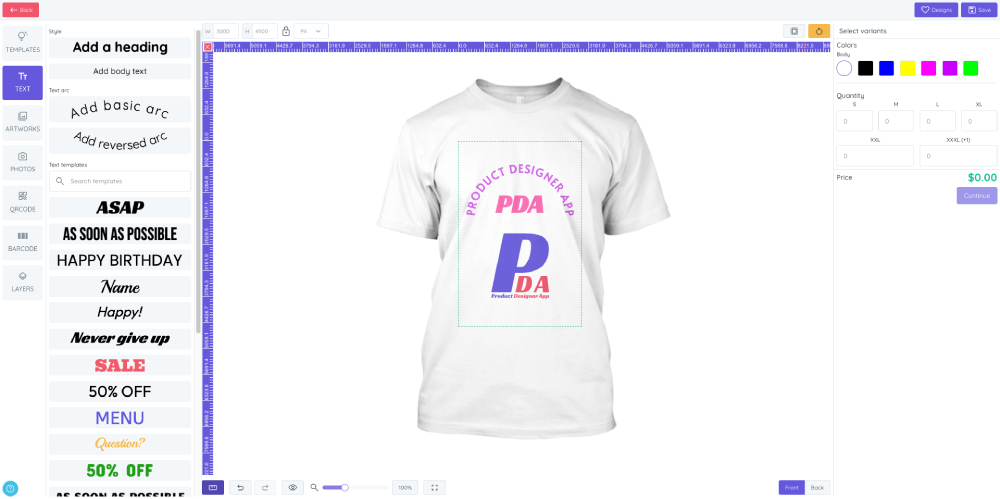
Design Tools - Create and refine designs with pixel-perfect precision.

Add Variants to Design - Add multiple variations of the same design to the cart.

Add to Cart Save all design information directly to the WooCommerce cart.

Order Overview - View complete design details in WooCommerce order summaries.

Download Print Files Export high-resolution PNG, SVG, or PDF files ready for printing.

WooCommerce Product Design - Combine WooCommerce products with product base designs to create custom product designs.

WooCommerce Product Templates - Add templates to product designs for fast, reusable layouts.

Dashboard - Get a quick overview of total resources, order statistics, and system status.

Artworks Management - Organize and manage all image and art resources for your customers.

Orders - View a complete list of orders containing designs.

Order Details - Access design thumbnails, uploaded images, pricing, notes, and download print files.

Quotes (Premium) - Manage all customer quotes, update status, or delete as needed.

Quote Details (Premium) - View detailed design information for quotes and download print-ready files.

Prints Management - Manage the list of prints including edit and delete options.

Add Printing Type - Configure pricing calculations based on components, sizes, colors, and set quantity discounts and view modes.

Products Base - Manage all base products: edit, import/export, or delete designs.

Add Product - Set up design areas, layers, colors, sizes, discounts, and layouts.

Templates - Manage design templates: edit, import/export, or delete.

Add Template - Quickly create new templates using the design tools.

Themes - Install, activate, or deactivate theme designers for your store.

Settings - Configure plugin-wide options, including uploads, layouts, and resources.

Upgrades - View and apply plugin updates with one click.

Import Resources - Easily import free resources from the store, including artworks, templates, texts, fonts, and product bases.
Changelog
1.0.0 – 2024-12-13
- Initial Public Beta Release
1.0.1 – 2024-12-26
-
Supported WooCommerce Version 9.5.1
-
Fixed bug display table guide hotkeys
-
Fixed bug clear cache quote
-
Fixed bug when upgrade
-
Refresh plugin after upgrade version
1.0.2 – 2025-02-13
-
Supported WooCommerce Version 9.6.1
-
Fixed bug limit variants attribute
-
Add more product base design
1.0.3 – 2025-03-10
-
Supported WooCommerce Version 9.7.1
-
Supported show all thumbnails on cart summary and cart
-
Supported change color with color picker by hex code
-
Fixed some style incorrect
1.0.4 – 2025-03-22
-
Fixed price template
-
Fixed refresh cache variants
-
Fixed layout on iphone
-
Fixed preview on iphone
-
Fixed ruler
1.0.5 – 2025-05-12
-
Fixed issues update
-
Fixed pagination loading artwork, templates
-
Fixed issues sort data in php 8.4
-
Fixed install with special mysql configuration
-
Supported WooCommerce Version 9.8.4
-
Supported WordPress Version 6.8.1
1.0.6 – 2025-06-08
-
Supported WooCommerce Version 9.8.5
-
Fixed show/hide add cart button
-
Fixed save printing type
-
Fixed verify platform
-
Fixed show order thumbnail
-
Fixed download PDF for Pro version
-
Add limit download (10 orders) for free version
-
Allow setup background product images with custom color (refer new document setup product)
1.0.7 – 2025-08-02
-
Supported WordPress Version 6.8.2
-
Supported WooCommerce Version 10.0.4
-
Fixed issues render SVG
-
Fixed setup background product images
-
Fixed show regular price and discount price
-
Fixed save teams on pro version
-
Fixed edit text on mobile
-
Fixed option show/hide download image type on pro version
-
Fixed remove quote on pro version
-
Fixed size of area design for printing type
-
Fixed some style
-
Fixed breadcrumbs order
-
Fixed load photo library when API KEY empty
-
Fixed get white colors from PNG image
-
Fixed upload custom font file
-
Updated zoom layout on mobile
-
Added color button on mobile
-
Added config convert DPI with download PNG for premium version
-
Added function duplicate product for premium version
-
Added quick add color from list colors for premium version
-
Added function remove order for premium version
-
Added allow change relatives product for pro version
1.0.8 – 2025-10-02
-
Supported to Wordress version 6.8.3
-
Supported WooCommerce version 10.2.2
-
Supported cart block and checkout block of WooCommerce
-
Supported edit design on cart classic of WooCommerce
-
Fixed lock/unlock layer
-
Fixed change text size
-
Fixed render cart thumbnail on safari mobile
-
Changed some style
-
Added addons system
-
Allow upload faster
1.0.9 – 2025-12-03
-
Supported to WordPress 6.9
-
Supported to WooCommerce 10.3.6
************ We stopped fixing issues on the free version starting from v1.0.9 (we only provide support for compatibility with the latest WordPress and WooCommerce versions) *************
* All issues are fully addressed in the Premium version, with complete support and access to new feature updates. Get the Premium version today and enjoy lifetime bug fixes and updates. *
-
Fixed issues import addon
-
Fixed ratio of mask area design
-
Fixed show mask layer on mobile
-
Fixed thumbnail when zoom
-
Fixed add design template
-
Fixed keep ratio design after change product on pro version
-
Added missing object design group alignment feature on mobile
-
Supported upload addon by zip file
-
Supported redo/undo group object design
-
Supported undo after moving object design out of the design area
-
Fixed issues change categories artwork, template
-
Fixed load product color after edit design from cart
-
Fixed save image size after resize design template
-
Fixed show replace photo on mobile
-
Fixed show product colors
-
Fixed create new page
-
Allow disable text template