

Woocommerce Product License Manager
A Woocommerce license management system for your wordpress theme, plugins, membership and for other web based application that you sell online.
Maintenance 22/1002831d since update
Active installs
10
Downloads
2,225
Reviews
1
Age
8.5y
Plugin info
Total downloads: 2,225
Active installs: 10
Total reviews: 1
Average rating: 5
Support threads opened: 0
Support threads resolved: 0 (0%)
Available in: 1 language(s)
Contributors: 1
Last updated: 7/2/2018 (2831 days ago)
Added to WordPress: 9/18/2017 (8 years old)
Minimum WordPress version: 4.0
Tested up to WordPress version: 4.8.26
Minimum PHP version: f
Maintenance & Compatibility
Maintenance score
Possibly abandoned • Last updated 2831 days ago • 1 reviews
22/100
Is Woocommerce Product License Manager abandoned?
Possibly abandoned (last update 2831 days ago).
Compatibility
Requires WordPress: 4.0
Tested up to: 4.8.26
Requires PHP: f
Similar & Alternatives
Explore plugins with similar tags, and compare key metrics like downloads, ratings, updates, support, and WP/PHP compatibility.
No similar plugins found yet.
Description
Woocommerce Product License Manager help you to create your own license server to helps the software developer and programmer to secure and track who is using thier software, system, plugin and theme. It has built in API to track status, deactivate, activate and block users who is using your web application.
Free Features
- Automatically creates license keys in every purchase in Woocommerce product
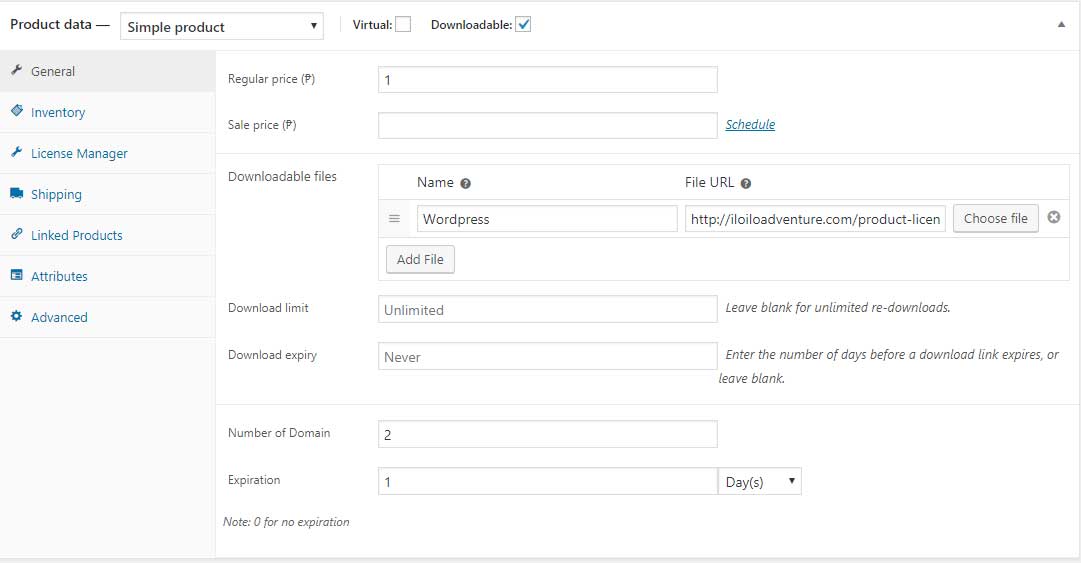
- License can be configure in every Woocommerce product
- License key included Woocommerce notification email.
- Add license key manually
- Manage status of license
- Manage domain allowed to access the license
- Validate if your license is still active remotely using API
- Add domain to the license key using API
- Deactivate license key remotely using API
Premium Features
- License Renewal – User can renew license by purchasing product in Woocommerce
- User can activate and deactivation domain allowed in license key Woocommerce My-account page.
- Domain limit per license
- License Expiration
- Automatic notification if the license is about to expire.
Installation
- Upload wordpress-license-manager.zip to the
/wp-content/plugins/directory - Activate the plugin through the ‘Plugins’ menu in WordPress
Frequently Asked Questions
Installation Instructions
- Upload wordpress-license-manager.zip to the
/wp-content/plugins/directory - Activate the plugin through the ‘Plugins’ menu in WordPress
Review feed
Arni Cinco
New and Improved Version
Added auto generate license key after product purchased in Woocommerce.
Screenshots




Changelog
4.0.1
- Add hooks and filter after complete order
- Fixed bug license domain and date expiration
4.0.0
- Add new Product Tab for License manager.
- Generate License after Product Integrated with License Manger completed order.
- Add hook and filter before the product license is generated
- Fixed text language translation
3.0.0
- First version release to the public