

Product Specifications for Woocommerce
This plugin adds a product specifications table to your woocommerce single-product page.
Plugin info
Maintenance & Compatibility
Maintenance score
Possibly abandoned • Last updated 506 days ago • 26 reviews
Is Product Specifications for Woocommerce abandoned?
Possibly abandoned (last update 506 days ago).
Compatibility
Languages
Similar & Alternatives
Explore plugins with similar tags, and compare key metrics like downloads, ratings, updates, support, and WP/PHP compatibility.
Description
With Product Specifications plugin you can easily create spec. tables for your products. you can create multiple tables so you can use them for different types of products.
Product Specifications is very light-weight and easy to customize.
Translation
To contribute in translating this plugin please visit: WordPress Translation Repository
Development
Product specifications development takes place under its Github Repository, Contributions are more than welcome.
Installation
- Upload plugin to “wp-content/plugins/” directory
- Activate it in plugins section.
Frequently Asked Questions
- Install and activate the plugin
- Go to specification tables -> groups and define some Groups
- Go to specification tables -> attributes and define some attributes associated with groups defined in previous step
- Go to specification tables -> add new to add a new table for a specific type of product ( eg. for mobile phones )
- Go to “Products -> add new” under the specifications tables section you see a dropdown which you can select which table should load.
- Select the table and fill product data in it. That’s it.
By default, The plugin adds its own styles to the tables, you can however disable plugin’s stylesheets in the settings section and style the tables on your own.
The specification table is under a div with .dwspecs-product-table CSS class and you can customize it in your CSS files.
Yes, You can use [specs-table] shortcode.
Review feed
Screenshots
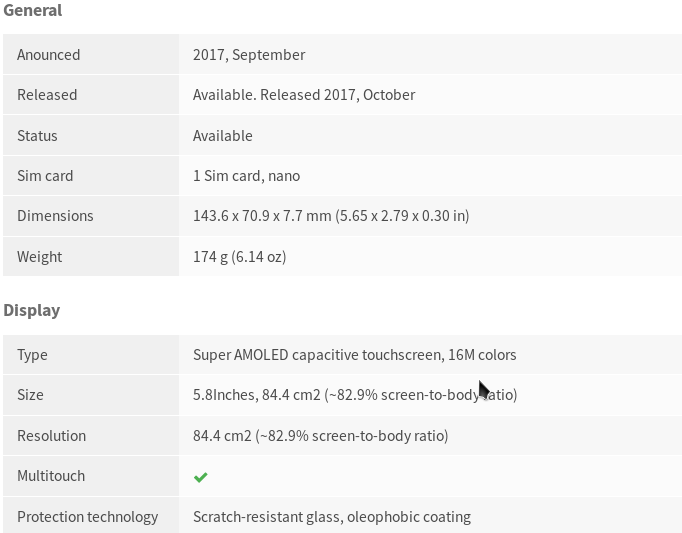
Product specs table on product single page

Add new product page, where you fill information about the product

Add new product page, where you fill information about the product

Table attribute groups page

Product specs with tabs on the left

Right-to-left languages support
Changelog
0.8.7 – 2024-11-12
- Add compatibility with HPOS order storage.
0.8.6 – 2024-11-06
- Fix: Group names are displayed as encoded strings.
- Fix: PHP notice.
- Maintenance: Ensure compatibility with latest WordPress and WooCommerce versions.
0.8.5 – 2024-11-05
- Fix possible fatal error in import/export tool.
- Fix issue with multiline textarea field.
- Maintenance: Add Github issue and Pull request templates.
0.8.4 – 2024-09-24
- Fix broken “select” and “radio” field types.
0.8.3 – 2024-09-22
- Fix fatal error in order edit page.
- Fix wrong minimum PHP version requirement (PHP 7.4+ is supported).
- Ensure compatibility with latest WordPress and WooCommerce versions.
0.8.2 – 2024-08-29
- Minor security improvements.
- Include composer.json in releases.