

Proofreading
Proofreading checks texts on every content of your WordPress site. You can proofread in 30 different languages and get tips to improve your writings.
Plugin info
Maintenance & Compatibility
Maintenance score
Possibly abandoned • Last updated 441 days ago • 8 reviews
Is Proofreading abandoned?
Possibly abandoned (last update 441 days ago).
Compatibility
Similar & Alternatives
Explore plugins with similar tags, and compare key metrics like downloads, ratings, updates, support, and WP/PHP compatibility.
Description
Proofreading plugin allows you to improve the quality of your posts, pages and all your WordPress website.
It gives you the possibility to check the correction of the texts inserted into posts, pages and drafts in less than a second!
Press the “Analyze” button and you will have a list of all found errors.
The plugin allows to recognize different types of text errors (thanks to Languagetool.org). Here some examples of error types:
* Typos
* Punctuation
* Typography
* Commonly Confused Words
* Nonstandard phrases
* Semantic
* Grammar
* Redundant Phrases
Proofreading plugin supports a lot of languages. For example:
* English
* Spanish
* German
* Italian
* Japanese
* French
* Portuguese
* Russian
* and so on…
For every language, in the settings page, you can customize which are the error categories you are interesting, hiding the others.
Installation
From your WordPress dashboard
- Visit ‘Plugins > Add New’
- Search for ‘Proofreading’
- Activate the plugin from your Plugins page.
From WordPress.org
- Download Proofreading zip file
- Unzip it
- Upload the unzipped directory to your ‘/wp-content/plugins/’ directory
- Activate the plugin from your Plugins page.
After installation the plugin select your WordPress installation language as default language for the plugin. If you want to change it, go to the settings page.
Frequently Asked Questions
Review feed
Very useful
Screenshots
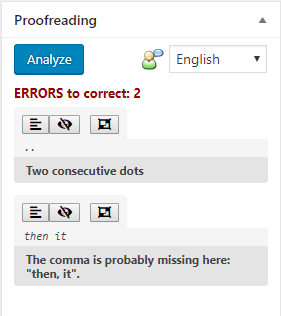
This screen shot the Proofreading box inside a post edit page. Pressing the Analyze button you provide a text errors check for the enabled error categories of the selected language. Three buttons for every found error allows you to: Show the paragraph of the error, Hide the error or Hide all errors of this type.

When at least one error has been hidden, you can show again every hidden error.

How to access to settings page
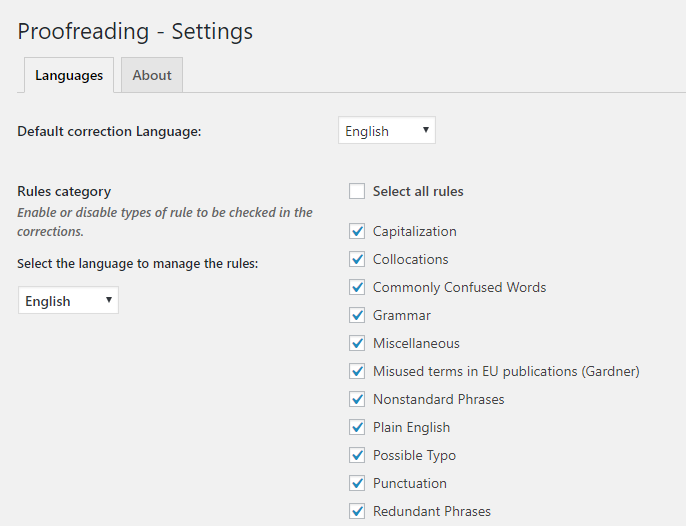
Settings page. Here you can: Select your default language, Enable/Disable error categories to check for every language
Changelog
1.2.2
- Escaping improved
- Code refactoring
- Placeholder for translators
- WordPress 6.7.1 compatibility (not Gutenberg)
1.2.1
- Security fixes
- Added prepare statements to queries
1.2
- Security fixes
- Changed escaping data methods
- WordPress 6.4.3 compatibility (not Gutenberg)
1.1
- WordPress 6.3.2 compatibility (not Gutenberg)
- URLs escaped
- Translations escaped
- Corrected URLs for multisite installations
1.0.11
- WordPress 5.8 compatibility (not Gutenberg)
- Restyling of about page
1.0.10
- WordPress 5.7 compatibility (not Gutenberg)
- Classic editor link corrected
1.0.9
- Enabled proofreading services for all post types
- Plugin webpage changed
- Minor changes
1.0.8
- WordPress 5.6 compatibility (not Gutenberg)
- Speed improvement (JS/CSS file loading)
- Font Awesome icons replaced by Dashicons
- Minor changes
1.0.7
- WordPress 5.3 compatibility (not Gutenberg)
- Code and documentation improvements
- Minor changes
1.0.6
- WordPress 5.2 compatibility (not Gutenberg)
- Graphical changes
1.0.5
- Security improvements
- Graphical changes
- Paragraph selection corrected
- Removed jQuery $ alias use
1.0.x
- Minor changes and bugfixes
1.0
- First plugin version