

Puntr
A professional provider management system for WordPress with roster scheduling, provider profiles, and calendar functionality.
Plugin info
Maintenance & Compatibility
Maintenance score
Stale • Last updated 249 days ago
Is Puntr abandoned?
Likely maintained (last update 249 days ago).
Compatibility
Similar & Alternatives
Explore plugins with similar tags, and compare key metrics like downloads, ratings, updates, support, and WP/PHP compatibility.
Description
Puntr is a comprehensive WordPress plugin designed for managing service providers with advanced scheduling capabilities. Perfect for agencies, clinics, or any business that needs to manage provider schedules and profiles.
Key Features
- Provider Management – Create and manage detailed provider profiles with photos, physical details, rates, and services
- Product-style Gallery – Professional image gallery with main photo and thumbnail navigation
- Roster Scheduling – Visual calendar interface for managing provider schedules using DayPilot
- Daily Roster Display – Customizable shortcode for displaying daily rosters on your website
- Provider Archive – Enhanced archive pages showing provider attributes and quick info
- Professional Admin Interface – Branded admin pages with consistent styling
- Flexible Taxonomies – Organize providers by service categories and body types
- REST API – Full API access to providers and roster data
- Extensible – Comprehensive hooks and filters for developers
- Security – Built with WordPress security best practices
Managing Providers
- Go to Puntr Providers to view all providers
- Click Add New Provider to create a new profile
- Fill in provider details including:
- Basic information (name, age, gender, ethnicity)
- Physical details (height, measurements, hair/eye color)
- Pricing (30/45/60/90/120/180 minute rates)
- Contact information
- Featured image (main photo)
- Gallery images (additional photos)
Managing Rosters
- Go to Puntr Roster to view the calendar
- Click and drag on the calendar to create a roster entry
- Select the provider and time slot
- Roster entries can be:
- Moved by dragging
- Resized by dragging edges
- Deleted via right-click menu
- Use zoom controls (+/-) to adjust the calendar view
- Navigate weeks using arrow buttons or date picker
Displaying Rosters on Your Website
Basic Daily Roster:
[puntr_daily_roster]
Advanced Options:
[puntr_daily_roster date=”2025-07-20″ show_photo=”true” photo_size=”60″ columns=”photo,name,age,location,start,end”]
Full Calendar:
[puntr_roster_calendar height=”700″]
Available Shortcode Parameters
date– Specific date to display (YYYY-MM-DD format)show_photo– Display provider photos (true/false)photo_size– Size of photos in pixels (default: 50)show_age– Include age column (true/false)show_height– Include height column (true/false)show_dress_size– Include dress size column (true/false)show_bust– Include bust size column (true/false)show_location– Include location column (true/false)show_services– Include services column (true/false)show_rates– Include rates column (true/false)columns– Comma-separated list of columns to display
Available Columns
photo, ethnicity, name, age, height, dress_size, bust, location, services, rates, start, end
Template System
Override templates by copying them from plugins/puntr/templates/ to yourtheme/puntr/:
archive-provider.php– Provider archive/listing pagesingle-provider.php– Single provider pagecontent-provider.php– Provider item in lists
Developer Hooks
Provider Hooks:
* puntr_before_save_provider
* puntr_after_save_provider
* puntr_provider_meta_fields
* puntr_provider_meta_boxes
* puntr_provider_display_data
* puntr_provider_archive_info
Roster Hooks:
* puntr_before_create_roster_event
* puntr_after_create_roster_event
* puntr_roster_event_data
* puntr_roster_table_columns
Calendar Hooks:
* puntr_calendar_event_colors
* puntr_calendar_event_text
* puntr_calendar_default_view
* puntr_calendar_time_slots
Template Hooks:
* puntr_skip_archive_provider_details
* puntr_archive_provider_data
* puntr_gallery_images
* puntr_gallery_position
* And many more…
REST API
Puntr includes a comprehensive REST API. All endpoints are available under /wp-json/puntr/v1/
Available Endpoints:
-
GET
/wp-json/puntr/v1/providers– Get list of providers- Parameters:
per_page,page,service,active_only
- Parameters:
-
GET
/wp-json/puntr/v1/providers/{id}– Get single provider details- Returns full provider information including all meta fields
-
GET
/wp-json/puntr/v1/roster– Get roster events by date range- Required:
start_date,end_date(YYYY-MM-DD format) - Optional:
provider_id
- Required:
-
GET
/wp-json/puntr/v1/daily-roster– Get daily roster- Optional:
date(YYYY-MM-DD format, defaults to today) - Returns roster entries including overnight shifts
- Optional:
Example Usage:
`
// Get today’s roster
GET /wp-json/puntr/v1/daily-roster
// Get specific date roster
GET /wp-json/puntr/v1/daily-roster?date=2025-01-15
// Get providers with pagination
GET /wp-json/puntr/v1/providers?per_page=20&page=2
// Get roster for a week
GET /wp-json/puntr/v1/roster?start_date=2025-01-01&end_date=2025-01-07
`
Additional Information
For support and feature requests, email [email protected]
For detailed documentation including all hooks, filters, and code examples, please refer to the plugin’s README.md file or visit https://puntr.me/wordpress
Installation
- Upload the
puntrfolder to the/wp-content/plugins/directory - Activate the plugin through the ‘Plugins’ menu in WordPress
- Navigate to the Puntr menu in your WordPress admin
- Configure settings under Puntr Settings
Frequently Asked Questions
Create a folder named puntr in your theme directory and copy any template from plugins/puntr/templates/ to customize.
Yes! Puntr inherits your theme’s styles and provides minimal styling to ensure compatibility.
Yes, the DayPilot calendar adapts to different screen sizes for optimal viewing on all devices.
Use the columns parameter in the shortcode:
[puntr_daily_roster columns=”photo,name,start,end”]
Yes, providers can be organized using service taxonomies and filtered accordingly.
Yes, Puntr includes a full REST API with endpoints for providers and roster data.
Use the puntr_provider_meta_fields filter to add custom fields.
Review feed
Screenshots
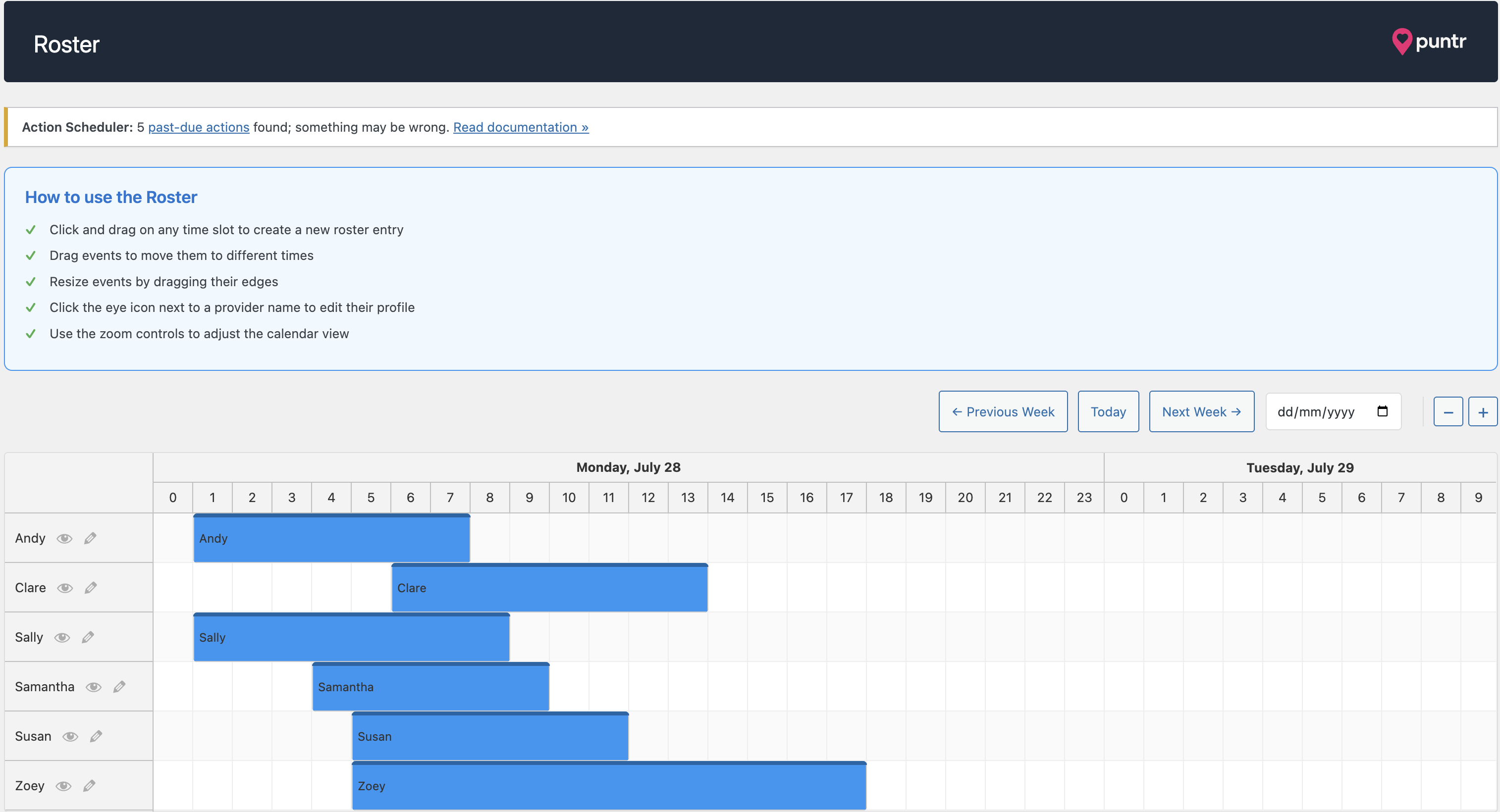
Roster admin interface with provider scheduling

Settings page with quick reference for shortcodes

Provider list page where you can manage your providers

Roster embed displayed on any page through use of a shortcode

Alternative roster embed displayed on any page through the use of a shortcode
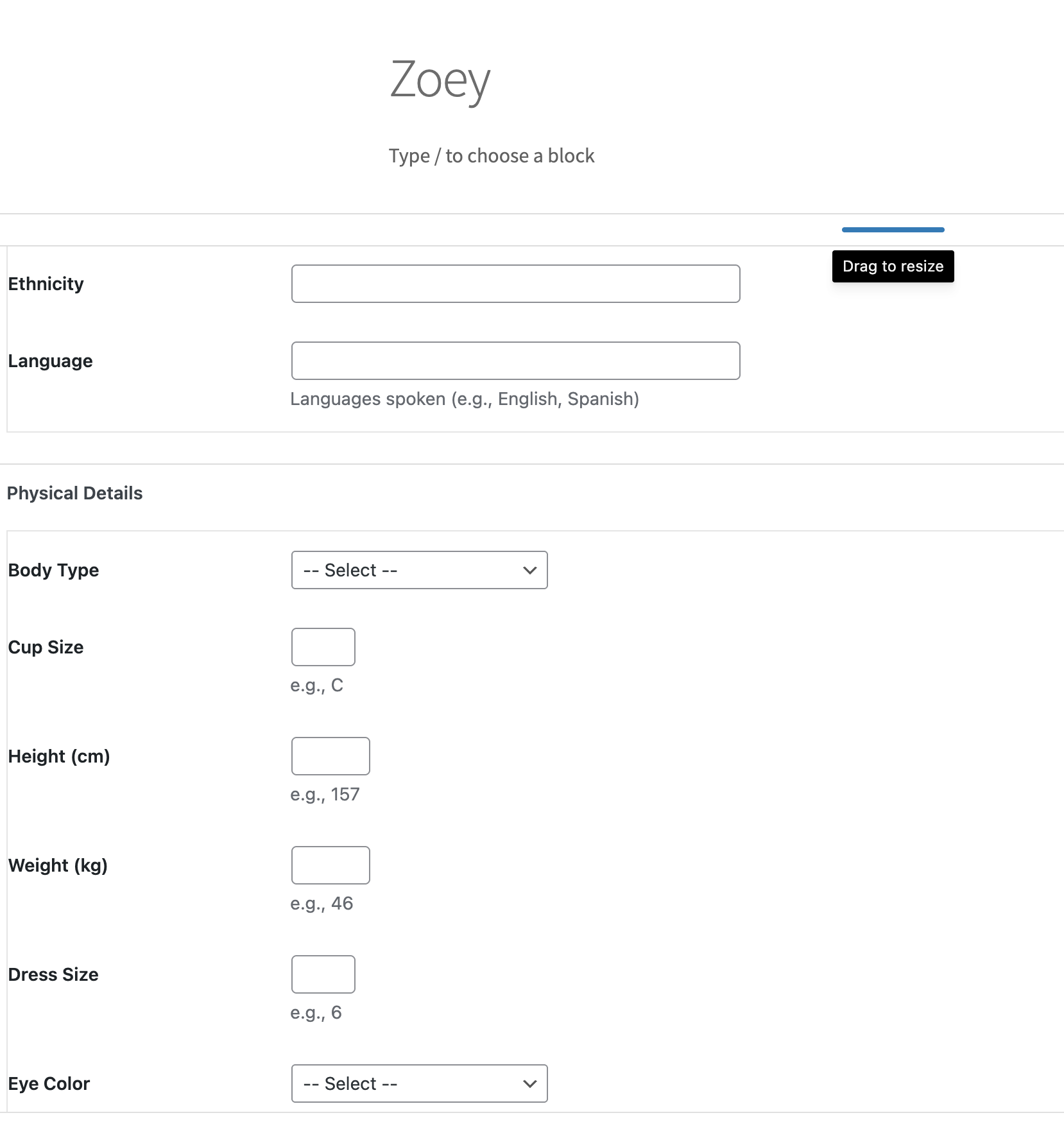
Provider edit page show many of the attributes you can modify
Changelog
1.2.0
- Removed venue functionality to simplify the plugin
- Fixed WordPress coding standards warnings
- Improved admin notices positioning
- Added Services taxonomy to admin menu
- Updated REST API documentation
- Fixed API endpoint issues with missing providers
- Enhanced admin UI with proper header positioning
- Removed unused API settings
- Improved error handling throughout
1.1.0
- Added template system with override capability
- Added hooks and filters for extensibility
- Added product-style image gallery for providers
- Improved roster display – removed status column for cleaner presentation
- Fixed duplicate roster display issue on provider pages
- Added template actions for gallery and roster placement
- Enhanced provider archive with flexible content positioning
1.0.0
- Initial release
- Provider management system
- Roster scheduling with DayPilot
- Daily roster shortcode
- Admin interface