

PVN Auth Popup
Wordpress custom authentication plugin. It Shows login, register and lost password form inn modal popup and process with ajax.
Maintenance 22/1003289d since update
Active installs
10
Downloads
1,471
Reviews
2
Age
9.0y
Plugin info
Total downloads: 1,471
Active installs: 10
Total reviews: 2
Average rating: 5
Support threads opened: 0
Support threads resolved: 0 (0%)
Available in: 1 language(s)
Contributors: 1
Last updated: 2/18/2017 (3289 days ago)
Added to WordPress: 2/18/2017 (9 years old)
Minimum WordPress version: 3.5
Tested up to WordPress version: 4.7.29
Minimum PHP version: f
Maintenance & Compatibility
Maintenance score
Possibly abandoned • Last updated 3289 days ago • 2 reviews
22/100
Is PVN Auth Popup abandoned?
Possibly abandoned (last update 3289 days ago).
Compatibility
Requires WordPress: 3.5
Tested up to: 4.7.29
Requires PHP: f
Similar & Alternatives
Explore plugins with similar tags, and compare key metrics like downloads, ratings, updates, support, and WP/PHP compatibility.
No similar plugins found yet.
Description
** wordpress login, register and lost password form in modal popup and process with ajax.**
Add Link to Menu:
- go through ‘appearance > menus’. make sure ‘CSS Classes’ option in ‘screen options’ (top right corner) is checked.
- add custom links in menu and put # in url field. and put desired class name in CSS Classes field. These class name should be configured in plugin’s admin page as a handler
- save menu and go to front end to test
Shortcode:
-
[pvnap_register] – show registration popup link.
Parameters:
text for link text
`class` for additional link class.
Example:
`[pvnap_register text=”Create an Account!” class=”smart_link”]` -
[pvnapp_login] – show login popup link.
Parameters:
text for link text
`class` for additional link class.
Example:
`[pvnapp_login text=”Create an Account!” class=”smart_link”]` -
[pvnapp] – show login & registration (both) popup link together.
Parameters:
login_text for text of login link
`login_class` for additional slasses of login link
register_text for text of register link
`register_class` for additional slasses of register link
Example:
`[pvnapp login_text=”Sign In” register_text=”Sign Up” login_class=”smart_link” register_class=”smart_link”]`
Features:
- Modal form with overlay or simple popup form.
- Shows a login or registration link for not logged in users that pops up on click.
- Provides shortcodes for use in posts and widgets
- If user logged in then login link will automatically converted to logout link and register link will be hide
- register link , forgot password link, remember me options can be managed (show/hide) from admin section
- Google recaptcha can be managed (show/hide) from admin section
- login registration popup liks can be managed by class name or id of link
- custom style can be set from admin section
Installation
No installation instructions available
Frequently Asked Questions
Installation Instructions
- Upload ‘pvn-auth-popup’ folder to the ‘/wp-content/plugins/’ directory.
- Activate the plugin through the ‘Plugins’ menu in WordPress.
- Go to post or page, then insert shortcode.
Review feed
krishjohnson
Fantastic Plugin
thanks for this great plugin. It saves my lot of time.
Screenshots
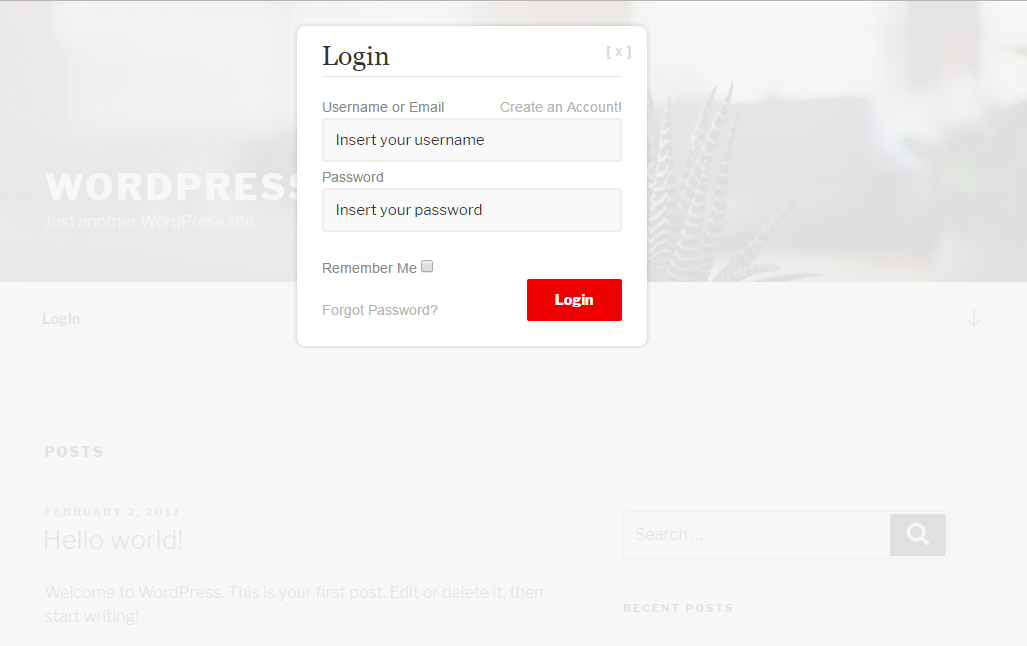
Login form.

Registration form.

Forgot password form.

All fields required.

Error form.

settings on WP Dashboard.

settings on WP Dashboard.
Changelog
1.0
- First release.