

Quick Location Maps
This Plugin insert a google map in to your posts using the Google Maps Api Free.
Plugin info
Maintenance & Compatibility
Maintenance score
Possibly abandoned • Last updated 4892 days ago
Is Quick Location Maps abandoned?
Possibly abandoned (last update 4892 days ago).
Compatibility
Similar & Alternatives
Explore plugins with similar tags, and compare key metrics like downloads, ratings, updates, support, and WP/PHP compatibility.
Description
This Plugin insert a location map in your posts/pages using the iFrame based Google Maps without any Api.
The user can set the exact coords (latutude or longitudes) or insert the location address. If you want to insert a map in a posts you must to generate two personalized fields (called ‘latitude’ and ‘longitude’) with the coordinates or a personalized field called ‘location’ with the address.
This is good for Real Estate type of Blog as shown in the pics and Custom filed type location. It is very lightweight tested in wordpress 3.3.2 version, custom template ready, Google API free.
Installation
- Upload
quick-location-mapsto the/wp-content/plugins/directory - Activate the plugin through the ‘Plugins’ menu in WordPress
- Place
<?php quickMap(); ?>in your templates or Short Code [QuickMap] - Add latitude, longitude and location in custom post template
Frequently Asked Questions
Who does generate the map?
The map image is generated using Static Google Maps API.
Review feed
Screenshots
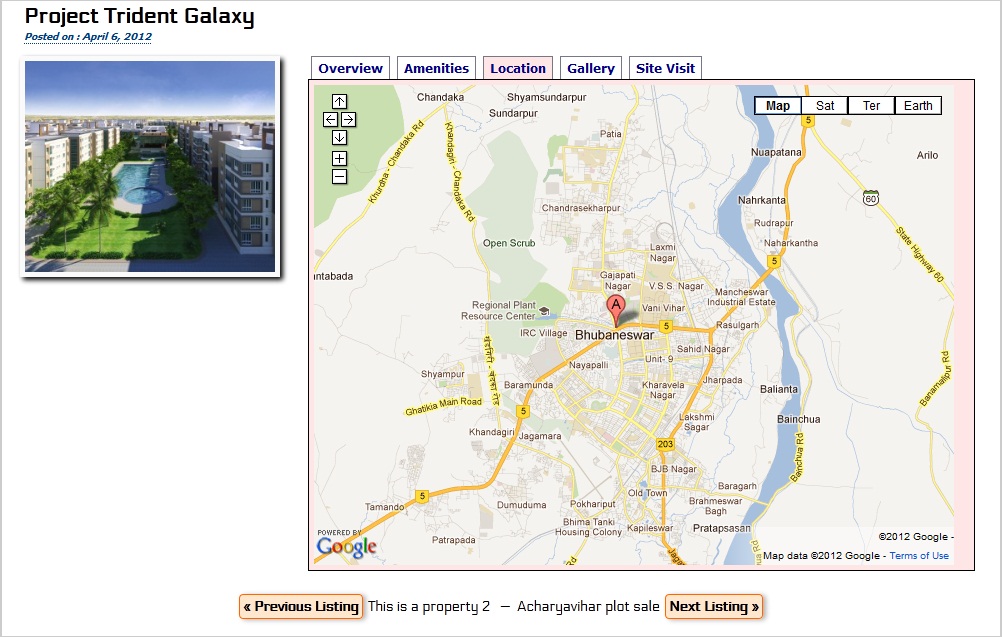
This is a demo output 'screenshot-1.jpg'

You can use custom filed maker plugins to use latitude, longitude and location 'screenshot-2.jpg'

You can do like this in each post 'screenshot-3.jpg'
Changelog
- Short code added