

QuickWebP – Compress / Optimize Images & Convert WebP | SEO Friendly
QuickWebP is a free WordPress plugin that converts images to WebP, optimizes performance, improves SEO, auto-fills metadata, and resizes images—no API …
Plugin info
Maintenance & Compatibility
Maintenance score
Stale • Last updated 199 days ago • Support resolved 0% • 16 reviews
Is QuickWebP – Compress / Optimize Images & Convert WebP | SEO Friendly abandoned?
Likely maintained (last update 199 days ago).
Compatibility
Developers
Languages
Similar & Alternatives
Explore plugins with similar tags, and compare key metrics like downloads, ratings, updates, support, and WP/PHP compatibility.
Description
QuickWebP is an image compression and optimization plugin for WordPress that automatically converts images to WebP when they are uploaded to the media library. It also optimizes the image to improve your site’s performance. The plugin also renames the image file to the WebP format and cleans up the file name for better SEO. Additionally, the plugin uses the cleaned up name to pre-populate the alt, caption, description, legend, and title metadata, making image management on your site easier. You can also set a maximum width and height for the image, which will automatically resize it if necessary. No API is required and the plugin is completely free, with no subscriptions or additional fees.
Important
QuickWebP is now include in WPMasterToolKit plugin. You can download it here : WPMasterToolKit
For use like QuickWebP, you can activate the module “Media encoder” in the settings of WPMasterToolKit.
Features
- Automatically converts images to WebP format when uploaded to the media library
- Optimizes images for improved site performance
- Renames image files to WebP format and cleans up file names for prevent special characters (ex : “Clé d’identification.jpg” becomes “cle-d-identification.webp”)
- Pre-populates image metadata (alt, caption, description, legend, and title)
- Allows for automatic image resizing based on maximum width and height (by default max 2000px)
- No API required for convertion and optimization
- Entirely free, with no subscriptions or additional fees.
- Directly paste image from clipboard or software like Photoshop (CTRL + V OR CMD + V) directly into the WP Media Frame.
- Select library for images to convert to webp (GD or Imagick).
- Bulk convert images to webp format and preserve original images (for old media on your website).
- Preview image optimization in settings for better optimization.
Demos
How to install QuickWebP
Paste an picture from clipboard to wp media easily
Other plugin by Webdeclic
Webdeclic is a French web agency based in Paris. We are specialized in the creation of websites and e-commerce sites. We are also the creator of the following plugins:
* WPMasterToolKit : A complete toolkit for your WordPress site.
* Mentions Legales Par Webdeclic
* Cookie Dough Compliance and Consent for GDPR
* QuickWebP – Compress / Optimize Images & Convert WebP | SEO Friendly
* Univeral Honey Pot
* Clean My WP
* Show all plugins on WordPress.org
Support us
⭐️ If you like this plugin, please give us a 5 star rating on WordPress.org. This will motivate us to develop new features and write other plugins. ⭐️
☕️ If you want buy me a coffee, you can do it here : Buy me a coffee ☕️
Installation
- Install the plugin through the WordPress plugins screen directly.
- Activate the plugin through the ‘Plugins’ screen in WordPress
- Go to Media / QuickWebP and configure the plugin
Frequently Asked Questions
The extension converts the uploader image to webp format and replaces it with the webp image.
The extension does not replace existing images. If you want this functionality you can contact us.
Yes, you can configure it in the Resize tab.
Yes, by default we set it to 75 but you can change that in the plugin settings.
No, we do not use an API to compress images. Everything is done locally on your server at the time of upload.
Yes, you can use this extension with a CDN or caching plugin such as WP Rocket, W3 Total Cache, WP Super Cache, etc.
Supported image formats are: JPG, PNG.
Yes, QuickWebP improves your site’s performance by converting images to WebP format. Your images will be lighter and faster to load.
QuickWebP makes SEO easy by automatically renaming image files to a clean, SEO-friendly filename when uploaded to media. It also uses this clean filename to pre-populate alt, caption, description, caption, and title metadata, which can help optimize image visibility on search engines. Additionally, by converting images to WebP format, QuickWebP can improve your site’s performance, which can also contribute to better SEO rankings.
Yes, QuickWebP works with other plugins. It is compatible with most caching plugins, such as WP Rocket, W3 Total Cache, WP Super Cache, etc. It is also compatible with most CDN plugins, such as Cloudflare, MaxCDN, etc.
Yes, QuickWebP works with all themes. It is compatible with most themes, including the most popular ones, such as Astra, OceanWP, GeneratePress, etc.
Yes, QuickWebP works with page builders. It is compatible with most page builders, including the most popular ones, such as Elementor, Beaver Builder, Divi, Visual composer(WPBakery), Oxygen Builder, Gutenberg, Thrive Architect, Brizy, Live Composer, etc.
Yes, it works with WooCommerce.
Yes, it works with SEO plugins. It is compatible with most SEO plugins, including the most popular ones, such as Yoast SEO, All in One SEO, Rank Math, SEOPress, etc.
You can copy the images from any software like Adobe Photoshop & Illustrator, GIMP, Canvas, Screenshot, Affinity Photo & Designer, a webpage, Finder, etc.
Review feed
Screenshots
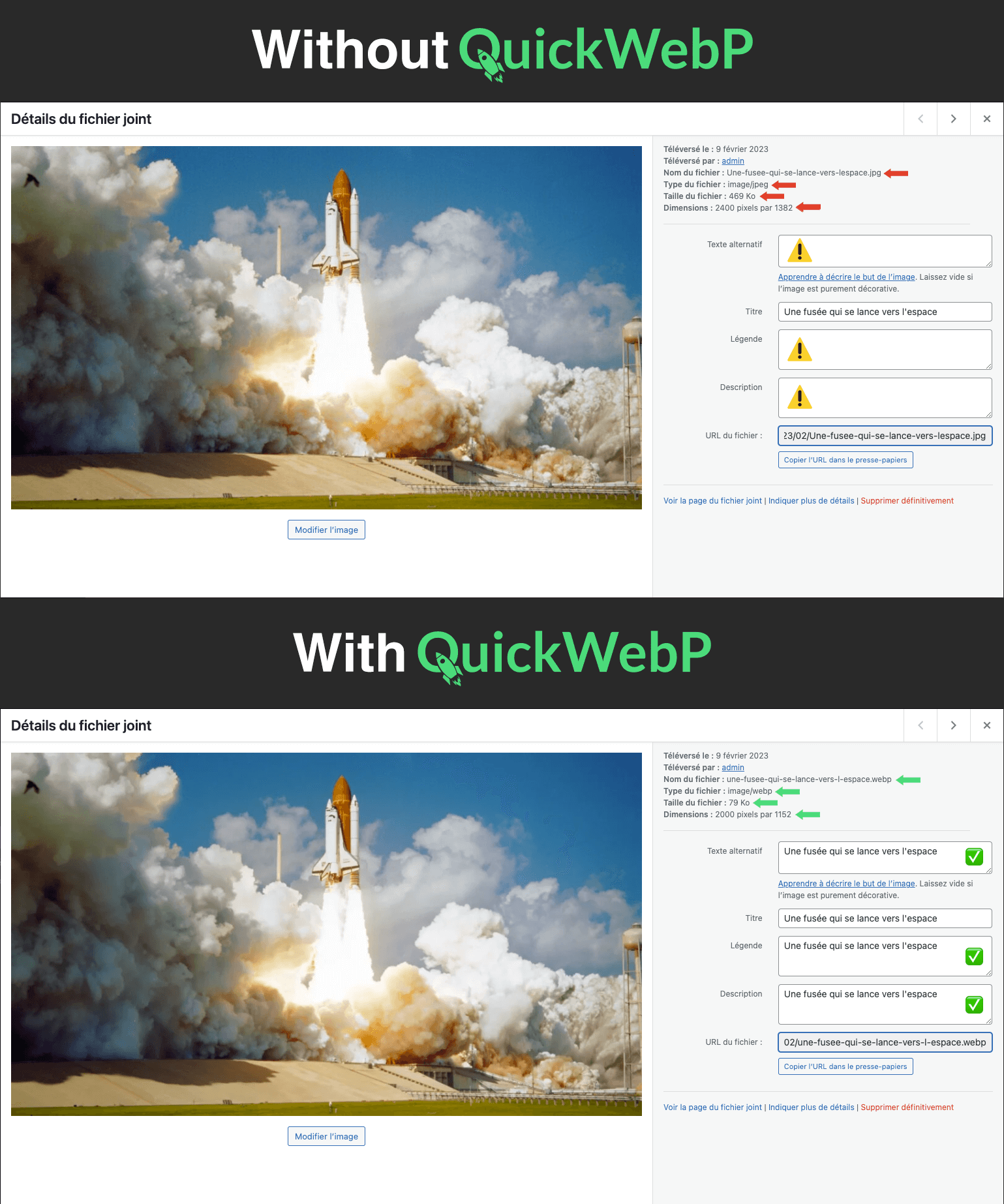
Screenshot without QuickWebP and with QuickWebP
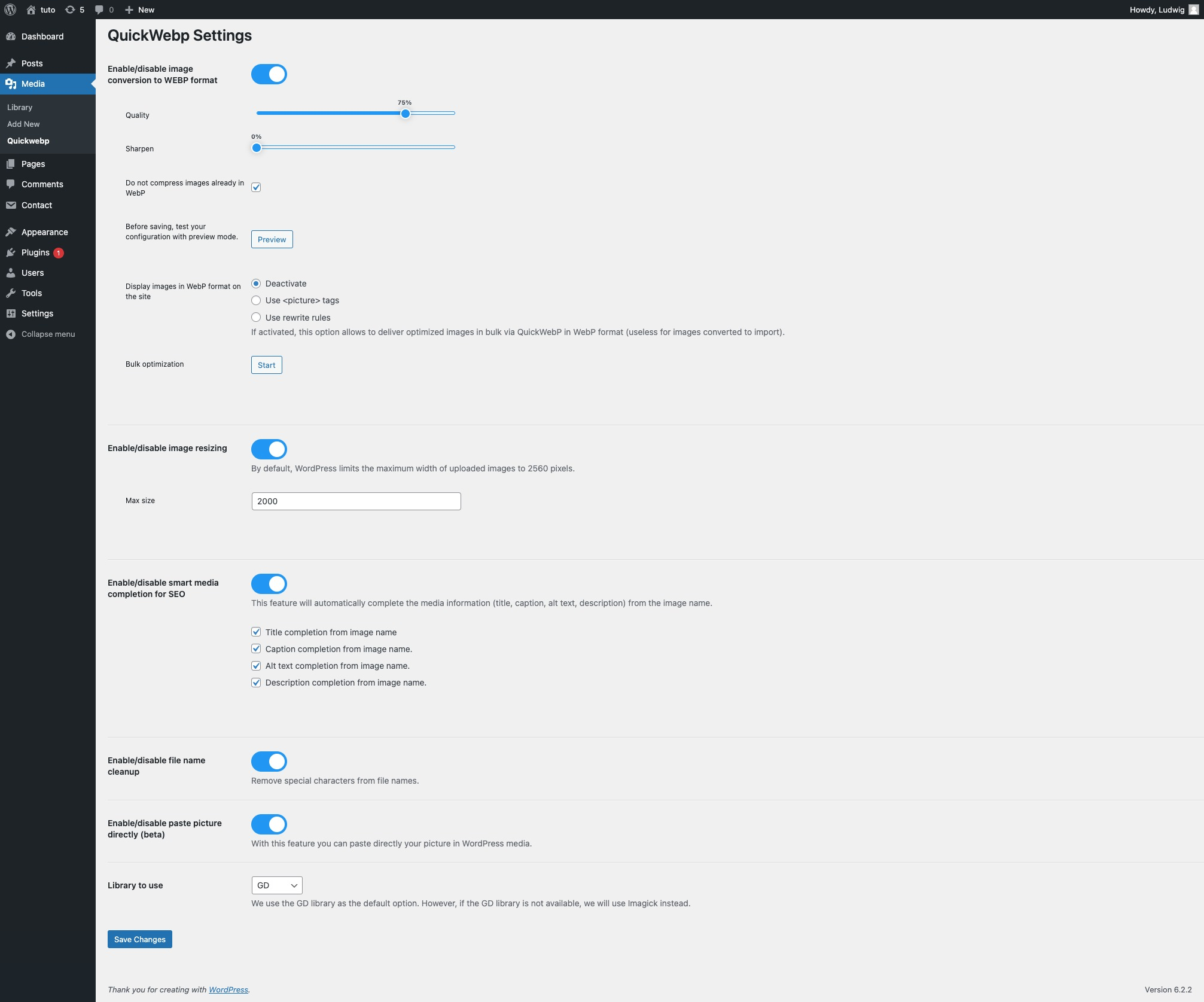
Settings page of QuickWebP
Changelog
3.2.6
- FIX: problem with lite speed cache plugin.
3.2.5
- FIX: problem with image weight after resize if “Do not compress images already in WebP” is enabled.
3.2.4
- FIX: problem with image weight after resize.
3.2.3
- FIX: problem with translation on WP 6.7.
- Add informations for migrate to WPMasterToolKit plugin.
3.2.2
- FIX: problem if an image file has a special character in the name.
3.2.1
- FIX: bug on bulk convertion.
3.2.0
- Add buymeacoffee link in settings page.
3.1.0
- Add new option on rewrite rules for webp images, for better compatibility with some website.
3.0.0
- Bulk convert images to webp format and preserve original images (for old media on your website).
- Copy paste image on Elementor supported.
- Preview feature in settings page.
2.1.0
- Add GD library, and assign by default.
- Select for switch between GD or Imagick library.
- Condition for convert only JPEG and PNG images (not GIF).
- Admin notices if error.
- Better compatibility with php extensions.
2.0.0
- Added new feature: paste image directly from clipboard (CTRL + V OR CMD + V) directly into the WP Media Frame.
- French translation added.
1.0.0
- First version.