

RaCar Clear Cart for WooCommerce
RaCar Clear Cart for WooCommerce allows you to add a customizable button to clear the shopping cart.
Plugin info
Maintenance & Compatibility
Maintenance score
Stale • Last updated 263 days ago • 5 reviews
Is RaCar Clear Cart for WooCommerce abandoned?
Likely maintained (last update 263 days ago).
Compatibility
Similar & Alternatives
Explore plugins with similar tags, and compare key metrics like downloads, ratings, updates, support, and WP/PHP compatibility.
Description
This plugin allows you to add a customizable button to clear the cart. The button appears on the WooCommerce’s cart page and when pressed, it asks for confirmation if the shopping cart should really be cleared. If the shopper clicks ok, it will remove all items from their WooCommerce shopping.
You may change the text for the questions. Also the position and colors of the button.
AFTER INSTALL
After installation and activation, on the plugins page, find RaCar Clear Cart for WooCommerce on the list and click ‘settings’ right under the title. It’ll take you to the plugin’s settings page. Another way of getting there is through the left admin menu. Find the RaCar Plugins handle and click it.
HOW TO USE IT
On settings page, choose your options such as colors and text and enable the plugin so the button will show.
The button itself is a ‘
RESET SETTINGS
So far, the only way to reset your settings is unistalling the plugin and installing it back on. Just deactivating and activating will NOT reset settings, only the unistalling will.
Languages
This plugin was written in English and has Brazilian Portuguese transalations. Este plugin está traduzido em Português do Brasil.
Screenshots Caption
Below, you’ll find the screenshots. Follow these captions:
1. Plugin Enabled
2. Confirmation
3. Cleared Cart
4. Plugin Options
5. Frontend With Option set
Installation
Minimum Requirements
- PHP version 5.6 or greater (PHP 7.2 or greater is recommended)
- MySQL version 5.6 or greater
Automatic installation
Automatic installation is the easiest option as WordPress handles the file transfers itself and you don’t need to leave your web browser. To do an automatic install of RaCar Clear Cart for WooCommerce, log in to your WordPress dashboard, navigate to the Plugins menu and click Add New.
In the search field type “RaCar Clear Cart for WooCommerce” and click Search Plugins. Once you’ve found our plugin you can view details about it such as the point release, rating and description. Most importantly of course, you can install it by simply clicking “Install Now”.
Manual installation
After you donwload it here (and only here), you can do it in 2 ways:
- WordPress Admin Dashboard
- On the left menu, click Plugins / Add New.
- Upload the file
racar-clear-cart-for-woocommerce.zip. - Activate it.
- Go to settings page.
- Enable it.
- FTP
- Unzip the file
racar-clear-cart-for-woocommerce.zip. - Upload the unziped folder
racar-clear-cart-for-woocommerceto the/wp-content/plugins/directory. - Activate the plugin through the ‘Plugins’ menu in WordPress
Updating
Automatic updates should work like a charm; as always though, ensure you backup your site just in case.
Frequently Asked Questions
There is not one yet. As the plugin is so easy to use, the screenshots above should suffice to get you on the right track.
Try and strip other CSS from the button. The button itself is a ‘<button type=”submit”>’ HTML tag, has the ‘class=”button”‘ and ‘id=”clear-cart”‘.
If you get stuck, you can ask for help in the Plugin Forum.
Rafa Carvalhido is a Brazilian WordPress Specialist Developer.
Profissional WordPress
Donate
Hire him at Workana
Review feed
Screenshots
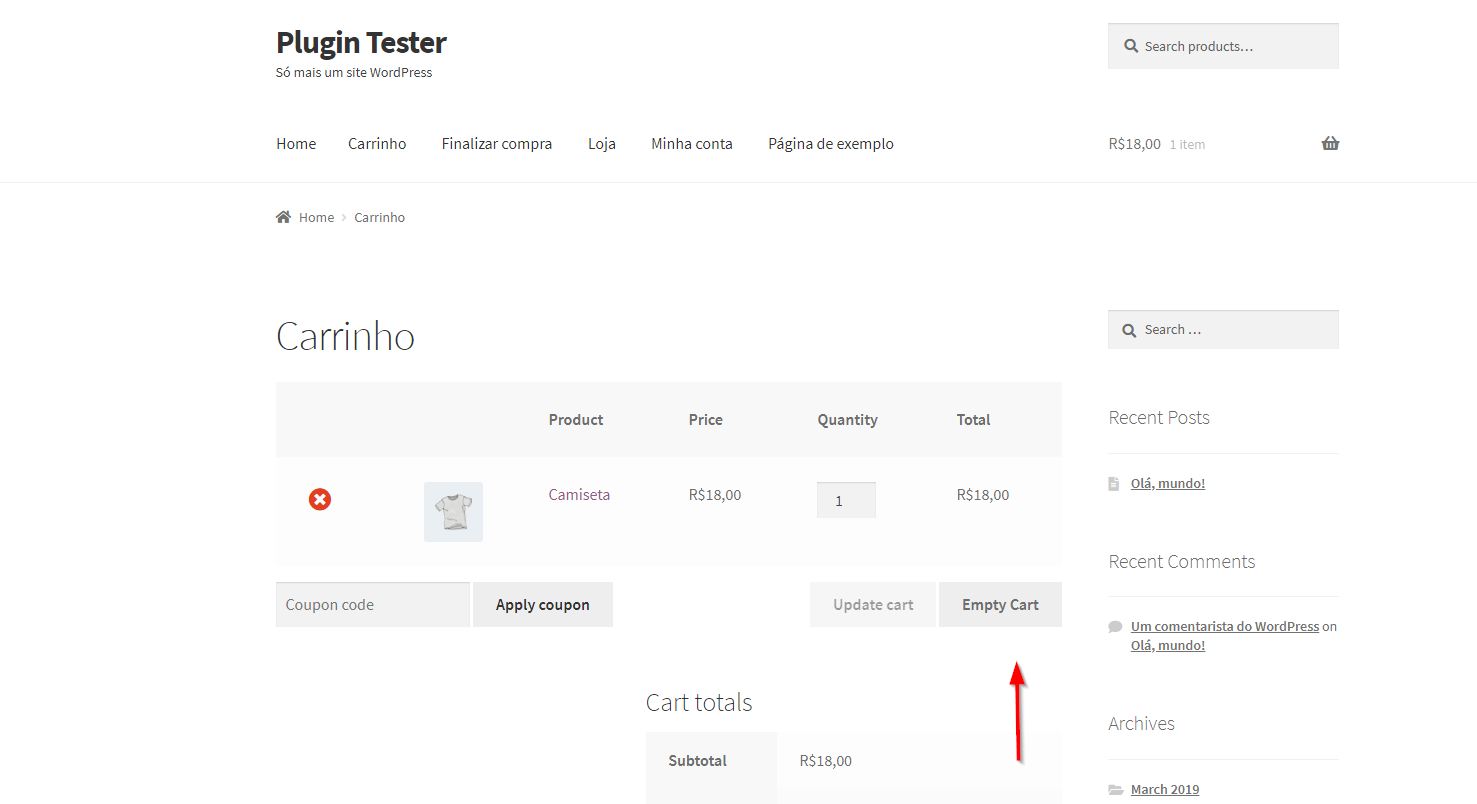
Plugin Enabled
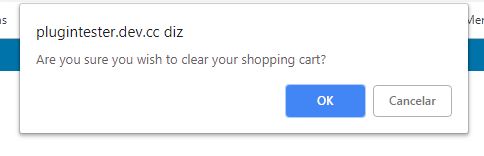
Confirmation
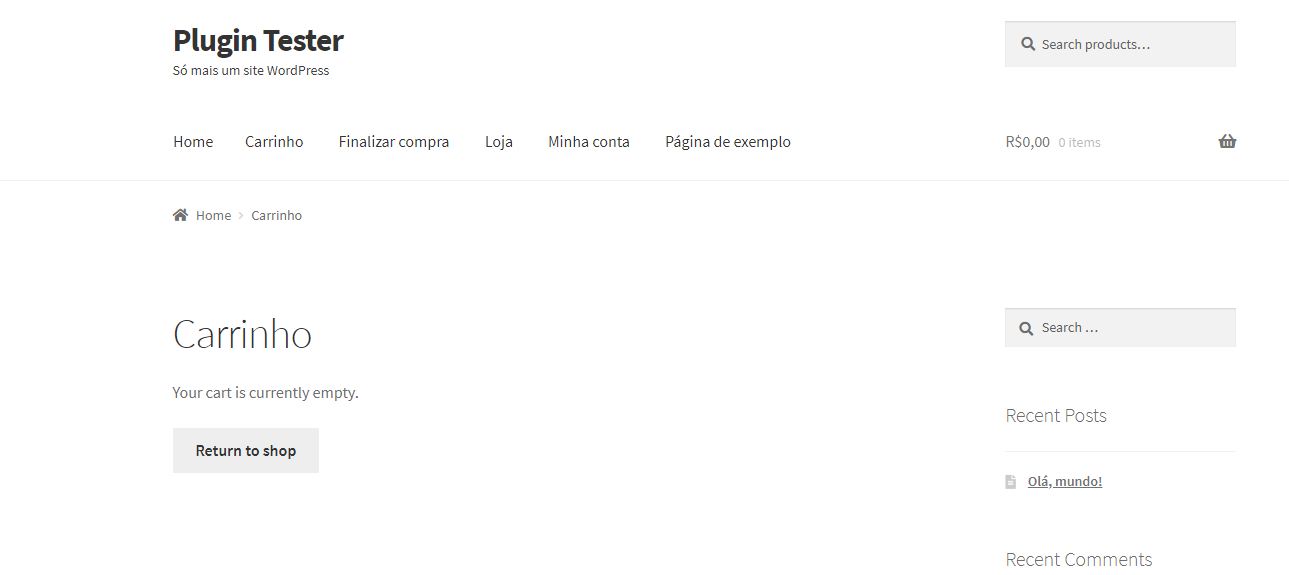
Cleared Cart
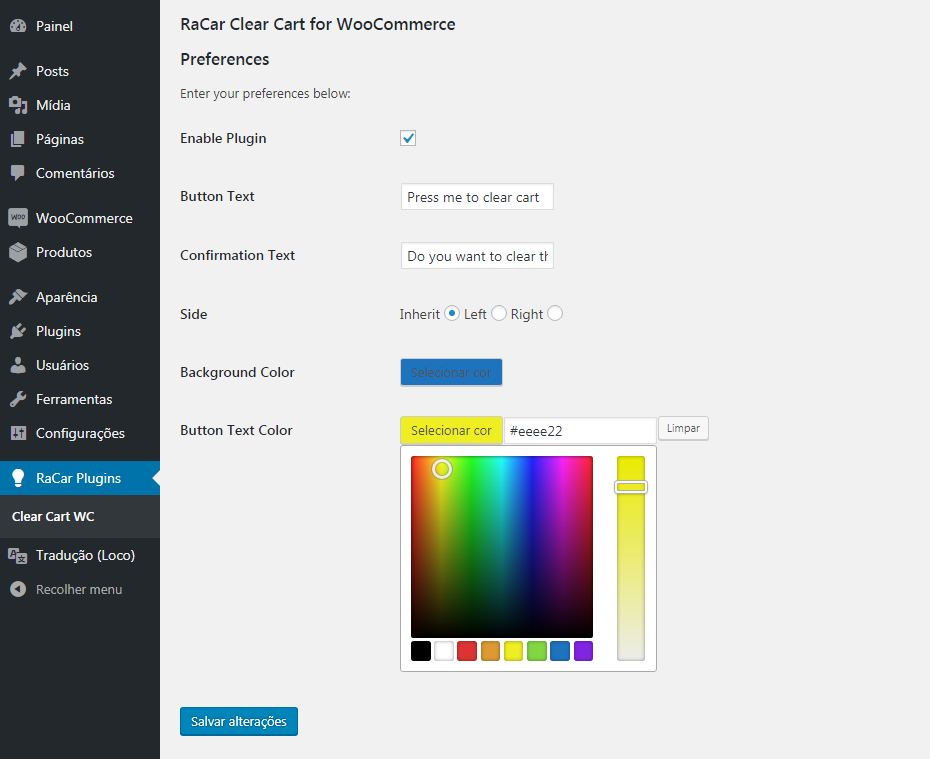
Plugin Options
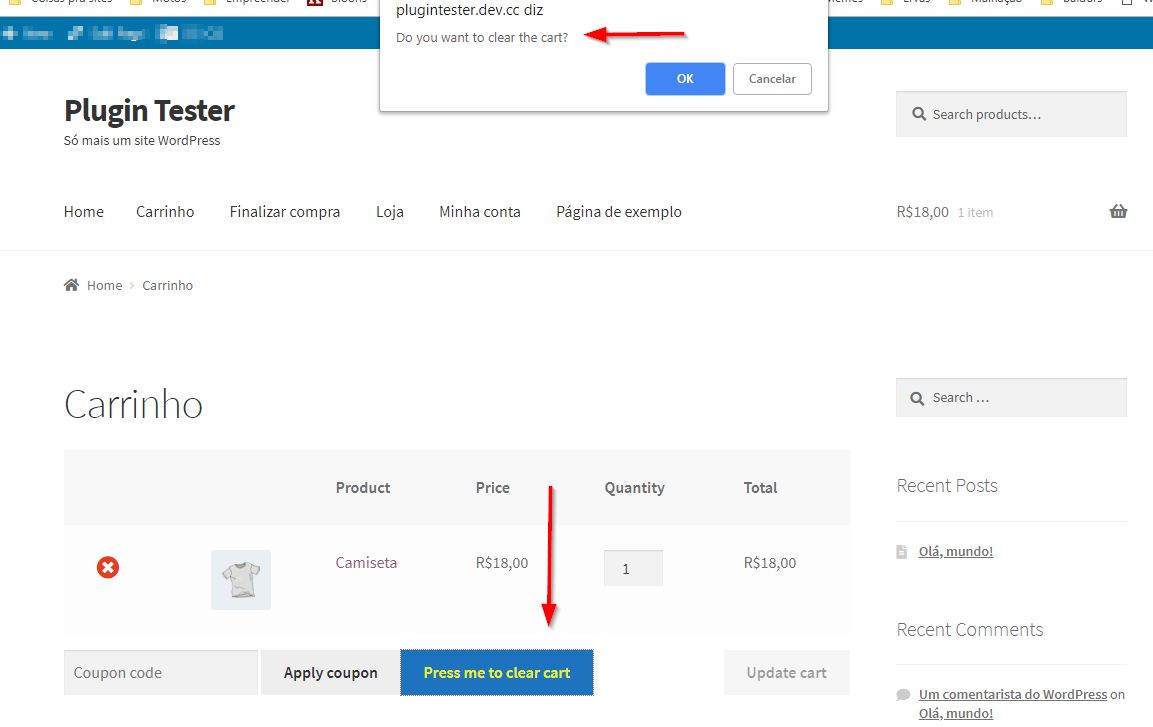
Frontend With Option set
Changelog
2.1.6 – 2025-07-13
- Update – Changed readme.txt as per WordPress.org rules
- Update – Changed the name of 2 functions adding the prefix rccwoo_
- Update – Removed load_text_domain function
- Update – Activated compatibility with Woo’s High-Performance Order Storage (HPOS)
- Fix – Escaped some echoed terms on Admin Options
- Fix – Added a nonce to the button action
- Fix – Removed closing tags in 2 files
2.1.5 – 2025-07-09
- Update – Tested on latest and greatest -> WP 6.8.1 and WC 9.9.5
- Update – Update of internationalization files
- Update – Update of translations (pt-BR and es-ES)
- Update – Update of author URL
- Fix – Fixed minor error when options have not been chosen yet
2.1.4 – 2025-04-13
- Update – Tested on latest and greatest -> WP 6.7.2 and WC 9.8.1
2.1.3 – 2024-05-17
- Update – Tested on latest and greatest -> WP 6.5.3 and WC 8.8.3
- Update – Added plugin dependency as per WP Core 6.5 API
2.1.2 – 2023-09-23
- Update – Tested on latest and greatest -> WP 6.3.1 and WC 8.1.1
2.1.0 – 2023-03-31
- Enhancement – Added redirection option as per @trondandre1962’s request.
2.0.3 – 2023-03-31
- Fix – Fixed inputs in wp-admin buged in some systems.
2.0.2 – 2023-03-30
- Fix – Fixed inputs in wp-admin because of the escapes.
2.0.1 – 2023-03-27
- Update – Changed the images to be WordPress.org compliant.
- Update – Escaped the echos.
- Fix – Fixed a bug that threw an error when admin page was not configured by user.
2.0.0 – 2023-03-27
- Update – Removal of Freemius platform.
- Update – Changed a few wordings on admin page.
- Fix – Fixed a bug that threw an error when admin page was not configured by user.
1.2.4 – 2022-06-30
- Update – Changed readme.txt to be WordPress.org compliant.
- Update – Changed plugin textdomain to be WordPress.org compliant.
1.2.3 – 2022-06-30
- Update – Changed Freemius version to be WordPress.org compliant.
1.2.2 – 2022-06-23
- Update – Tested on latest and greatest -> WP 6.0 and WC 6.6.1
1.2.1 – 2021-03-08
- Update – Tested on latest and greatest -> WP 5.7.0 and WC 5.0.0
- Update – Translations to pt_BR and es_ES were updated
- Enhancement – Added links for support and rating on plugin’s settings.
- Tweak – Positioned the radio buttons vertically in the plugin’s settings for better reading.
- Fix – Button did not take hover colors set on wp-admin.
1.1.4 – 2020-08-10
- Update – Tested on latest and greatest -> WP 5.5.1 and WC 4.5.2
1.1.3 – 2019-12-11
- Update – Tested on latest and greatest -> WP 5.3.0 and WC 3.8.1
1.1.2 – 2019-09-02
- Update – Tested on latest and greatest -> WP 5.2.2 and WC 3.7.0
1.1.1 – 2019-07-09
- Dev – Added Fremius code for better tracking
- Update – Tested on latest and greatest -> WP 5.2.2 and WC 3.6.5
1.1.0 – 2019-05-26
- Dev – Code organizing
- Enhancement – changed the way this plugin depends on Woo with better coding
- Update – Translations to pt_BR and es_ES were updated
- Update – Tested on latest and greatest -> WP 5.2.1 and WC 3.6.3
1.0.1 – 2019-04-21
- Dev – Added option for the text color on mouse hover
- Tweak – Removed the admin option to turn the plugin on and off (which was the same as disabling/enabling the plugin)
- Enhancement – Added “requires at least” and “tested up to” for both WordPress and WooCommerce
- Enhancement – Added donation link to plugins action links
- Enhancement – Added Spanish es_ES transalations
- Update – Translation to Portuguese pt_BR was updated
- Update – Tested on latest and greatest -> WP 5.1.1 and WC 3.6.1
1.0.0 – 2019-03-25
- Dev – Added new options to better css control
- Enhancement – Changed the options page to be more intuitive
- Enhancement – Removed unecessary resources from load, making it even faster
- Enhancement – Improved the readme.txt to be more well documented
- Tweak – Altered main button HTML tag from input to button to match other buttons in WooCommerce
- Update – translation pt_BR
0.9 – 2019-03-14
- Release version