

Radiojar Audio Player
Audio player plugin for Radiojar platform , just by dragging the widget or added shortcode [rj-player].
Plugin info
Maintenance & Compatibility
Maintenance score
Possibly abandoned • Last updated 2122 days ago • 1 reviews
Is Radiojar Audio Player abandoned?
Possibly abandoned (last update 2122 days ago).
Compatibility
Similar & Alternatives
Explore plugins with similar tags, and compare key metrics like downloads, ratings, updates, support, and WP/PHP compatibility.
Description
Important Note:
This plugin is only functional for stations operating under Radiojar.
It’s the simplest way to add your Radiojar station’s player to your WordPress site using widget or shortcode [rj-player].
Fill in your station’s stream name, select the player of your preference and have the player into your site or post easily.
An advanced selection for Ajaxify is also provided, for uninterrupted playback during the user’s navigation in the site.
For details on Ajaxify, kindly refer to Ajaxify WordPress Site(AWS).
Radiojar Audio Player in 3 steps:
1: Install Radiojar Audio Player plug-in.
2: Fill in the stream name.
3: Just drag the widget or added to any post/page using shortcode [rj-player].
Installation
- Upload
radiojar-audio-playerfolder to the/wp-content/plugins/directory. - Activate the plugin through the ‘Plugins’ menu in WordPress.
- Configure the plugin by going to the Radiojar player menu that appears in your admin menu.
- Add the player to any post/page using shortcode [rj-player] or drag the widget.
Frequently Asked Questions
Can i use multiple player (for multiple streams) in different pages on my website?
Definitely! Please use the shortcode
[rj-player streamname='uf6x8w5f81ac' autoplay='true' player='3' defaultimage='http://www.radiojar.com/img/sample_images/Radio_Stations_Avatar_BLUE.png']
- streamname : the station’s stream name, as depicted in the station’s administration panel
- autoplay : set this to
'true' or 'false' - player : choose between
'1', '2' or '3'for the player that best matches your needs. - defaultimage : choose the image depicted in the player -only available for player style #3-.
(excluded options load default values)
For any support inquiries, please contact us at : Help & Support Centre
Review feed
Screenshots
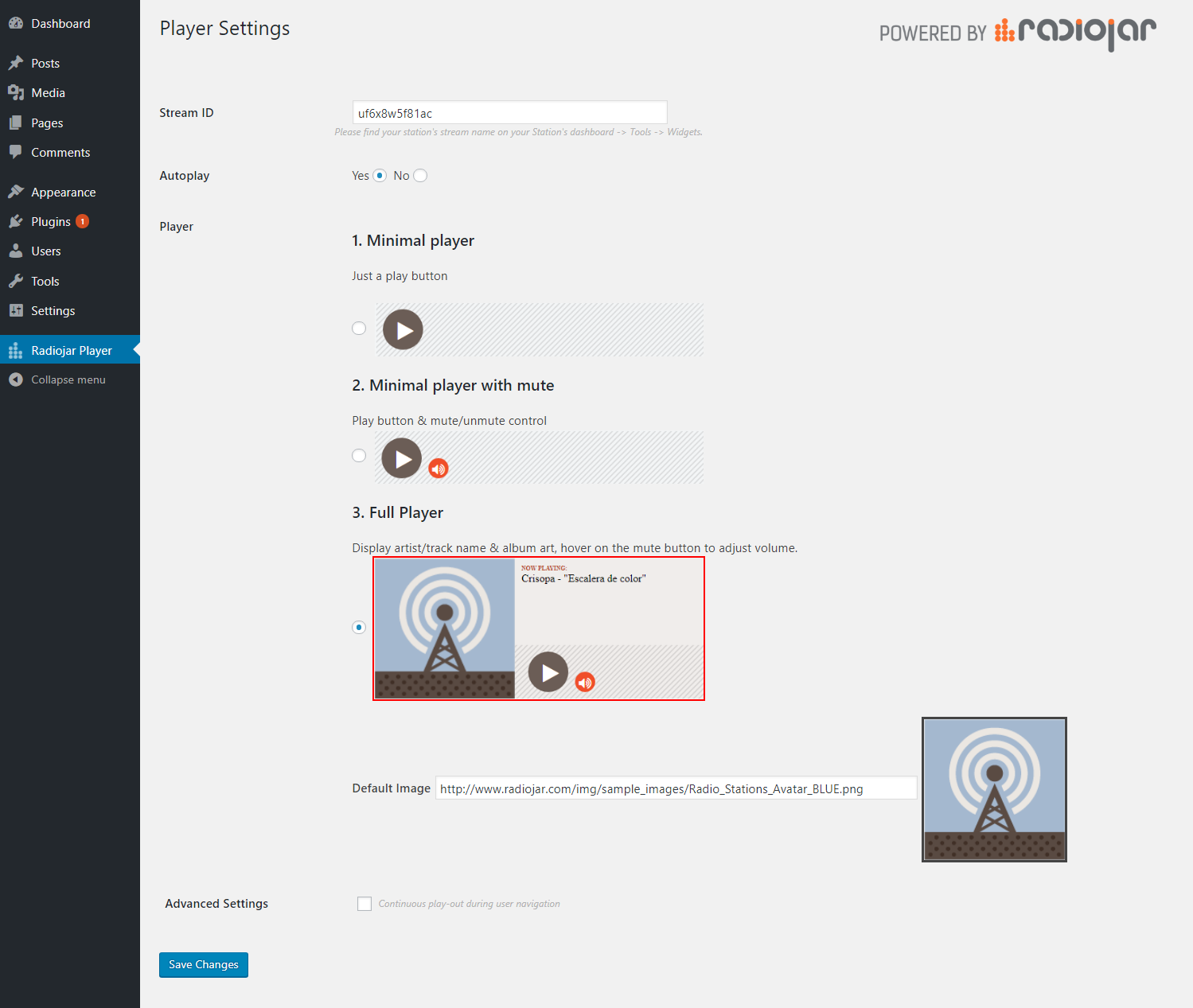
Settings Preview

Widget View

Player Editor
Changelog
1.4
- add rj-chat shortcode
1.3.1
- add v2 radiojar player API widget script
1.3
- add shortcode with attributes for more than one implementations
1.2
- add player editor.
1.1
- add widget.
1.0
- First Stable release 13/11/2017.
0.1.0
- First release by Radiojar.