

Random image light box
Random image light box plugin allows you to show one random image with on click light box effect in the website.
Plugin info
Maintenance & Compatibility
Maintenance score
Possibly abandoned • Last updated 1174 days ago
Is Random image light box abandoned?
Possibly abandoned (last update 1174 days ago).
Compatibility
Similar & Alternatives
Explore plugins with similar tags, and compare key metrics like downloads, ratings, updates, support, and WP/PHP compatibility.
Description
Random image light box plugin allows you to show one random image with on click light box effect in the website. We can upload your images via plugin admin, alternatively we can use the image folder path in the short code to display the image.
Check official website for live demo http://www.gopiplus.com/work/2020/10/11/wordpress-plugin-random-image-light-box/
- Live Demo : Live Demo
- More Information : More Information
- Plugin : Plugin URI
Plugin features
-
Simple and easy installation.
-
Display one image on random order.
-
Light box effect on mouse click.
How to configure
-
Install and activate the Random image light box plugin.
-
During activation it create 2 default records in the plugin admin.
-
Go to Settings >> Random image >> Add New in your WordPress admin to add and update the details.
-
To add the Random image light box plugin in the page or post, copy the below given plugin short and use it in your post.
-
If you want to add in the widget, you can drag and drop the Random image light box widget in to your sidebar.
Installation
Install Plugin using WordPress Plugin Search
Go to your WordPress admin area and click on Plugins >> Add New. Search Random image light box plugin using search option. Find the plugin and click Install Now link. Finally click activate plugin link to activate the plugin.
Install Plugin using the WordPress Admin Plugin Upload
Download the plugin random-image-light-box.zip from download location. Go to Plugins >> Add New in your WordPress admin. Select upload plugin button. Upload the available random-image-light-box.zip file and click Install Now. Finally click activate plugin link to activate the plugin.
Frequently Asked Questions
In the plugin admin dashboard, we have option to upload the images, in the same page we have option to set the thumbnail size. also we have option to add folder path, with this option we can load the images directly from the server folder.
We have option to enter thumbnail width when we upload the images in the admin. if we use folder path to load the image, in the short code itself we have option to set thumbnail width.
In the admin we have display option, set value to NO if you don?t what to show images.
Yes, this plugin using wordpress default jQuery script and light box JavaScript.
In admin image upload page we have option to enter title for each image and this is optional field in the form. Automatically this title will be displayed in the light box description.
If you want to add this plugin in the widget, you can drag and drop the Random image light box widget in to your sidebar. in the widget option we have option to set Group/Folder path to load the images.
Review feed
Screenshots

Front Screen 1. http://www.gopiplus.com/work/2020/10/11/wordpress-plugin-random-image-light-box/

Front Screen 2. http://www.gopiplus.com/work/2020/10/11/wordpress-plugin-random-image-light-box/

Admin Screen 1. http://www.gopiplus.com/work/2020/10/11/wordpress-plugin-random-image-light-box/
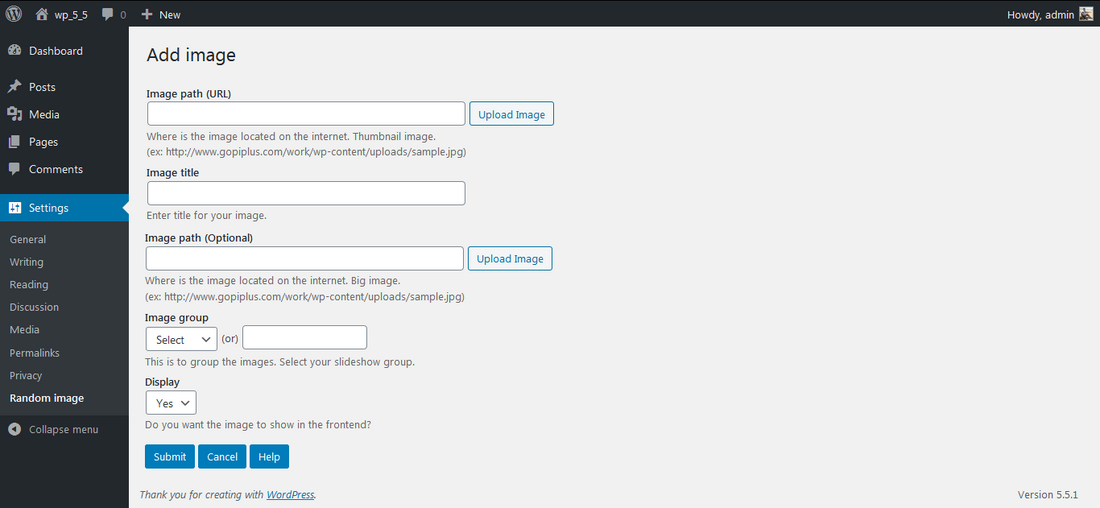
Admin Screen 2. http://www.gopiplus.com/work/2020/10/11/wordpress-plugin-random-image-light-box/
Changelog
1.0
- First version
1.1
- Tested upto 5.7
1.2
- Tested upto 5.8
- Use plugin short code in the widget.
1.3
- Tested upto 5.9