

Ravelry Projects Widget
Show your recent Ravelry projects with picture and description in a widget.
Plugin info
Maintenance & Compatibility
Maintenance score
Possibly abandoned • Last updated 2607 days ago • 2 reviews
Is Ravelry Projects Widget abandoned?
Possibly abandoned (last update 2607 days ago).
Compatibility
Similar & Alternatives
Explore plugins with similar tags, and compare key metrics like downloads, ratings, updates, support, and WP/PHP compatibility.
Description
Ravelry Projects Widget outputs your most recent crochet and knitting projects from Ravelry in a widget. A picture of each project, description, date and a link to your project on Ravelry are shown.
Widget settings
- Number of projects to show
- Only show finished projects
- Show project notes
- Show a link to your Ravelry profile
You don’t need an Ravelry API key to use this plugin just your username.
Languages
Ravelry Projects Widget are also translated to the following languages:
- Swedish (Svenska)
Ravelry
Ravelry is a large community for knitters and crocheters worldwide. Note that this plugin is not an official Ravelry plugin and hence not supported by them.
Icon design
Yarn designed by Marie Coons from The Noun Project.
Installation
- Upload the
ravelry-projects-widgetfolder to your/wp-content/plugins/directory - Activate the plugin through the ‘Plugins’ menu in WordPress
- Add the widget to your sidebar through the ‘Appearance’ -> ‘Widgets’ menu in WordPress by dragging the widget to a sidebar or other widget-enabled area.
- Type your username for Ravelry in the widget settings.
Frequently Asked Questions
Do I need an Ravelry API key?
No, just your username.
Review feed
Screenshots
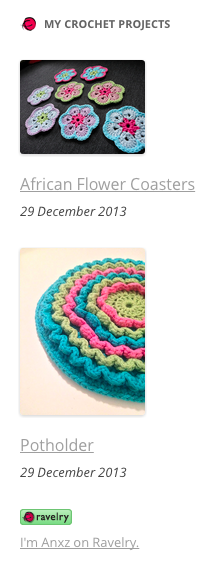
Widget placed in your sidebar.

Settings for the widget.
Changelog
1.1
- Added: Option for showing project notes
- Added: Link to Ravelry profile opens in a new window
- Changed: Project image placement to be above project heading and date
- Changed: Minor CSS fixes and improvements
1.0
- First release of this plugin.