

Reading Time Block
Adds a Gutenberg block to display the estimated reading time of the current post. Reading speed is customizable from the Settings → Reading screen.
Plugin info
Maintenance & Compatibility
Maintenance score
Stale • Last updated 306 days ago • 1 reviews
Is Reading Time Block abandoned?
Likely maintained (last update 306 days ago).
Compatibility
Similar & Alternatives
Explore plugins with similar tags, and compare key metrics like downloads, ratings, updates, support, and WP/PHP compatibility.
Description
The Reading Time Block plugin calculates and displays an estimated reading time based on the post content.
It uses a configurable reading speed (default: 200 words per minute) and outputs a clean, server-rendered block to the frontend.
This is ideal for blogs, documentation, or any content where you want to set expectations about how long it will take a visitor to read the page.
Features
- Adds a block to the Gutenberg editor for reading time.
- Automatically calculates based on post content.
- Supports customizable reading speed (WPM) via Settings Reading.
- Lightweight and fast—no JS build step required.
- Fully translatable and namespace-isolated.
License
This plugin is licensed under the GNU General Public License v2.0 or later.
See https://www.gnu.org/licenses/gpl-2.0.html for full license text.
Installation
- Upload the plugin files to the
/wp-content/plugins/reading-time-block/directory, or install the plugin through the WordPress plugin screen directly. - Activate the plugin through the “Plugins” screen in WordPress.
- Open a post in the block editor and insert the Reading Time block from the Widgets category.
- Adjust the reading speed (optional) by visiting Settings Reading.
Frequently Asked Questions
The plugin counts the number of words in the post content and divides by the configured reading speed in words per minute (WPM). It then rounds up to the nearest minute if necessary.
Yes. You can adjust the reading speed via a numeric input or preset values in Settings Reading.
No, the block is written in plain JavaScript and PHP, so there’s no build step or asset compilation required.
Review feed
Screenshots

The block as it appears in the editor.

The estimated reading time on the frontend.
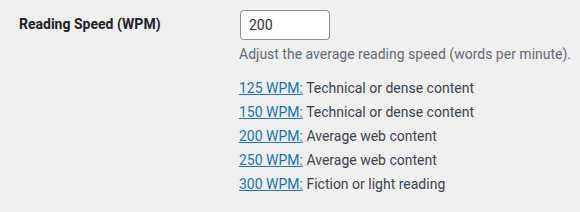
The WPM setting in Settings → Reading.
Changelog
1.2.2
- Moved javascript to separate file, enqueued file
- Removed load_plugin_textdomain function call
1.2.1
- Added shortcode [reading_time].
1.2.0
- Added language support.
1.1.0
- Added settings under Settings Reading for customizing WPM.
- Refactored render logic into a dedicated class.
- Improved block code structure.
1.0
- Initial release.
- Added a Gutenberg block to display estimated reading time.