

Really Simple CAPTCHA
Really Simple CAPTCHA is a CAPTCHA module intended to be called from other plugins. It is originally created for my Contact Form 7 plugin.
Plugin info
Maintenance & Compatibility
Maintenance score
Possibly abandoned • Last updated 425 days ago • 128 reviews
Is Really Simple CAPTCHA abandoned?
Possibly abandoned (last update 425 days ago).
Compatibility
Languages
Similar & Alternatives
Explore plugins with similar tags, and compare key metrics like downloads, ratings, updates, support, and WP/PHP compatibility.
Description
Really Simple CAPTCHA does not work alone and is intended to work with other plugins. It is originally created for Contact Form 7, however, you can use it with your own plugin.
Note: This product is “really simple” as its name suggests, i.e., it is not strongly secure. If you need perfect security, you should try other solutions.
How does it work?
Really Simple CAPTCHA does not use PHP “Sessions” for storing states, unlike many other PHP CAPTCHA solutions, but stores them as temporary files. This allows you to embed it into WordPress without worrying about conflicts.
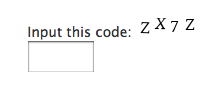
When you generate a CAPTCHA, Really Simple CAPTCHA creates two files for it; one is an image file of CAPTCHA, and the other is a text file which stores the correct answer to the CAPTCHA.
The two files have the same (random) prefix in their file names, for example, “a7hk3ux8p.png” and “a7hk3ux8p.txt.” In this case, for example, when the respondent answers “K5GF” as an answer to the “a7hk3ux8p.png” image, then Really Simple CAPTCHA calculates hash of “K5GF” and tests it against the hash stored in the “a7hk3ux8p.txt” file. If the two match, the answer is confirmed as correct.
How to use with your plugin
Note: Below are instructions for plugin developers.
First, create an instance of ReallySimpleCaptcha class:
$captcha_instance = new ReallySimpleCaptcha();
You can change the instance variables as you wish.
// Change the background color of CAPTCHA image to black
$captcha_instance->bg = array( 0, 0, 0 );
See really-simple-captcha.php if you are interested in other variables.
Generate a random word for CAPTCHA.
$word = $captcha_instance->generate_random_word();
Generate an image file and a corresponding text file in the temporary directory.
$prefix = wp_rand();
$captcha_instance->generate_image( $prefix, $word );
Then, show the image and get an answer from respondent.
Check the correctness of the answer.
$correct = $captcha_instance->check( $prefix, $the_answer_from_respondent );
If the $correct is true, go ahead. Otherwise, block the respondent — as it would appear not to be human.
And last, remove the temporary image and text files, as they are no longer in use.
$captcha_instance->remove( $prefix );
That’s all.
If you wish to see a live sample of this, you can try Contact Form 7.
Installation
In most cases you can install automatically from WordPress.
However, if you install this manually, follow these steps:
- Upload the entire
really-simple-captchafolder to the/wp-content/plugins/directory. - Activate the plugin through the ‘Plugins’ menu in WordPress.
FYI: There is no “control panel” for this plugin.
Frequently Asked Questions
Really Simple CAPTCHA needs GD and FreeType library installed on your server. Ask your server administrator if they are installed.
Also, make the temporary file folder writable. The location of the temporary file folder is managed by the instance variable tmp_dir of ReallySimpleCaptcha class. Note that the setting varies depending on the calling plugin. For example, Contact Form 7 uses wp-contents/uploads/wpcf7_captcha as the temporary folder basically, but it can use different folder depending on your settings.
If you have any further questions, please submit them to the support forum.
Review feed
Great work - easy to implement
Screenshots
screenshot-1.png
Changelog
2.4
- Bumps up the minimum required WordPress version to 6.6.
- Introduces the ReallySimpleCaptcha_Filesystem trait.
- Uses SHA-256 as the hash algorithm.
- Uses
wp_rand()instead ofmt_rand().