

reCAPTCHA Jetpack
A simple plugin that adds a Google reCAPTCHA to the Jetpack contact form. Requires the Jetpack plugin.
Plugin info
Maintenance & Compatibility
Maintenance score
Possibly abandoned • Last updated 3054 days ago • 8 reviews
Is reCAPTCHA Jetpack abandoned?
Possibly abandoned (last update 3054 days ago).
Compatibility
Similar & Alternatives
Explore plugins with similar tags, and compare key metrics like downloads, ratings, updates, support, and WP/PHP compatibility.
Description
Jetpack makes it easy to add contact forms to your WordPress site, but you may want a simple way to add a Google reCAPTCHA to prevent spam. This plugin will manipulate the Jetpack [contact-form] shortcode to prepend the Google script, add a button, and parse the response.
This plugin allows both reCAPTCHA v2 and invisible reCAPTCHA (see screenshots and choose whatever works for you!).
Shoot me a question about it on Twitter: @bozdoz.
This plugin is open source on GitHub!
Installation
- Install from the WordPress plugin install page in the admin.
OR
- Choose to add a new plugin, then click upload
- Upload the recaptcha-jetpack zip
- Activate the plugin through the ‘Plugins’ menu in WordPress
Frequently Asked Questions
None yet! Shoot me a question about it on Twitter: @bozdoz.
Installation Instructions
- Install from the WordPress plugin install page in the admin.
OR
- Choose to add a new plugin, then click upload
- Upload the recaptcha-jetpack zip
- Activate the plugin through the ‘Plugins’ menu in WordPress
Review feed
Screenshots
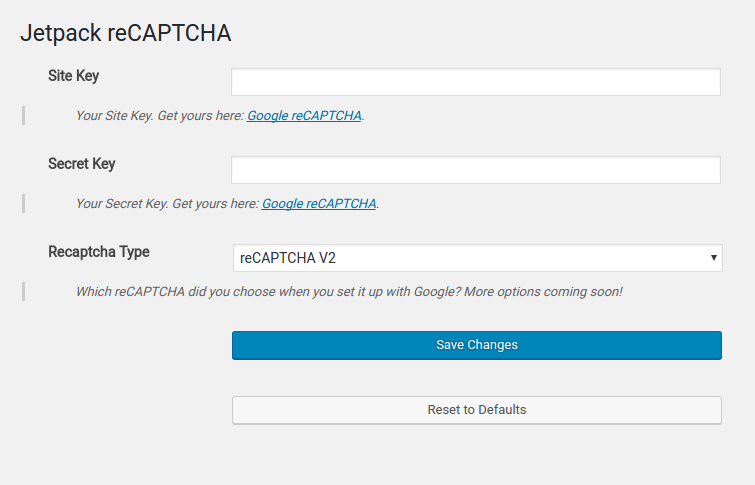
Register with Google reCAPTCHA and fill in your site key, and secret key (also, choose which kind of reCAPTCHA; see other screenshots for examples)
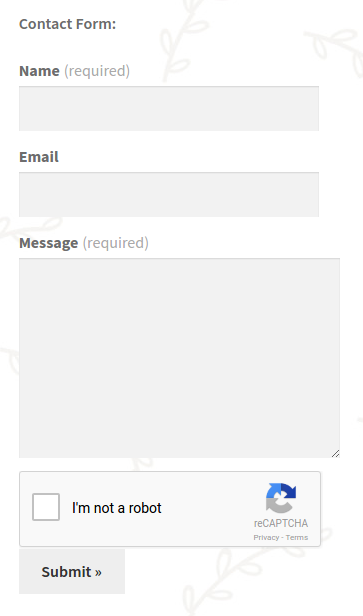
Example Jetpack form with reCAPTCHA v2.

Example Jetpack form with invisible reCAPTCHA.
Changelog
0.2.2
- Added additional
issetchecks to fix undefined index errors.
0.2.1
- Renamed plugin to reCAPTCHA Jetpack; added minor Google response validation and nonce verification.
0.2.0
- Added invisible reCAPTCHA; fixes to plugin activation.
0.1.0
- First Version. Basic
[contact-form]manipulation.