

Plugin info
Maintenance & Compatibility
Maintenance score
Possibly abandoned • Last updated 2852 days ago • 1 reviews
Is Recommender abandoned?
Possibly abandoned (last update 2852 days ago).
Compatibility
Similar & Alternatives
Explore plugins with similar tags, and compare key metrics like downloads, ratings, updates, support, and WP/PHP compatibility.
Description
Once you have activated the plugin, go to the ‘Recommender’ screen from your wordpress dashboard to configure the plugin.
Main settings tab
You have to enter your recommender.ir service address.
[Note] Please make sure you opened your recommender.ir service port as a outbound port.
Advanced settings tab
You can configure some advanced settings.
Widget
You can use recommender widget in order to show following methods:
- recommend (recommend to user)
- similarity (similar items)
- trendShortTime (trends in short time)
- trendLongTime (trends in long time)
- termBasedRecommendInclusive (recommend to user based on terms)
- termBasedSimilarityInclusive (similar items based on terms)
Requires at least WordPress 4.0 and PHP 5.4
To order or request additional information, please visit http://recommender.ir/#order
Installation
- Upload the plugin files to the
/wp-content/plugins/recommenderdirectory, or install the plugin through the WordPress plugins screen directly. - Activate the plugin through the ‘Plugins’ screen in WordPress
- Use the Recommender screen to configure the plugin
- Make sure you opened your recommender.ir service port as a outbound port
Frequently Asked Questions
Installation Instructions
- Upload the plugin files to the
/wp-content/plugins/recommenderdirectory, or install the plugin through the WordPress plugins screen directly. - Activate the plugin through the ‘Plugins’ screen in WordPress
- Use the Recommender screen to configure the plugin
- Make sure you opened your recommender.ir service port as a outbound port
Review feed
Screenshots

Main settings
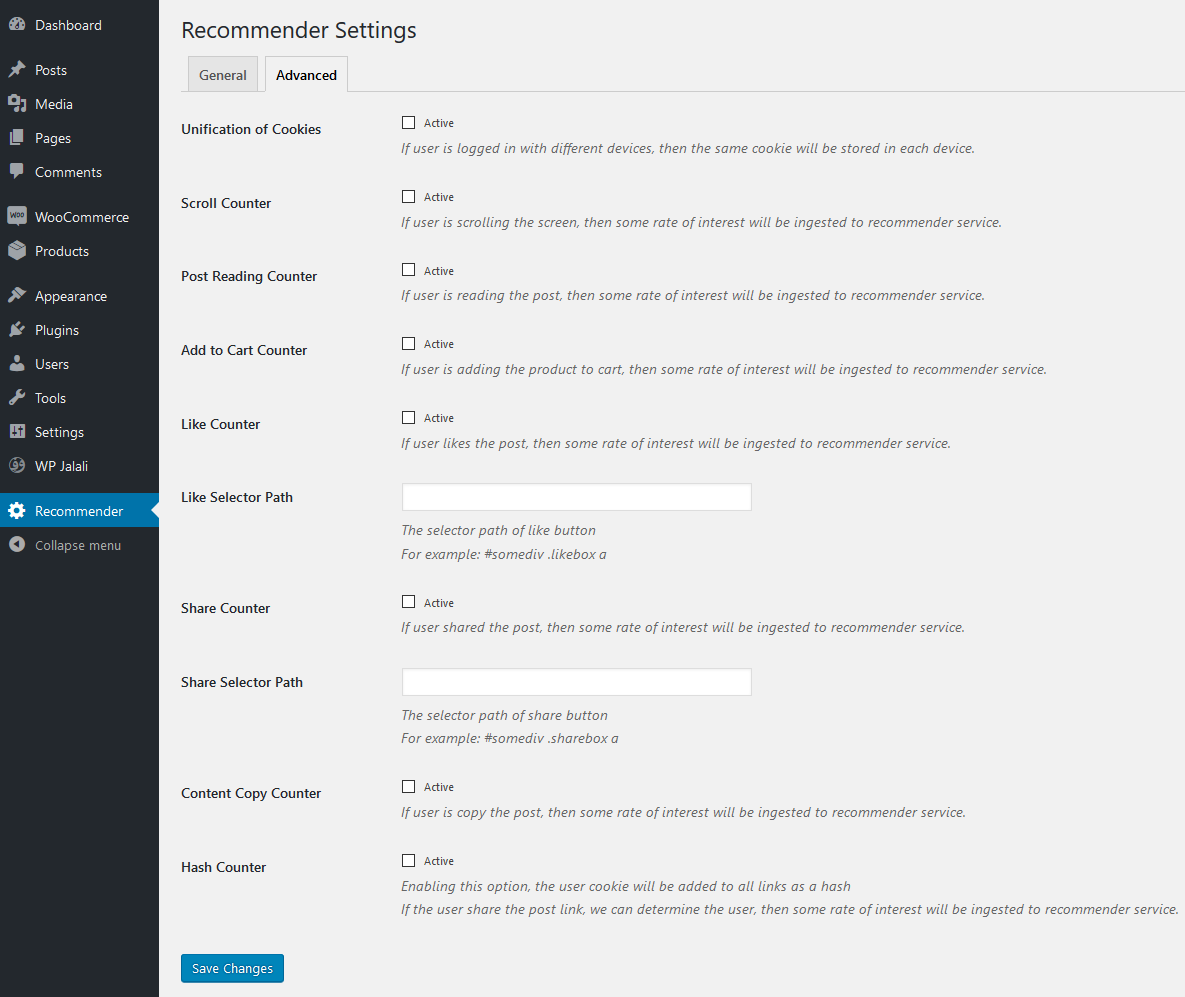
Advanced settings

Widget
Changelog
1.2.0
- Added two new methods.
1.1.0
- Added capability to sending post tags to recommender.ir service.
- Replaced jQuery dependencies with vanilla javascript.
- Improved AJAX performance.
1.0.2
- Fixed an error.
- Change ingest method to POST.
1.0.1
- Fixed a bug.
1.0.0
- Just released.