
Smart Logout Redirect
A simple plugin to redirect users to a custom URL after they log out of WordPress.
Plugin info
Maintenance & Compatibility
Maintenance score
Maintained • Last updated 122 days ago
Is Smart Logout Redirect abandoned?
Likely maintained (last update 122 days ago).
Compatibility
Languages
Similar & Alternatives
Explore plugins with similar tags, and compare key metrics like downloads, ratings, updates, support, and WP/PHP compatibility.
Description
Smart Logout Redirect is the ultimate solution for managing user redirections after logout in WordPress. Whether you want to redirect users to a custom URL, the home page, or the page they were viewing, this plugin handles it all with ease.
Now featuring a modern React-based interface, Role-Based Redirection, and a Searchable Page Selector, it gives you complete control over the logout experience for different user types (Admins, Subscribers, Customers, etc.).
Key Features:
- Role-Based Redirection: Set unique redirect URLs for specific user roles (e.g., redirect Admins to the dashboard, Subscribers to a custom page, and Customers to the shop).
- Flexible Redirect Options: Choose between:
- Home Page: Redirect users to your site’s homepage.
- Current Page: Keep users on the same page they were viewing.
- Custom URL: Enter any internal or external URL.
- Select Page: Easily search and select any existing page from your site.
- Modern Settings UI: A clean, fast, and user-friendly interface built with React.
- Safe Redirect: Optional security feature to restrict redirects to your own domain only.
- Lightweight & Fast: Optimized for performance with background data loading.
- Translation Ready: Fully compatible with translation plugins.
Why Choose Smart Logout Redirect?
-
Complete Control:
Don’t settle for default WordPress behavior. Customize the logout flow to enhance user experience, guide users to special offers, or simply say “Goodbye” on a custom page. -
Role-Specific Logic:
Perfect for membership sites, WooCommerce stores, or multi-author blogs. tailored the experience based on who is logging out. -
Easy Configuration:
No coding needed! The intuitive sidebar layout and searchable dropdowns make setup a breeze. -
Secure & Reliable:
Built with security in mind, including a “Safe Redirect” option to prevent open redirect vulnerabilities.
Check out our other Plugins
- Smart Password Protect – Secure your WordPress site with password protection and IP whitelisting.
- Random Quote – Display a random quote on your site to inspire visitors.
- Redirect After Logout – Redirect users to a custom page after logging out for enhanced user experience.
- Product Spotlight Badge – Highlight special products with a customizable spotlight badge on your WooCommerce store.
- User First Kit – Enhance your site’s user experience with a toolkit designed to prioritize user engagement and interaction.
Installation
Plugin Installation Method:
- Go to the WordPress dashboard.
- Navigate to Plugins > Add New.
- Search for “Redirect After Logout”.
- Click on the Install button.
- Activate the plugin after installation.
Installation via Zip File:
- Download the Redirect After Logout plugin zip file.
- Go to Plugins > Add New > Upload Plugin.
- Upload
redirect-after-logout.zipand click Install. - Activate the plugin once installation is complete.
Plugin Configuration:
- Navigate to Settings > Logout Redirect.
- General Settings: Choose your default redirect behavior (Home, Current Page, or Custom).
- Role-Based Redirection: Switch to the “Role-Based Redirection” tab to set specific rules for each user role.
- Click Save Settings.
Frequently Asked Questions
In the “Role-Based Redirection” tab, you will see a list of all user roles on your site. You can assign a specific redirect URL or page for each role. If a role has no specific rule set, the “General Settings” rule will apply.
Yes! Select “Custom Redirect” and enter the full URL (e.g., https://google.com). If “Safe Redirect” is enabled, external redirects will be blocked for security.
If no redirect is configured, users will see the default WordPress logout screen.
Yes, it works perfectly with WooCommerce. You can redirect “Customer” and “Shop Manager” roles to specific shop pages or their account dashboard.
Review feed
Screenshots
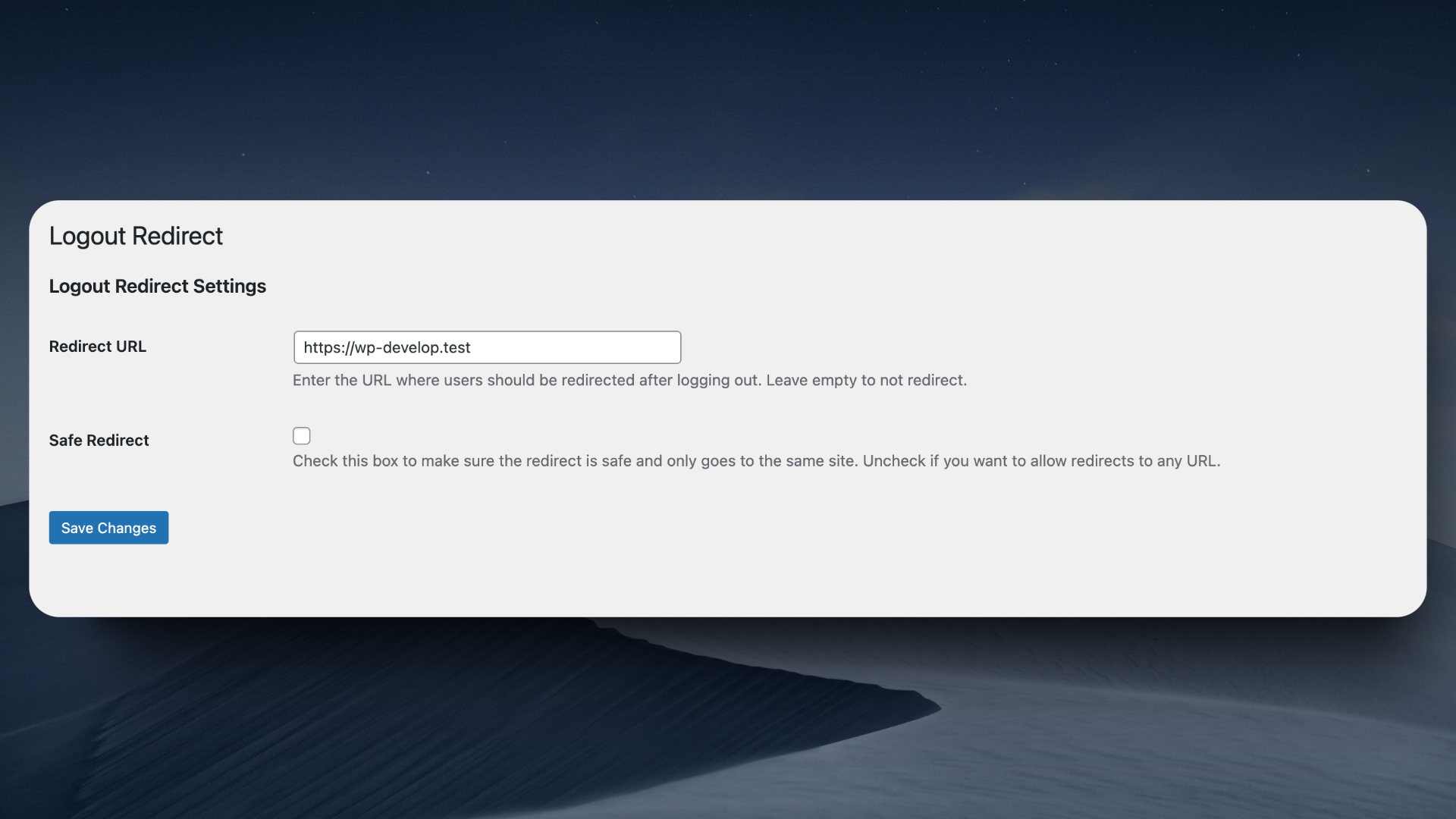
General Settings: Modern UI to configure default redirect behavior.

Role-Based Settings: Easily assign different redirect URLs for each user role.
Changelog
2.0.0
- Feature: Modern React-based settings page for a better user experience.
- Feature: Added role-based redirection.
- Feature: Added options to redirect to Home Page or Current Page.
- Feature: Searchable page selector for easier configuration.
- Feature: New sidebar layout with “General” and “Role-Based” tabs.
- Feature: Background data loading for improved performance.
- Compatibility: Tested up to WordPress 6.9.
1.0.6
- Added translation support for better internationalization
- Improved language file loading
1.0.5
- Improved translation loading reliability
- Fixed internationalization loading issues
1.0.4
- Removed Appsero SDK.
- Removed composer.json from production.
1.0.3
- Integrated Appsero SDK for optional telemetry data collection.
- Organized and updated the readme file for better clarity and structure.
1.0.2
- Version update (Tested up to WordPress 6.6.2).
1.0.1
- Added settings page for customizing the redirect URL.
- Added an option to choose whether the redirect should be limited to your site (safe redirect) or allow any URL.
- Improved security and adherence to WordPress coding standards.
- Added translation support.
1.0
- Initial release.