
Remoji – Post/Comment Reaction and Enhancement
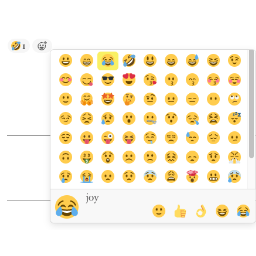
Reactive emoji. Allow visitors to add emoji reactions to your posts and comments. Disable comment for pages, posts.
Plugin info
Maintenance & Compatibility
Maintenance score
Maintained • Last updated 169 days ago • 5 reviews
Is Remoji – Post/Comment Reaction and Enhancement abandoned?
Likely maintained (last update 169 days ago).
Compatibility
Similar & Alternatives
Explore plugins with similar tags, and compare key metrics like downloads, ratings, updates, support, and WP/PHP compatibility.
Description
Add the slack style emoji to posts, pages or comments.
Features:
-
React with emojis to any post or comment.
-
Post View counter. Compatible with all cache plugins! Easy to use. Automatically exclude bots.
-
Disable comment on any post type (pages, posts, attachments).
-
Most Viewed widget. Recent Reacted Emoji Post widget.
-
Allow guests reaction or logged-in user reaction only.
-
GDPR compliant. With this feature turned on, all logged IPs get obfuscated (md5-hashed).
Post View
-
Edit
wp-content/themes/or/index.php archive.php/single.php/post.php/page.php. -
In the loop
while ( have_posts() ) {or anywhere you want to show the views, add the following codes:do_action( 'remoji_postview' );.
API
To show postview in themes/plugins, use do_action( 'remoji_postview', $the_post_id_to_inquire );.
Shortcode [views] available
Use [views] or [views id="3"](To show the views of post ID 3) in your editor.
Installation
Frequently Asked Questions
Review feed
Very nice
Screenshots

Comment emoji style

Remoji Settings

Post View counter
Changelog
Todo:
* Reaction withdraw.
2.2
- Test up to latest WP.
2.1.1
- Translation fix. (@alexclassroom)
2.1
- Bypassed version check to speed up WP v6.
2.0
- Postview column in Posts list. (@inside83)
1.9.1
- Test up to WP v5.8.
1.9
- 🌱 Limit emoji amount per visitor per post.
1.8.1
- More accurate to detect IP.
1.8
- WordPress v5.5 REST compatibility.
1.7
- 🌱 Recent Reacted Emoji Post widget. (@wilcosky)
- 🌱 Most Viewed widget.
1.6
- 🌱 Disable comments on any post type (posts/pages/attachments).
1.5
- 🌱 Post view counter.
1.4
- 🌱 Reaction delete. (@wilcosky)
- 🌱 Guest Reaction Control. (@wilcosky)
- Bugfix Fixed repeated reactions issue when GDPR mode is ON.
1.3
- 🌱 Reaction log.
1.2
- Options to turn emoji ON/OFF on Post/Page/Comment.
1.1
- Reactive emoji for posts.
1.0
- Reactive emoji for comments.