

Remove noreferrer
"Remove noreferrer" automatically removes rel="noreferrer" attribute from links on your website on-the-fly.
Plugin info
Maintenance & Compatibility
Maintenance score
Possibly abandoned • Last updated 1914 days ago • 14 reviews
Is Remove noreferrer abandoned?
Possibly abandoned (last update 1914 days ago).
Compatibility
Similar & Alternatives
Explore plugins with similar tags, and compare key metrics like downloads, ratings, updates, support, and WP/PHP compatibility.
Description
“Remove noreferrer” automatically removes rel="noreferrer" attribute from links on your website on-the-fly.
Plugin does not modify original links or content in the database.
Which kind of content supported?
- Posts
- Pages
- Blog page (homepage, etc.)
- Comments
Also it supports standard WordPress widgets:
- “Text”
- “Custom HTML”
Docs & Support
This plugin is an open source project and we would love you to help us make it better. If you want a new feature will be implemented in this plugin, you can open a GitHub Issue. If you don’t have a GitHub Account you can send me email to [email protected]. You can find more detailed information about plugin on GitHub.
Donations
Installation
Install Remove Noreferrer within WordPress
- Visit the plugins page within your dashboard and select “Add New”
- Search for “remove noreferrer”
- Activate plugin from your Plugins page
Install Remove Noreferrer manually
- Upload the “remove-noreferrer” folder to the
/wp-content/plugins/directory - Activate the plugin through the “Plugins” menu in WordPress
Frequently Asked Questions
Review feed
Screenshots
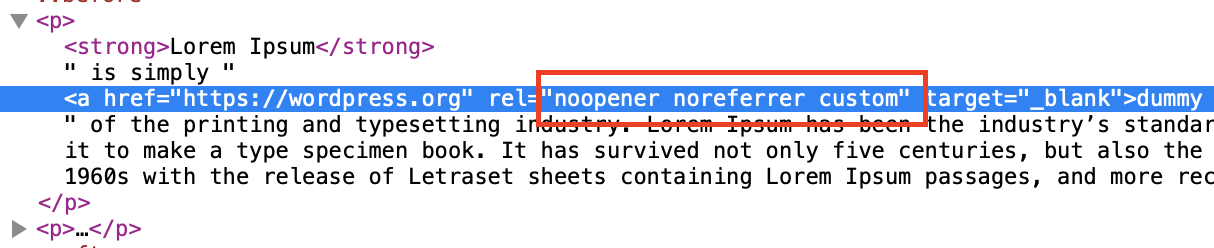
Before installation

After installation

Plugin's settings
Changelog
2.0.0
- Add support for PHP 5.6 and WordPress 5.1
- Remove noreferrer from “Text” widgets
- Remove noreferrer from “Custom HTML” widgets
- Do not modify content if links or
noreferrerattributes are not found - Add notice after settings saved
- Remove plugin settings on uninstall
- Migrate plugin settings to new version
1.2.0
1.1.1
1.1.0
- Added plugin’s options page
- Added possibility to remove
noreferrerfrom Home and static Pages - Removed extra spaces from
relattribute