

Reorder Multisite Sites Dropdown
The "Reorder Multisite Sites Dropdown" plugin empowers administrators of multisite WordPress installations with a simple yet powerful soluti …
Plugin info
Maintenance & Compatibility
Maintenance score
Possibly abandoned • Last updated 437 days ago • 5 reviews
Is Reorder Multisite Sites Dropdown abandoned?
Possibly abandoned (last update 437 days ago).
Compatibility
Similar & Alternatives
Explore plugins with similar tags, and compare key metrics like downloads, ratings, updates, support, and WP/PHP compatibility.
Description
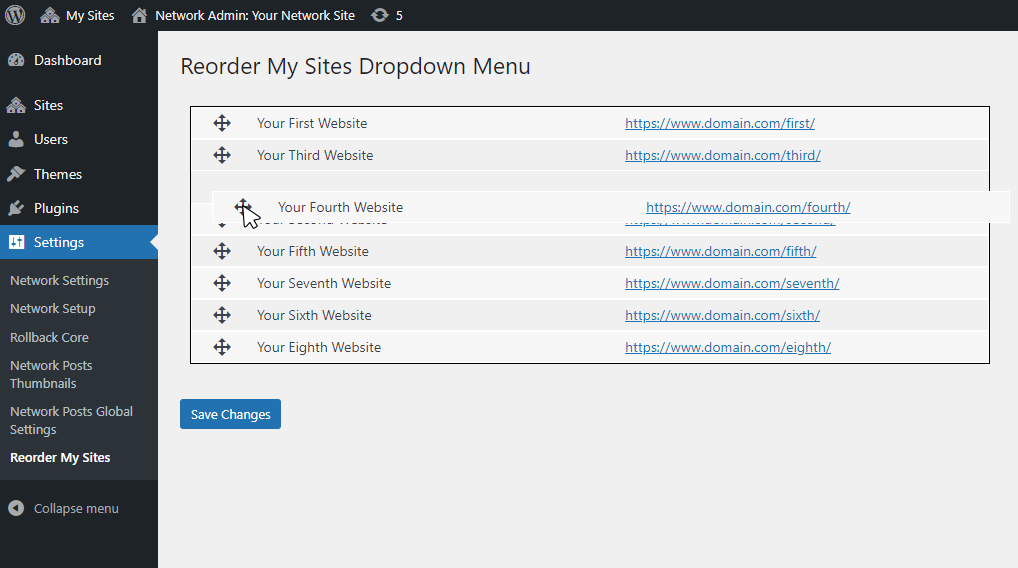
The “Reorder Multisite Sites Dropdown” plugin empowers administrators of multisite WordPress installations with a simple yet powerful solution to customize the ordering of the “My Sites” dropdown menu within the Admin Bar. Installing and setting up the plugin is straightforward. Once the plugin is added to your WordPress installation, navigate to the Network Admin area and locate the “Reorder My Sites” option under Settings, rearrange the sites according to your preferences through the drag-and-drop interface. After customizing the order to your satisfaction, finalize the changes by clicking the “Save Changes” button.
Installation
- Upload the plugin folder to your WordPress installation’s plugin directory.
- Access the Network Admin area and navigate to Settings > Reorder My Sites.
- Reorder the sites using the simple drag-and-drop interface.
- Click Save Changes to apply your custom ordering.
Frequently Asked Questions
Review feed
Screenshots

Changelog
v1.0.2
Added functionality to allow manual ordering with input fields in addition to drag-and-drop reordering.
v1.0.1
Refactored the array access method to prevent fatal errors caused by the use of curly braces for offsets, a syntax that is no longer supported.
v1.0
The initial creation of the plugin.