

ReordeRe Lite – Subscriptions For WooCommerce
WooCommerce Subscriptions made simple! ReordeRe Lite enables product subscriptions & recurring payments via PayPal & Stripe. Easy setup!
Plugin info
Maintenance & Compatibility
Maintenance score
Maintained • Last updated 129 days ago • 2 reviews
Is ReordeRe Lite – Subscriptions For WooCommerce abandoned?
Likely maintained (last update 129 days ago).
Compatibility
Similar & Alternatives
Explore plugins with similar tags, and compare key metrics like downloads, ratings, updates, support, and WP/PHP compatibility.
Description
GET A POWERFUL SUBSCRIPTION PLUGIN FOR WOOCOMMERCE THAT ALSO HANDLES AUTOMATED REORDERS. MANAGE WOOCOMMERCE SUBSCRIPTIONS AND RECURRING ORDERS IN ONE PLUGIN.
ReOrdeRe Lite is a complete WordPress subscription plugin built for WooCommerce stores. With this plugin you can turn any product into a subscription model, schedule recurring payments, enable customers to reorder past purchases automatically, and simplify subscription management for both store owners and customers.
Our plugin helps merchants launch a subscription plugin for WooCommerce that supports simple products, variable products, services or physical goods — and includes a smart WooCommerce reorder plugin capability that no ordinary subscription plugin offers.
🚀 WITH THIS WOOCOMMERCE SUBSCRIPTION & REORDER PLUGIN YOU CAN:
- Create subscription-based products or services using the subscription plugin for WooCommerce
- Automate WooCommerce subscriptions and set billing intervals weekly, monthly or yearly
- Enable reorders for WooCommerce past purchases—so customers return automatically
- Manage WooCommerce subscription plugins with zero complexity
- Provide trial periods, initial sign-up fees, cancellation options and renewals for subscriptions for WooCommerce
- Use our intuitive dashboard to manage WooCommerce subscriptions, review active renewal orders and keep churn low
- Display subscription tables, reorder summaries, and control customer experience via a WordPress subscription plugin
- Stand out from other WooCommerce subscription plugins by offering built-in reorder features
KICKSTART YOUR WOOCOMMERCE SUBSCRIPTION + REORDER BUSINESS
ReOrdeRe WooCommerce Subscription Plugin is fully compatible with the latest WooCommerce versions and tested for reliability. Build your recurring revenue model, lower churn, offer seamless reorder flows — all inside one plugin.
🔗 RESOURCES:
WooCommerce Subscription Plugin Demo | WooCommerce Reordere Documentation
Upgrade to ReordeRe Pro to unlock the full potential of subscription commerce!
⭐ Key Features of ReOrdeRe Lite – Subscription Plugin for WooCommerce
🔹 1️ Subscription Plan Expiry Choice
Merchants can set a defined duration for WooCommerce Subscriptions (e.g., 3 months, 6 months, or a year). When the period ends, the subscription automatically expires. This helps improve control over subscription billing cycles, reduces manual management, and keeps renewals predictable.
🔹 2️ Transparent Recurring Subscriptions
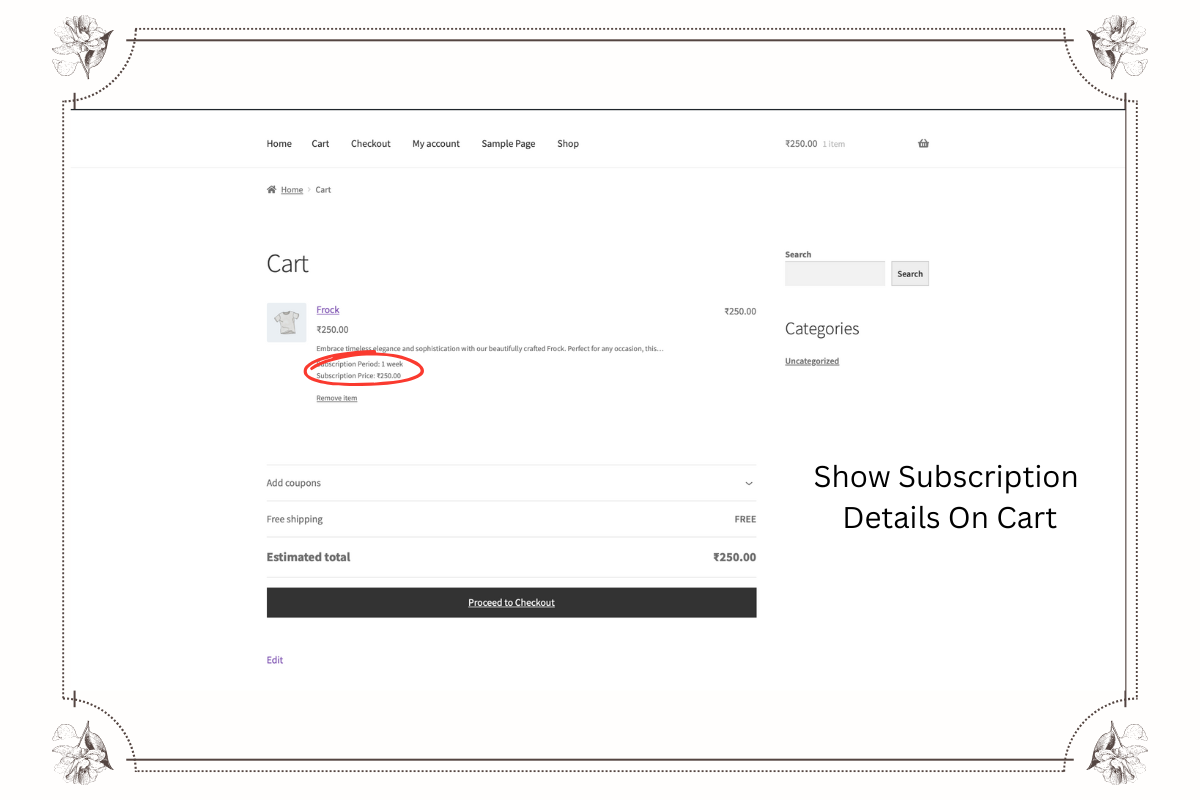
Important Subscriptions for WooCommerce details such as total amount, taxes, billing intervals, and renewal dates appear directly on cart and checkout pages. This improves clarity, builds trust, and reduces checkout confusion.
🔹 3️ Dynamic Pricing for Better Retention
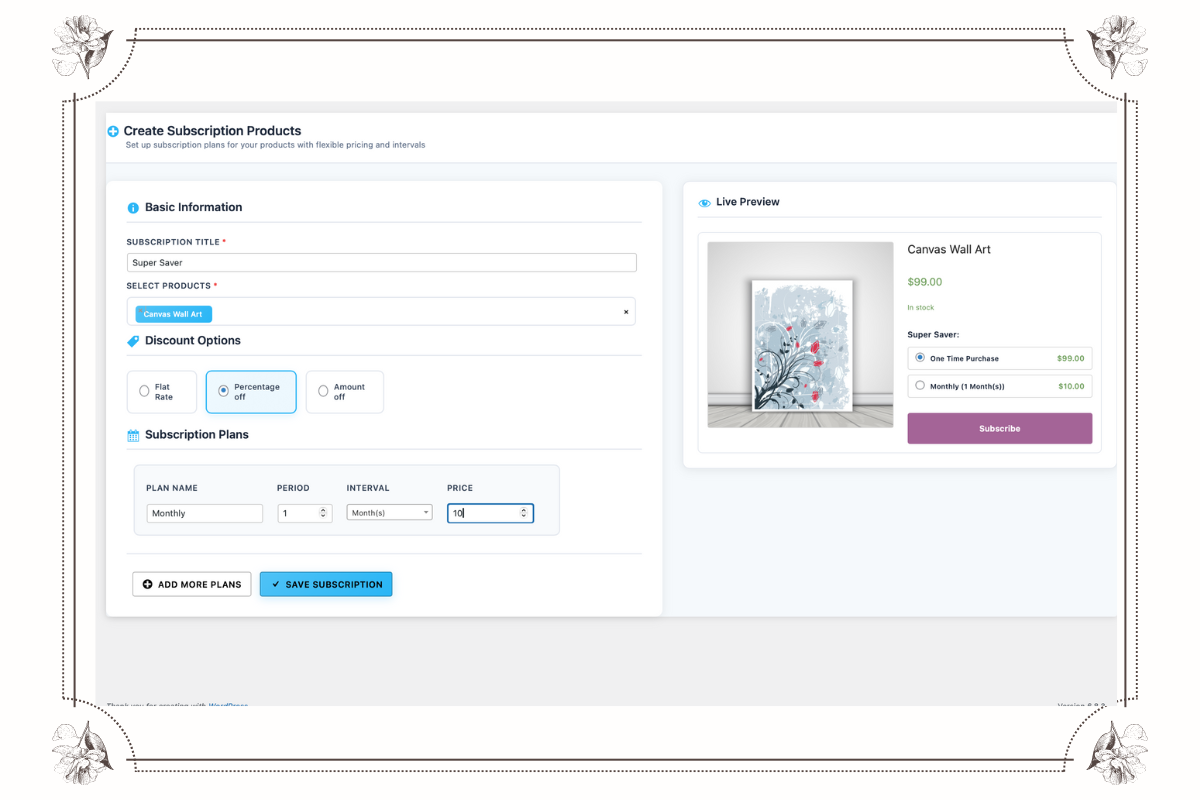
Merchants can set flexible pricing settings like subscription discounts, tiered pricing, and promotional rates for repeat buyers. This encourages long-term loyalty and significantly boosts recurring revenue with WooCommerce Subscription plugins.
🔹 4️ Revenue Reports & Analytics
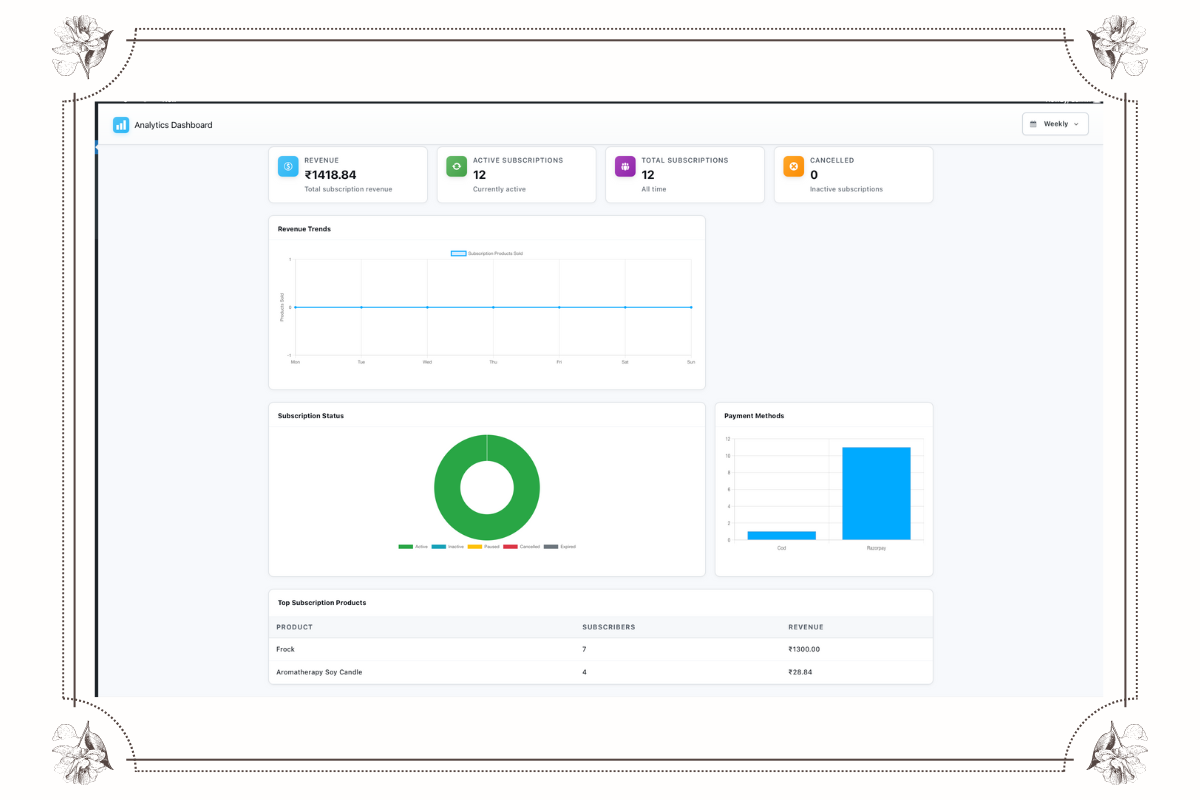
Get actionable insights with subscription analytics showing reorder frequency, revenue trends, and customer behavior. These reports enable merchants to optimize subscription offerings and effectively Manage WooCommerce Subscriptions.
🔹 5️ Bulk Subscription for Faster Ordering
Users can subscribe to multiple products in a single action — perfect for wholesale, grocery, bundles, or recurring essentials. Improves buyer convenience and lifts AOV for stores using a Subscription Plugin for WooCommerce.
🔹 6️ Pause & Resume Subscription Flexibility
Customers can temporarily pause their WooCommerce Subscriptions and resume anytime — without canceling. This customer-friendly approach reduces churn and enhances long-term subscriber engagement.
🔹 7️ Product Subscription (Scheduled Auto-Delivery)
Customers can subscribe to products weekly, monthly, or yearly — ensuring they never run out of the products they love. Reordere Lite also includes automated reorder reminders — a unique WooCommerce Reorder Plugin advantage.
🔹 8️ Multiple Payment Gateways (PayPal, Stripe, Razorpay, and Square Supported)
Seamless integration with PayPal, Stripe, Razorpay, Square, and more gateways means secure, reliable recurring payments. This increases checkout trust and conversion rates for WordPress Subscription plugin stores.
🔹 9️ Inventory Validation for Subscription Orders (Recommended Feature Added)
Before subscription renews, stock is checked automatically to prevent failed orders — a strong value add for Manage WooCommerce Subscriptions.
🔹 10 Automated Email Notifications (Recommended Feature Added)
Customers receive reminders for upcoming renewals, payment failures, pauses, or resuming — improving communication and retention.
Get ReordeRe Pro Today for Advanced WooCommerce Subscriptions!
⭐ Best Use Cases for Subscription Plugin for WooCommerce – Reordere Lite
Implement powerful recurring payment models using Reordere Lite – Subscription Plugin for WooCommerce. Perfect for merchants who want to automate repeat orders and scale predictable revenue with seamless WooCommerce subscriptions.
🛍️ 1 Subscribe & Save Programs
Offer discounts for recurring deliveries of consumables — groceries, medicines, pet food, daily essentials, etc. Increase customer retention by automating reorders through Subscriptions for WooCommerce.
🎟️ 2 Membership & Premium Access
Charge recurring subscription fees for premium content, exclusive communities, online learning, or VIP perks. Ideal for stores using a WordPress subscription plugin to monetize member-only content.
💻 3 SaaS & Digital Service Licensing
Automatically bill users for software access, digital tools, and hosted services using reliable subscription billing cycles.
🎁 4 Curated Subscription Box Selling
Sell monthly product boxes like beauty kits, snacks, fashion accessories, or toys. Boost convenience and engagement using the WooCommerce reorder plugin capability inside Reordere Lite.
🛠️ 5 Service & Maintenance Subscriptions
Offer automated recurring payments for support packages, cleaning services, coaching plans, annual warranties, and retainers powered by WooCommerce subscription plugins.
🚀 Start Growing with Reordere Lite – Subscriptions for WooCommerce
Turn one-time customers into long-term subscribers with automated recurring orders.
Easy setup. Full flexibility. Maximum recurring revenue.
[Install Reordere Lite and power your subscription business today!] (https://reordere.com/#pricing)
Advanced Premium Features – Take Your Subscription Plugin for WooCommerce to the Next Level
Unlock exclusive features with Reordere Pro – Subscription Plugin for WooCommerce, designed for scaling recurring revenue, automating renewals, and giving full control over WooCommerce Subscriptions and recurring payments.
- 💳 20+ Payment Gateways for WooCommerce Subscriptions: Supports Stripe, PayPal Express, Razorpay, Square, Authorize.Net, Mollie, MultiSafePay, Payfast, PayHere & more — offering secure and flexible subscription payments for global customers.
- 🔁 Variable Subscription Products & Flexible Plans: Create variable WooCommerce subscription products with different pricing tiers, billing cycles, and product variations to offer fully customizable subscription plans.
- 🔄 Subscription Plan Switching (Upgrade, Downgrade & Crossgrade): Allow users to switch between subscription plans anytime — a powerful way to improve customer retention and enhance flexibility within your Subscriptions for WooCommerce.
- 🧠 Smart Dunning Management & Auto Payment Retries: Prevent subscription failures with automated retry logic for unsuccessful payments — essential for retaining subscribers and maximizing recurring revenue.
- 📊 Advanced Subscription Analytics & Revenue Tracking: Get detailed insights with WooCommerce recurring payment analytics — track renewals, cancellations, churn rate, and revenue to make data-driven business decisions
- 📥 Import & Export WooCommerce Subscription Data: Manage subscription data seamlessly with subscription import/export tools — perfect for store migration, backups, and bulk subscription updates.
- 📥 🔐 Advanced Subscription Options: Enable powerful options like manual renewals, early renewal, sign-up fees, and add-to-existing subscription to increase upsell opportunities across WooCommerce subscription plugins.
- ⭐ Priority Support & Faster Assistance: Premium users get access to our dedicated support team to ensure your WooCommerce subscription business runs smoothly and efficiently.
- 🧩 Integration with WCFM Frontend Manager:Enable vendors to manage their own subscription-based products from the frontend — ideal for multi-vendor subscription marketplaces.
Ready to Implement WooCommerce Subscriptions? Get Started with ReordeRe Lite Today!
Differences Between ReordeRe Lite and Pro
ReordeRe Lite (Free)
* Create simple WooCommerce product subscriptions.
* Automated recurring payments via PayPal Standard & Stripe.
* Customer can view & cancel subscriptions from their account.
* Automated email notifications for key subscription events.
* Basic subscription management tools in WP admin.
ReordeRe Pro (Premium)
* Includes all Lite features.
* Multiple Payment Gateways (Stripe, PayPal Express, Square, Authorize.Net, Mollie, MultisafePay, Payfast, PayHere, etc.) for flexible subscription payments.
* Variable Subscription Products for offering tiered options.
* Subscription Plan Switching (Upgrades/Downgrades/Crossgrades).
* Advanced Dunning Management (Automated Payment Retries).
* Detailed Subscription Analytics & Reporting.
* Subscription Import/Export Tools for easy data management.
* More Flexible Options: Early Renewals, Manual Renewals, Sign-up Fees, Add-to-Existing-Subscription.
* Priority Support from our dedicated team.
* Integration with WCFM Frontend Manager.
Why Use ReordeRe for Your WooCommerce Subscriptions?
Managing recurring payments and subscriptions manually is time-consuming and prone to errors. ReordeRe Lite provides a streamlined and automated recurring billing system directly within WooCommerce.
- Automation Saves Time: Forget chasing payments or manually creating renewal orders. ReordeRe handles the automated billing process via PayPal, freeing up your time to focus on growing your business.
- Improved Customer Experience: Offer customers the convenience of automatic renewals and a dedicated area in their account to manage their subscriptions, enhancing customer retention.
- Reliable Recurring Payments: Leverage the security and reliability of PayPal Standard for processing subscription payments automatically.
- Centralized Management: Keep all your subscription data and customer information organized within your WordPress dashboard, integrated with your standard WooCommerce orders and customers.
- Foundation for Growth: Start with the essentials in Lite and easily scale up to ReordeRe Pro when you need more advanced features like multiple gateways, variable products, or detailed analytics, ensuring a smooth growth path for your recurring revenue model.
Using a dedicated subscription management system like ReordeRe provides a more professional, efficient, and scalable solution compared to makeshift methods.
Installation
- Upload the plugin files to the
/wp-content/plugins/reordere-lite-subcriptions-for-woocommercedirectory, or install the plugin via the WordPress plugins screen (Search for “ReordeRe Lite Subscriptions”). - Activate the plugin through the ‘Plugins’ screen in WordPress.
- Navigate to WooCommerce Settings ReordeRe to configure basic settings.
- Ensure PayPal Standard is enabled and configured in your WooCommerce payment gateway settings to process recurring payments.
- Edit a simple WooCommerce product, check the ‘Subscription’ box in the ‘Product data’ section, and configure the recurring price, interval, and period to enable the subscribe option for customers.
Frequently Asked Questions
- Edit an existing simple WooCommerce product or create a new one.
- Locate the ‘Product data’ section on the product edit screen.
- Find and check the ‘Subscription’ checkbox to enable subscription settings for this product.
- Configure the subscription terms: set the recurring price, the billing interval (e.g., every 1, 2, 3…), the billing period (day, week, month, year), and optionally, a free trial length.
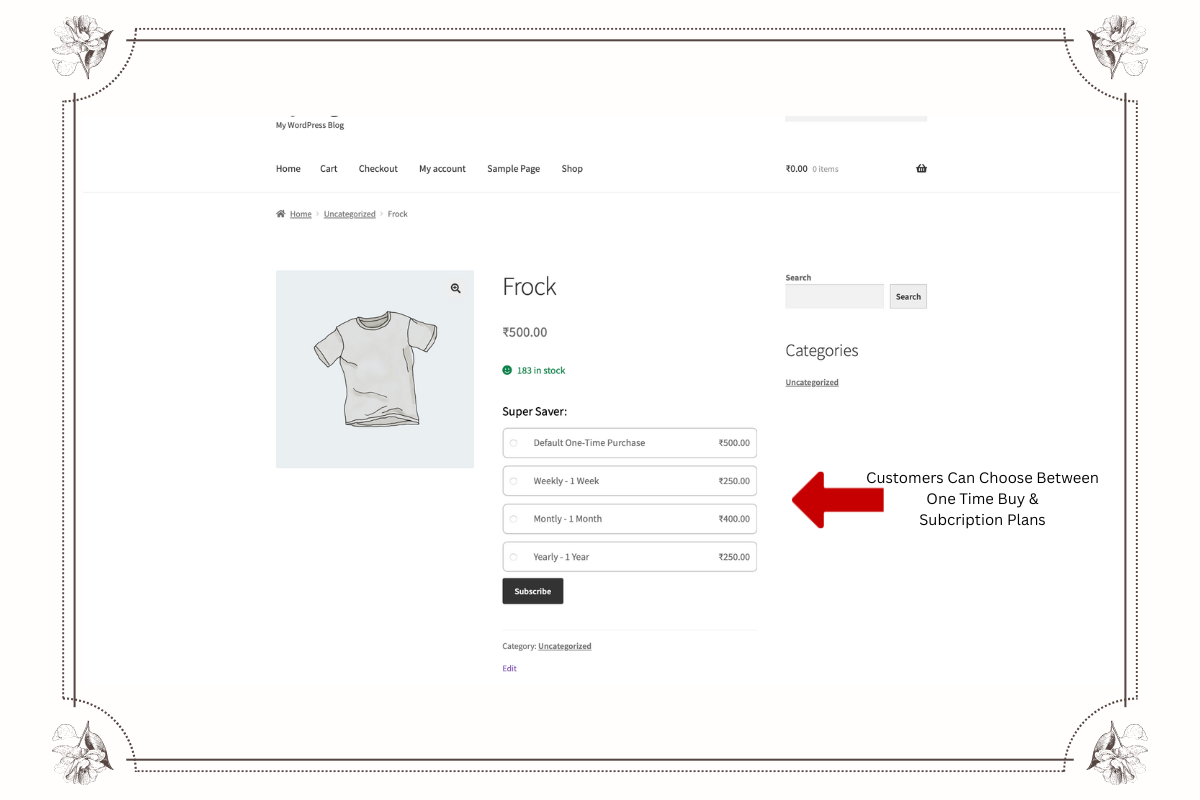
- Save or update the product. Customers visiting the product page will now see the option to purchase it as a subscription.
ReordeRe Lite supports automatic WooCommerce recurring payments via PayPal Standard and Stripe. This allows for automated billing without manual intervention. For more gateway options like Square, Authorize.Net, Mollie, MultisafePay, Payfast, PayHere, and PayPal Express/Advanced, consider upgrading to ReordeRe Pro.
Yes, logged-in customers can navigate to their standard WooCommerce “My Account” page. Within this area, they will find a “Subscriptions” section (or similar tab depending on your theme) where they can view details of their active ReordeRe WooCommerce subscriptions, see past recurring payments, and cancel future renewals.
Yes, ReordeRe Lite integrates seamlessly with WooCommerce’s core shipping and tax calculation systems. When a renewal order is automatically generated, the appropriate shipping costs and taxes based on your store’s settings and the customer’s location will be calculated and included, just like a standard order.
ReordeRe Lite is developed according to official WooCommerce and WordPress standards. It should be compatible with most well-coded themes that follow these standards. The plugin primarily uses standard WooCommerce hooks, templates, and the existing “My Account” structure to ensure broad compatibility.
Support for the free ReordeRe Lite version is provided through the community support forum on the WordPress.org plugin page. Users of ReordeRe Pro receive access to our priority email support system for dedicated assistance.
Review feed
Screenshots
Subscription Product Option: Adding subscription settings to a WooCommerce product.
Recurring Billing Configuration: Setting the price, interval, period, and trial.
Customer Account View: How subscriptions appear in the user's account area.
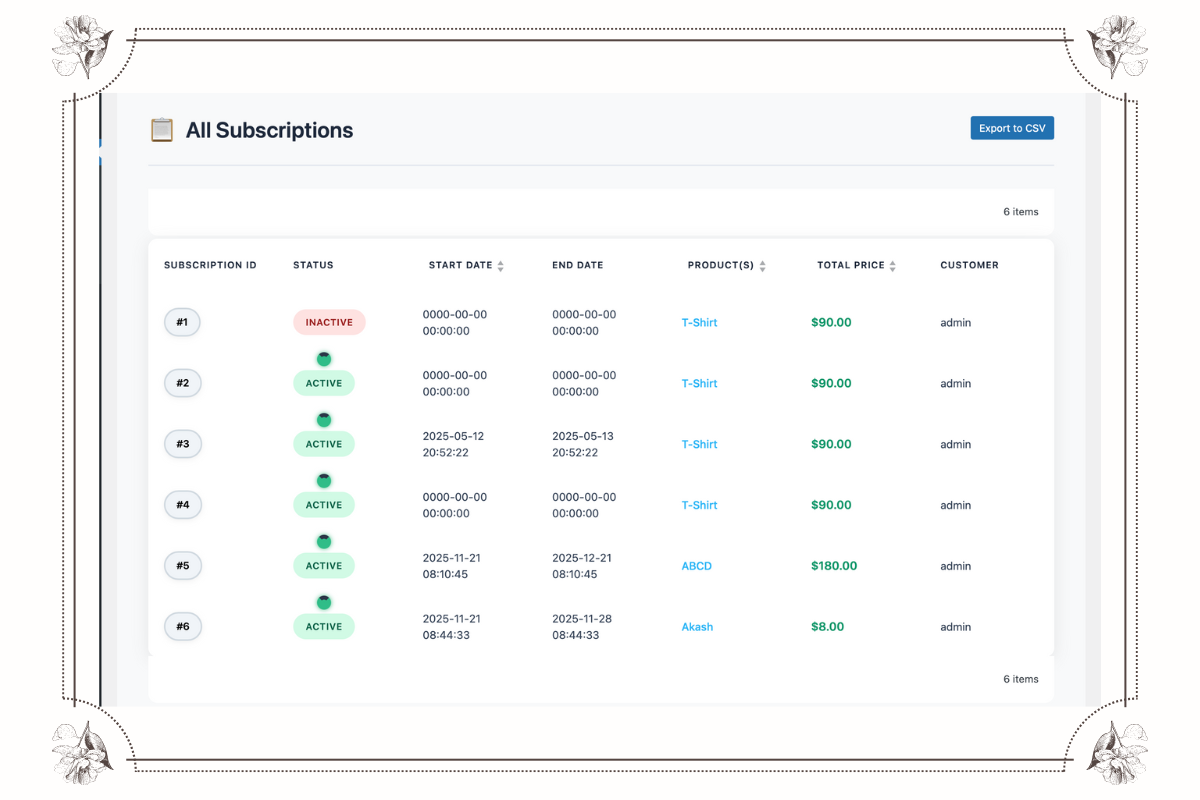
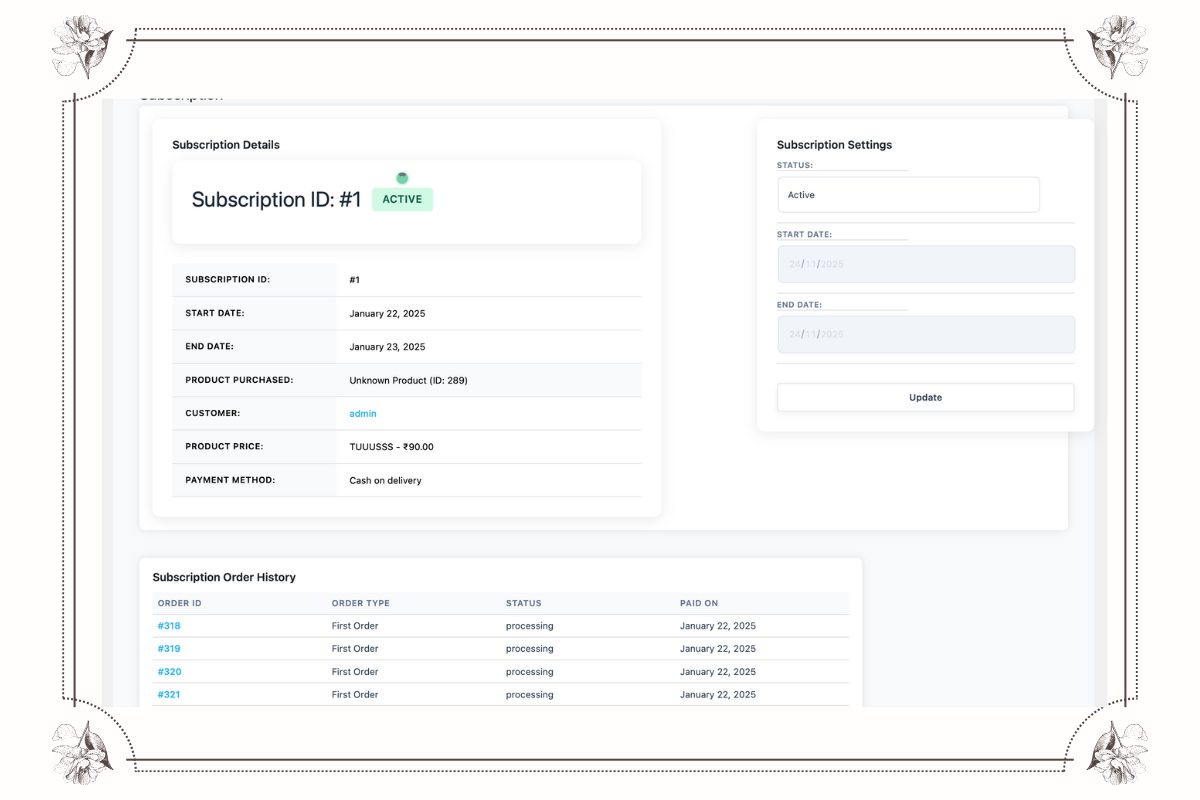
Admin Subscription List: Managing Woo Subscriptions in the WordPress dashboard.
Checkout Subscription Display: How the subscription details look during checkout.

Changelog
1.0.2
- Bug fixes and improvements
1.0.0
- Initial release of ReordeRe Lite – Add powerful WooCommerce subscription features to your store!