

Logo Carousel – Display Brand or Client Logos in Slider
Responsive Client Logo Carousel Slider Is a nice WordPress plugin which can be used to showcase your client logo in a professional way.
Plugin info
Maintenance & Compatibility
Maintenance score
Maintained • Last updated 151 days ago • 2 reviews
Is Logo Carousel – Display Brand or Client Logos in Slider abandoned?
Likely maintained (last update 151 days ago).
Compatibility
Languages
Similar & Alternatives
Explore plugins with similar tags, and compare key metrics like downloads, ratings, updates, support, and WP/PHP compatibility.
Description
👉 Plugin Demo | Documentation ) 👈
Logo Carousel is an easy-to-use and versatile WordPress plugin that enables you to showcase a responsive carousel slider of your clients’ logos or images on your website. With Logo Carousel, you can create an engaging and professional display of your clients’ logos to help build trust with your visitors.
The plugin comes with a range of customizable settings, allowing you to create a carousel slider that seamlessly matches your site’s branding and design. You can customize the slider’s animation style, speed, and the number of images to display. Additionally, you can add links to each image, redirecting your visitors to your clients’ websites or pages.
Logo Carousel is fully responsive and mobile-friendly, ensuring that your carousel slider looks great and functions smoothly across all devices and screen sizes. You can further customize the slider’s appearance using CSS or the built-in style editor, giving you the flexibility to create a unique and customized slider that matches your website’s look and feel.
The plugin is user-friendly and easy to install, with a simple interface that allows you to add and manage your clients’ logos or images with ease. You can upload images directly from your media library or import them from an external URL, and the plugin will automatically generate a carousel slider for you.
Logo Carousel is highly flexible and adaptable to your needs. You can use it to showcase your clients’ logos, display customer testimonials, or even to showcase your own work or portfolio. The possibilities are endless!
Features
- You can create unlimited carousel
- Any types of image are supported
- Shortcode driven, So that you can place anywhere of wordpress such as post, page, widgets and template
- Control the Direction with mouse pointer
- Control the speed, behavior, width, height, border , background and more….
- User friendly interface
- Works on all major browsers – IE7, IE8, IE9, Safari, Firefox, Chrome
- LIte weight and super fast
Feedback
Liked that plugin? Hate it? Want a new feature? [Send your feedback](mailto: [email protected] “Send feedback”)
â Checkout our other WordPress Plugins-
🔥 Html5 Audio Player – Best audio player plugin for WordPress.
🔥 Html5 Video Player – Best video player plugin for WordPress.
🔥 PDF Poster – A fully-featured PDF Viewer Plugin for WordPresss.
🔥 StreamCast – A fully-featured Radio Player Plugin for WordPresss.
🔥 3D Viewer – Display interactive 3D models on the webs.
🔥 Store Finder for WooCommerce – Lists your store contact info professionally.
Installation
This section describes how to install the plugin and get it working.
e.g.
- Upload
plugin-directoryto the/wp-content/plugins/directory - Activate the plugin through the ‘Plugins’ menu in WordPress
- Use shortcode in page, post or in widgets.
- If you want player in your theme php, Place
<?php echo do_shortcode('YOUR_SHORTCODE'); ?>in your templates
Frequently Asked Questions
coming soon
Review feed
Screenshots

Admin menu

Carousel Option

Output in pages or post
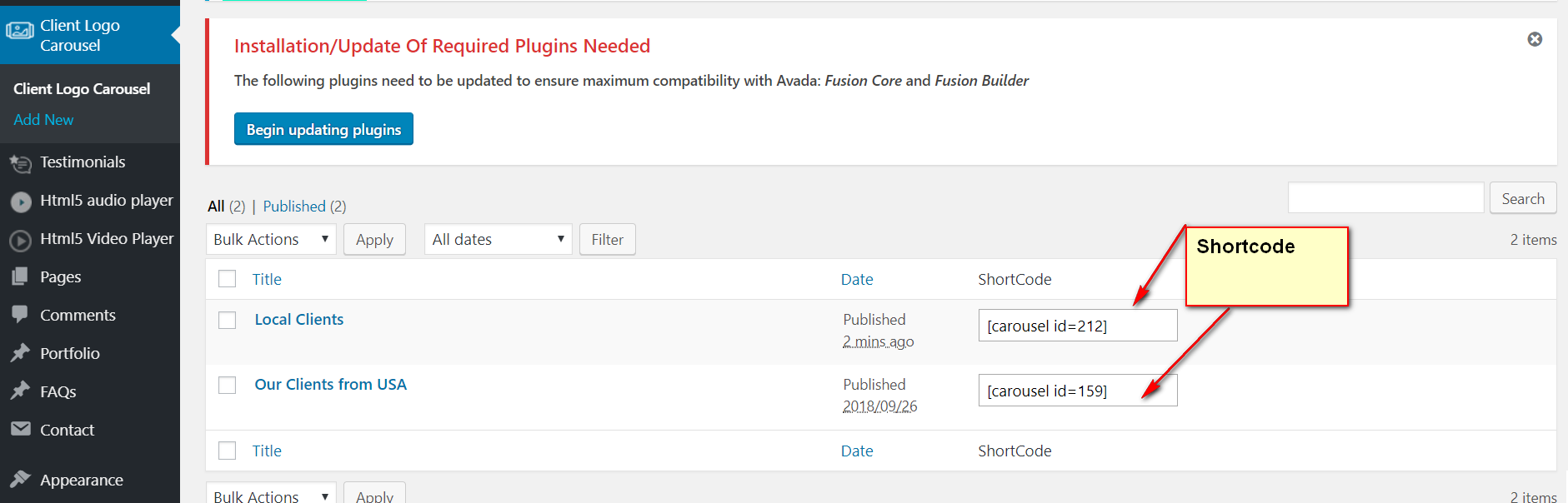
Shortcode
Changelog
1.3.0 – 5 Sep 2024
- Improved: Security
1.1
- fix position issue
1.0
- Initial Release
1.2
- Fix isuue and make compatible with WordPress 5.5 Version
- Fix other php warning
- Add Shortcode on Logo Carousel View page