

Responsive Testimonials
A responsive, clean and easy way to display testimonials. Create testimonials, add authors and their jobs and copy-paste the shortcode into any page.
Plugin info
Maintenance & Compatibility
Maintenance score
Stale • Last updated 197 days ago • 4 reviews
Is Responsive Testimonials abandoned?
Likely maintained (last update 197 days ago).
Compatibility
Similar & Alternatives
Explore plugins with similar tags, and compare key metrics like downloads, ratings, updates, support, and WP/PHP compatibility.
Description
This plugin adds a “Testimonials” section to the admin panel which allows you to display your references/testimonials on your website the easy way. You can quickly add your testimonials with their authors, jobs and pictures. When done, simply re-order them at anytime and display them anywhere with a simple shortcode. What you see is what you get, and it’s totally free.
No limitation for the Free version
The free version of the Responsive Testimonials plugin is not limited.
The PRO version adds new features: additional layouts, heading quote, choose a color per testimonial, text-alignment, change picture’s size.
Fully translatable
- POT files included (/lang/)
- French translation included
- Spanish translation included
Available fields
- Author
- Job/company
- Testimonials text
- Picture
Available settings
- Testimonial layout
- Author block background
- Author font size
- Job’s font size
- Text font size
- Color
Usage
Go to the plugin’s documentation if you need more information on how to use this plugin.
Support
Find help on our support platform for this plugin (we’ll answer you fast, promise).
Installation
Installation
- In your WordPress admin panel, go to Plugins > New Plugin
- Find our Responsive Testimonials plugin by WP Darko and click Install now
- Alternatively, download the plugin and upload the contents of responsive-testimonials.zip to your plugins directory, which usually is /wp-content/plugins/
- Activate the plugin
Usage
Go to the plugin’s documentation for information on how to use it.
Frequently Asked Questions
The free version of the Responsive Testimonials plugin is not limited.
The PRO version adds new features: additional layouts, heading quote, choose a color per testimonial, text-alignment, change picture’s size.
- POT files included (/lang/)
- French translation included
- Spanish translation included
Go to the plugin’s documentation if you need more information on how to use this plugin.
Find help on our support platform for this plugin (we’ll answer you fast, promise).
Review feed
Screenshots
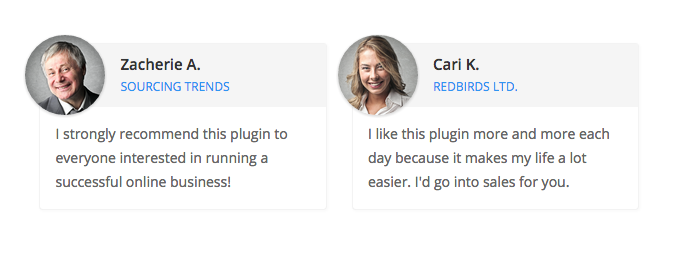
Testimonials (front view - 2 per line)

Testimonials (front view - 3 per line)

Testimonials (front view - alternative layout)

Creating testimonials (admin view)

Testimonial settings (admin view 2)
Changelog
1.3
- Tested with WordPress 5.6
- Updated metabox framework
1.2.1
- Fixed styling for WordPress 5.5
1.2
- Plugin is now translation ready
- Added French translation
- Added Spanish translation
- Fixed a few PHP errors
- Cleaner edit screen
- Security update= 1.1 =
- Fixed a spacing issue
1.0
- Responsive Testimonials custom type/shortcode