

Maintenance 22/1002057d since update
Active installs
1,000
Downloads
13,892
Reviews
8
Age
6.7y
Plugin info
Total downloads: 13,892
Active installs: 1,000
Total reviews: 8
Average rating: 4.5
Support threads opened: 0
Support threads resolved: 0 (0%)
Available in: 1 language(s)
Contributors: 1
Last updated: 8/14/2020 (2057 days ago)
Added to WordPress: 7/19/2019 (6 years old)
Minimum WordPress version: 5.0
Tested up to WordPress version: 5.5.17
Minimum PHP version: 5.6
Maintenance & Compatibility
Maintenance score
Possibly abandoned • Last updated 2057 days ago • 8 reviews
22/100
Is REST API Custom Fields abandoned?
Possibly abandoned (last update 2057 days ago).
Compatibility
Requires WordPress: 5.0
Tested up to: 5.5.17
Requires PHP: 5.6
Similar & Alternatives
Explore plugins with similar tags, and compare key metrics like downloads, ratings, updates, support, and WP/PHP compatibility.
SysBasics Customize My Account for WooCommerce
Rating 4.1/5 (23 reviews) • Active installs 9,000
SMNTCS Disable REST API User Endpoints
Rating 5.0/5 (2 reviews) • Active installs 5,000
Better Rest Endpoints
Rating 5.0/5 (1 reviews) • Active installs 200
Ajax Load More: REST API
Rating 0.0/5 (0 reviews) • Active installs 100
Customize Dokan Dashboard Endpoints
Rating 5.0/5 (2 reviews) • Active installs 80
Advanced Account – WooCommerce Customize My Account Page / OTP Login & Registration
Rating 0.0/5 (0 reviews) • Active installs 50
Description
This plugin enhances WordPress REST API v2 responses about metadata.
Installation
- Upload “rest-api-custom-fields” folder to the “/wp-content/plugins/” directory.
- Activate the plugin through the “Plugins” menu in WordPress.
- New item “REST API Custom Fields” appears in the admin menu (under the Settings menu). There you can select which metadata you want to contain in the REST API response.
Frequently Asked Questions
No FAQ available
Review feed
No reviews available
Screenshots
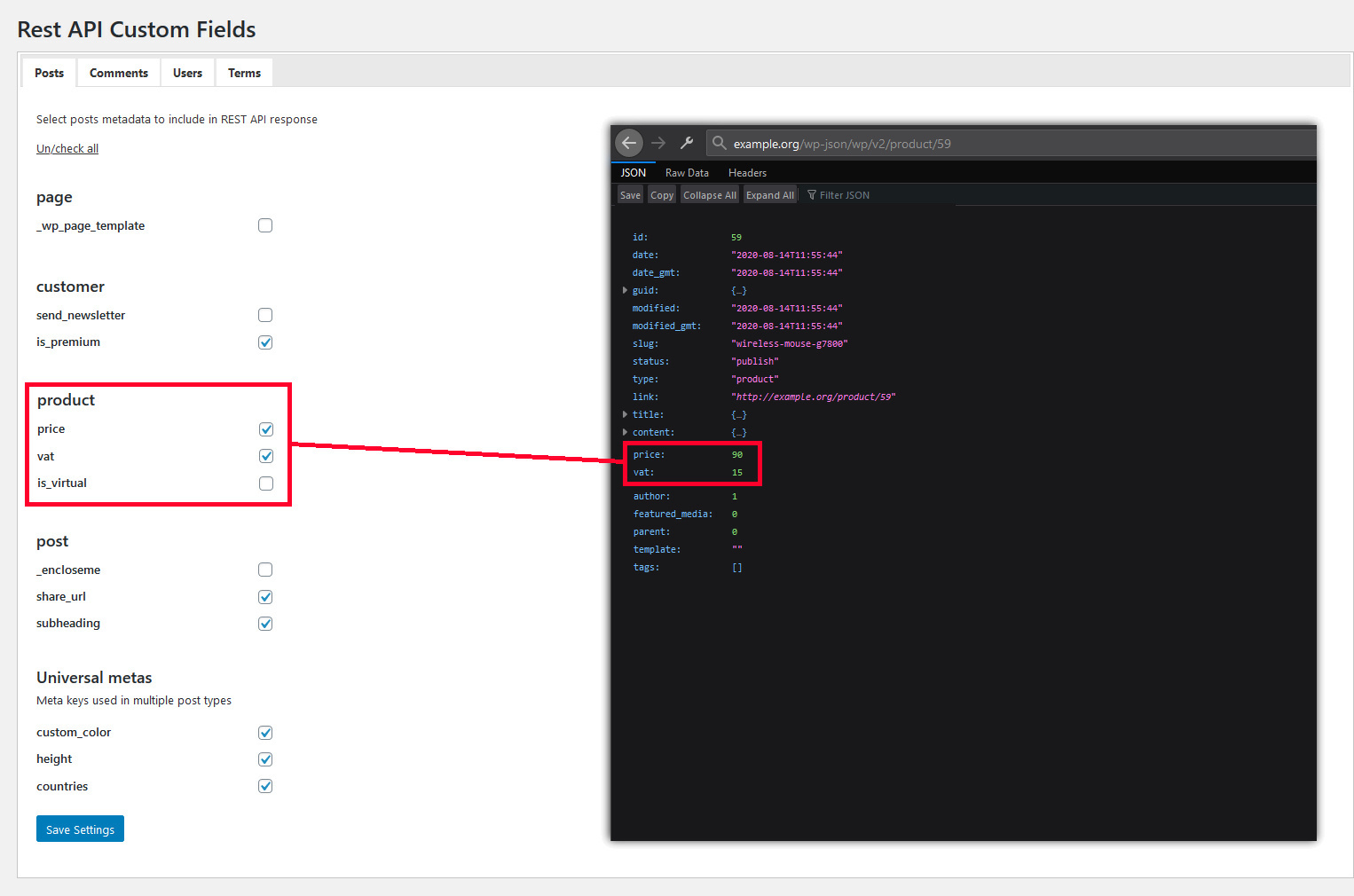
Settings pane
Changelog
1.3
- It is now possible to expose custom fields of custom post types
1.2
- Exposed values can now contain arrays
- Attributes representing custom fields moved directly under the top-level node in the response
1.1
- Fixed db prefix
1.0
- Init version