

Restricts Date for WPForms
Restrict Dates is a WPForms add-on that restricts users from selecting specific dates in your WPForms date picker field.
Plugin info
Maintenance & Compatibility
Maintenance score
Maintained • Last updated 125 days ago • 2 reviews
Is Restricts Date for WPForms abandoned?
Likely maintained (last update 125 days ago).
Compatibility
Languages
Similar & Alternatives
Explore plugins with similar tags, and compare key metrics like downloads, ratings, updates, support, and WP/PHP compatibility.
Description
DEMO: https://demo.add-ons.org/demo-restrict-date-fields/
Pro version: https://add-ons.org/plugin/restrict-date-field-for-wpforms-pro/
Document: https://add-ons.org/restrict-dates-field/
WPForms – Restrict Dates allows you to set specific date restrictions on date fields within your WPForms. It allows you with various settings to restrict the selected dates easily
You can set minimum and maximum dates, specify date ranges, and customize additional options to control the available choices for users.
Features
- Min days: Allow admin to set minimum restrict date range
- Max days: Allow admin to set maximum restrict date range
- Weeks: Allow admin to set weekend/weekdays for the selected date range
- Exceptions: Allow admin to add exception dates for the selected date range
- 2 dependent dates: With min and max date
Flexibility in Date Restrictions
Provides flexibility in defining date restrictions. You can set both the minimum and maximum dates, allowing you to create a specific range of selectable dates. This is beneficial for scenarios where you want to limit the date options based on specific requirements, such as event start and end dates or booking availability.
Minimum Date
Set the earliest date that users can select. For example, you can restrict the selection to dates starting from today or today +1 days or any specific date.
Maximum Date
Set the earliest date that users can select. For example, you can restrict the selection to dates starting from today or today +1 days or any specific date.
Exclusion Days
You can exclude specific days of the week from being selectable. For example, if your business is closed on Sundays, you can exclude that day from the available choices.
Relative Dates
You can utilize relative dates to set dynamic restrictions. For instance, you can specify a minimum date as “+2 weeks” from the current date, ensuring that users can only select dates at least two weeks in the future.
Improved User Experience
By implementing date restrictions in your WPForms, you enhance the user experience. Users will only see and be able to select valid and relevant dates, reducing confusion and potential errors.
PRO VERSION
- 2 dependent datepickers with min and max date
WPForms Restrict Date
WPForms Date Restrictions, Restrict Dates WPForms, Date Picker Restrictions, Minimum Date, Maximum Date, Date Range Limitation, Disable Past Dates, Limit Days WPForms, Weekend/Weekday Restrictions, Exception Dates, Form Scheduling, Date/Time Field Customization, WPForms Pro, Conditional Logic Dates, Event Registration Forms, Appointment Scheduling, Booking Availability, Custom Date Picker, Date Dropdown, Dynamic Date Range
Installation
Normal installation
- Download the restrict-field-for-wpforms.zip file to your computer.
- Unzip the file.
- Upload the
restrict-field-for-wpformsdirectory to your/wp-content/plugins/directory. - Activate the plugin through the ‘Plugins’ menu in WordPress.
- Document: https://add-ons.org/restrict-dates-field/
Frequently Asked Questions
Review feed
Author
Screenshots
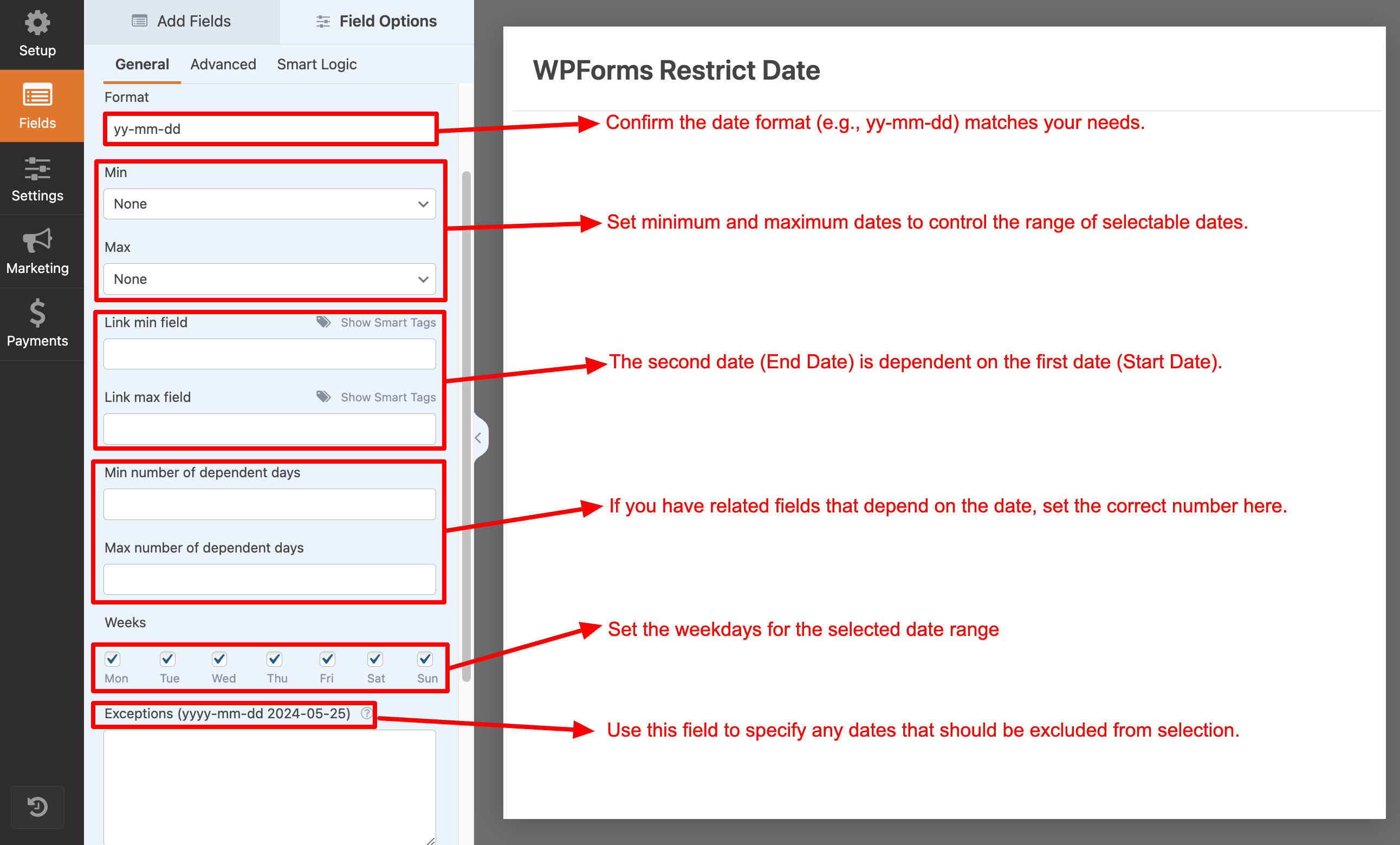
Backend settings

Frontend view

Demo
Changelog
1.1.4
- Range Years: -130 to +100 years
1.1.3
- Fixed: trigger(“change”)
1.1.0
- Added: Divided into 2 versions: free and pro
1.0.7
- Fixed: Option curent min
1.0.6
- Fixed: Hide Settings
1.0.5
- Fixed: Pro version
1.0.4
- Fixed: Options backend
1.0.3
- Fixed: Exceptions
1.0.1
- Version 1.0 Initial Release