

Reusable Blocks Extended
Extend Gutenberg Reusable Blocks feature with a complete admin panel, widgets, shortcodes and PHP functions.
Plugin info
Maintenance & Compatibility
Maintenance score
Maintained • Last updated 126 days ago • 40 reviews
Is Reusable Blocks Extended abandoned?
Likely maintained (last update 126 days ago).
Compatibility
Languages
Similar & Alternatives
Explore plugins with similar tags, and compare key metrics like downloads, ratings, updates, support, and WP/PHP compatibility.
Description
Extend Gutenberg Reusable Blocks feature with a complete admin panel, widgets, shortcodes and PHP functions.
This plugin extends the Reusable Blocks admin interface and provides few fancy features:
- Add Reusable Blocks dashboard informations
- Activate Reusable Blocks admin screen
- Provide a list of Posts where each Reusable Block is used and the date it was last modified
- Provide a live preview of your reusable blocks from the Reusable Blocks admin screen, with your theme stylesheets
- Provide a Reusable Blocks Widget to use your block anywhere you want in your theme’s widgets areas
- Provide a Reusable Blocks Shortcode to use your block anywhere you want in your Post types (even if they use the Classic Editor rather than Gutenberg!)
-
Provide some Reusable Blocks PHP functions to use your block anywhere you want in your theme even
-
NEW: An easy tool to convert reusable blocks to block patterns in one click!
For a full presentation of Reusable Blocks Extended, see this WordCamp Talk synthesis available on my blog.
Installation
- Install the plugin and activate.
- Go to Reusable Blocks Admin Menu
Frequently Asked Questions
- Go to WP-Admin > Appearance > Widgets.
- Add “Reusable Block” Widget to your widget area.
- Choose the reusable block you want to use and save the widget.
- Go to WP-Admin > Reusable Blocks.
- Choose the reusable block you want to use; copy the provided shortcode.
- Then, paste it where you want.
Syntax: [reblex id="NUMERIC_ID_OF_THE_REUSABLE_BLOCK"]
- Go to WP-Admin > Reusable Blocks.
- Choose the reusable block you want to use; copy the provided PHP function.
- Then, paste it where you want.
Syntax:
reblex_display_block( NUMERIC_ID_OF_THE_REUSABLE_BLOCK );
Note for developers: you may also need to get the shortcode data before displaying it. In this case, you should use the following function:
reblex_get_block( NUMERIC_ID_OF_THE_REUSABLE_BLOCK );
Review feed
Block patterns to sidebar! That's what I was looking for
Great job
Now I have a reason to use reusable blocks!
Screenshots
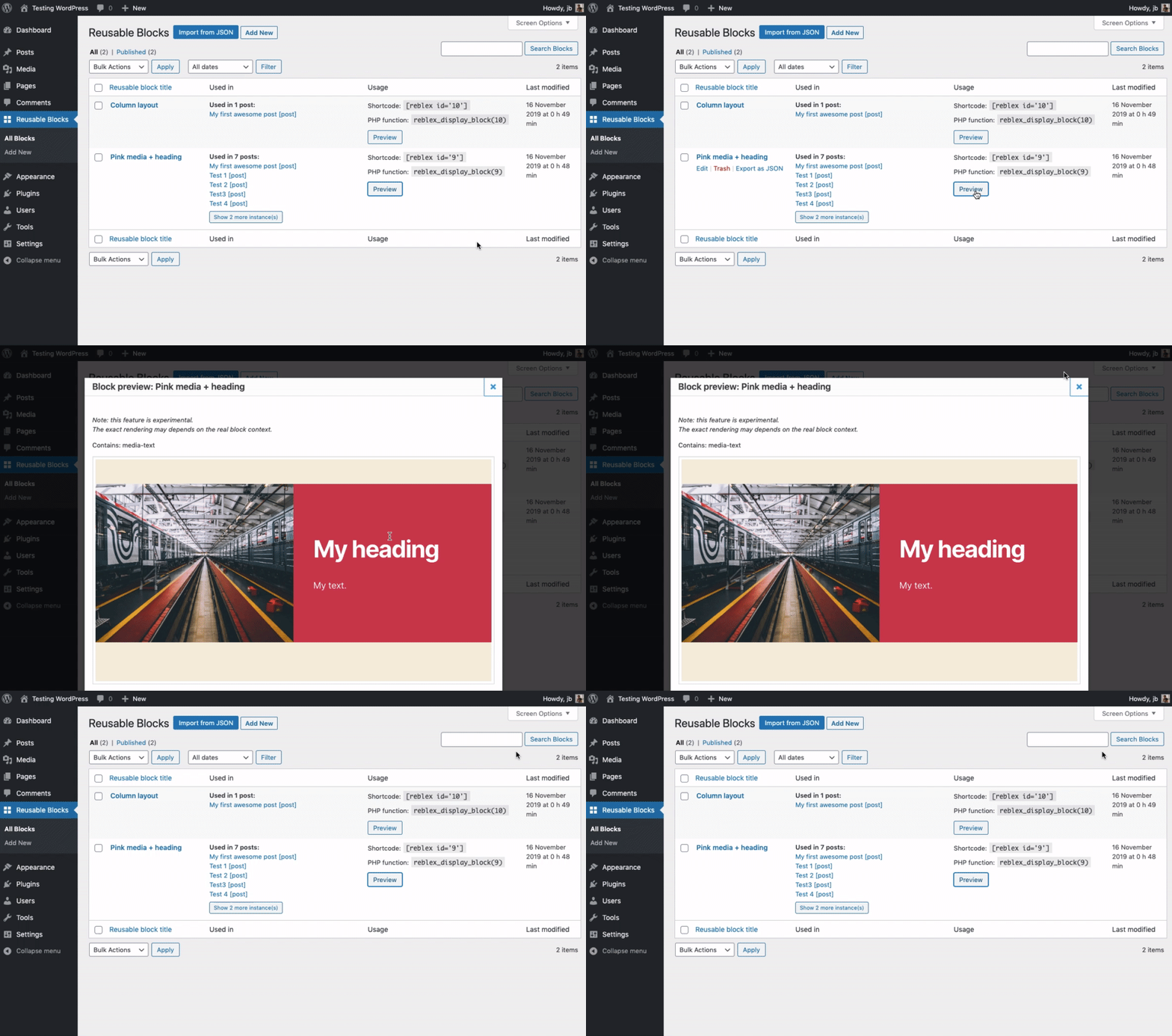
Extended Reusable Blocks admin screen with preview
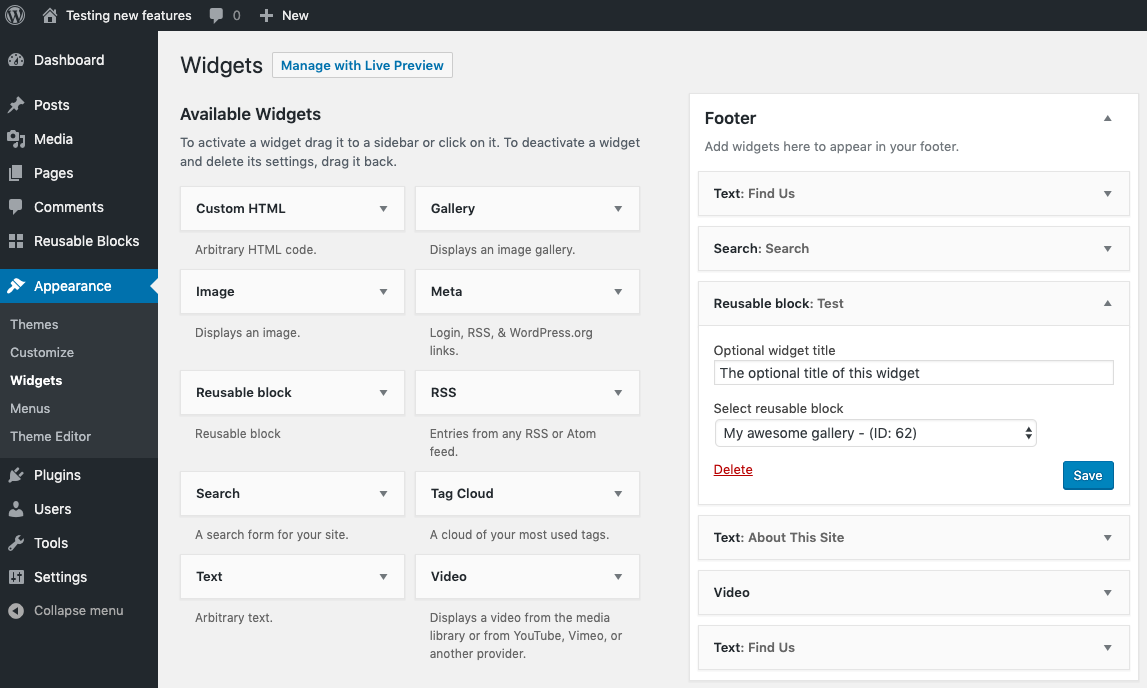
Reusable block widget
Changelog
0.9.1
- Security fixes. Props to Rio Darmawan and Darius S., via Patchstack Alliance ♥️
0.9
- Props @chaton666 (Marie Comet) for a small fix.
- WP 6.0 compatibility.
0.8
- Performance enhancement on the
wp_blocklist table. Props @grapplerulrich for spotting this.
0.7
- WP 5.8 compatibility.
- Replace “Reusable blocks” menu name with “Blocks”.
- Small variable name and docs change.
- Various minor interface improvements.
0.6.2
- Removes a PHP notice.
0.6.1
- Fix an issue with polylang plugin (props @eddystile).
0.6
- Introduces the Block Pattern conversion tool for WP 5.5+.
0.5.1
- Fixes a bug with ACF Pro Blocks. Props @mbcreation for raising the issue.
0.5
- Improvement of the preview feature, which is now displaying your reusable blocks in a modal window.
0.4
- Force block editor for wp_block post type even with Classic Editor plugin activated.
- Collapsible items improvements.
0.3
- Make block instances collapsible for a better preview. Props @alfredg.
0.2
- Use @import instead of link tag or enqueues in the preview iframe.
0.1
- Plugin initial commit. Works fine 🙂