

Plugin info
Maintenance & Compatibility
Maintenance score
Possibly abandoned • Last updated 6523 days ago
Is Revisions abandoned?
Possibly abandoned (last update 6523 days ago).
Compatibility
Similar & Alternatives
Explore plugins with similar tags, and compare key metrics like downloads, ratings, updates, support, and WP/PHP compatibility.
Description
Provide Versioning, Preview and Rollback ability on Pages and Posts.
Version Histroy
1.0 – 2008-03-16: Initial release
1.1 – 2008-03-21: Fixed slight error in INSERT SQL for the new Revision. Also fixed escape on inserted content.
1.1b- 2008-04-04: Changed the ‘post_status’ value on the saved revision to ‘inherit’ as this was causing problems with some other plugins.
1.1c- 2008-04-17: Added notation to indication current version.
1.2 – 2008-04-18: Changes to Admin display section to make things work under WP 2.5
1.8 – 2008-05-04: changes to enhance WP 2.5 design integration. Added ability to delete revisions, set a no revision ‘minor-edit’ option, set a no revisions for life checkbox. Display on last 5 revisions with link to reveal more.
1.8.3 – 2008-05-23: Minor changes to display. Added link to reload most current version of content.
Installation
- Upload
Revisionsfolder and contained files to your/wp-content/plugins/directory - Activate the plugin through the ‘Plugins’ menu in WordPress
- Navigate to Write -> Post or Write -> Page.
Frequently Asked Questions
What Post fields are versioned?
At the moment only the content itself is saved. I’ve had requests for categories, tags and meta information. I will be adding revision support for title and meta in the next major release.
Review feed
Screenshots
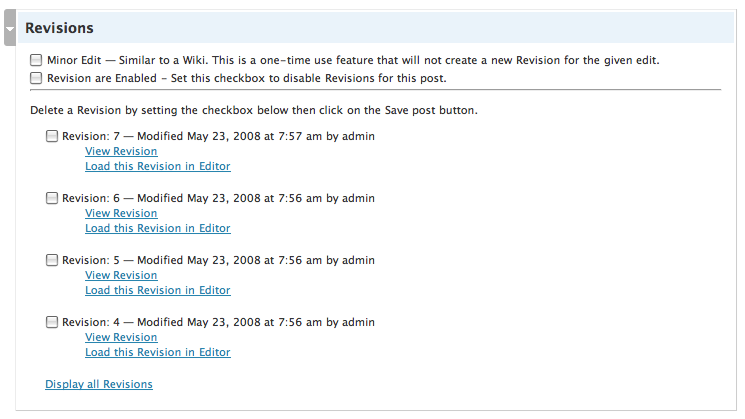
Post/Page Admin interface in WordPress 2.5.x

Post/Page Admin interface when older Revision is loaded with notes.