

Rich Contact Widget
A simple contact widget enhanced with microdatas & microformats tags for your local SEO
Plugin info
Maintenance & Compatibility
Maintenance score
Possibly abandoned • Last updated 3047 days ago • 7 reviews
Is Rich Contact Widget abandoned?
Possibly abandoned (last update 3047 days ago).
Compatibility
Similar & Alternatives
Explore plugins with similar tags, and compare key metrics like downloads, ratings, updates, support, and WP/PHP compatibility.
Description
This contact widget comes with microdatas & microformats markup, so that search engines can use it in their search results. They can help display contact information about your business or yourself below your website in search results, and even a map with your location, to improve your local SEO.
The telephone & email are linked so that visitors can click on it and make a call (through mobile or skype) or send a mail from their computer or their mobile devices.
You can also display a static image map of your location, linking to the address’ Google Maps page, and display a download link for a vCard.
More informations on microdatas microformats can be found here :
- http://schema.org
- http://microformats.org
Feedbacks and suggestions for improvement are greatly appreciated ! You can go to github to help : https://github.com/Tabrisrp/rich-contact-widget
Rich Contact Widget requires PHP5 to work !
Credits for translation :
- Slovak by WebHostingGeeks.com
Installation
- Upload the
rich-contact-widgetdirectory to the/wp-content/plugins/directory - Activate the plugin through the
Appearance->Pluginsmenu in WordPress - Go to the Widgets sub-section and add the Rich Contact Widget in the required sidebar
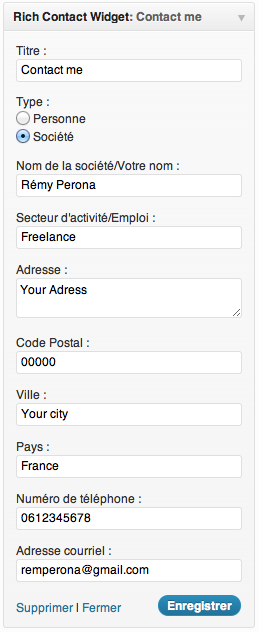
- Fill the fields to add your contact information
- Save
Frequently Asked Questions
Installation Instructions
- Upload the
rich-contact-widgetdirectory to the/wp-content/plugins/directory - Activate the plugin through the
Appearance->Pluginsmenu in WordPress - Go to the Widgets sub-section and add the Rich Contact Widget in the required sidebar
- Fill the fields to add your contact information
- Save
How to change the output using the filters ?
- You can add or remove fields in the contact widget output and widget form with the
rc_widget_keys,rc_widget_form_ouputandrc_widget_outputfilters. - You can add more types of the schema.org itemtype to better fit your business with the
rc_schema_typesfilter.
Review feed
Screenshots


Changelog
1.4.6
- Link to Google Maps opens in a new tab/window
1.4.5
- Fix link to Google Maps when the map is displayed
1.4.4
- Bugfix : the coordinates in the KML file were in the wrong order
1.4.3
- Bugfix : the KML file didn’t have the corresponding coordinates when an address was filled. Replaced custom code with native wp_remote_get() function
1.4.2
- Compatibility test with WP 3.9 widget customizer
- Small fixes
1.4.1
- Added German translation (Thanks to Patrick Niemann)
1.4
- The plugin now creates a kml file and an associated sitemap file (You’ll have to re-save the data to create the files)
- If you have WordPress SEO by Yoast installed, it will add the sitemap to the sitemap index created by the plugin
1.3.2
Added spanish translation by https://wordpress.org/support/profile/cris_gn
1.3.1
- bugfix : added defaults values if width and height fields for the map are empty or the values are above 640
- changed markup for the address
- added support for multilines address
1.3
- Replaced the radio buttons for company type by an extensive select menu containing all schema.org business types.
1.2.1
- Some HTML Fixes (thanks to Julien Maury @TweetPressFr)
1.2
- Undefined variable fix
- Added Slovak translation
1.1
- Added Russian translation
1.0
- Fix : bug with WP version lower than 3.4 with wp_is_mobile
- Added : optional link for vCard download
0.7
- Updated to work with US addresses (added state field and changed output a little)
- Added width and height attributes to image map
0.6
- Added mobile check with wp_is_mobile() for the “tel:” link (link is displayed only if wp_is_mobile() is true)
- Cleaned up some code with checked() and selected() functions
- Moved screenshots to assets folder, reducing the size of the plugin zip file
0.5
Added option for static image map displayed in the widget, linking to Google Maps
0.4
Added antispambot on email adress
0.3
Added filters to change the output of the widget
0.2
- Added choice between Person or Company for microdata/microformat tagging
- Added activity/job field
0.1
Initial release