
Rife Extensions & Templates for Elementor
Brings new widgets to be used in Elementor and allows you to import beautiful full page templates for Elementor page builder designed by Apollo13Theme …
Plugin info
Maintenance & Compatibility
Maintenance score
Stale • Last updated 189 days ago • 3 reviews
Is Rife Extensions & Templates for Elementor abandoned?
Likely maintained (last update 189 days ago).
Compatibility
Developers
Languages
Similar & Alternatives
Explore plugins with similar tags, and compare key metrics like downloads, ratings, updates, support, and WP/PHP compatibility.
Description
Are you looking for beautiful Elementor templates for your site? Glad you have found this plugin.
We bring you well designed & responsive templates for your landing pages. Check templates live here.
Current templates are:
- Pile – (New!)nice looking Elementor template prepared especially for an Architecture Studio but, it also great for developers.
- Loma – excellent template for use on a personal website where you can describe you Resume and your portfolio.
- Shore – is a perfect template for presenting your company or product. It also works great as a landing page or one page!.
- Ava – also works great when creating a description of your company, but you can also use it to prepare About us page.
- Bold – Bold is another universal Elementor template that you can use for any purpose.
Additionally, a plugin has a special writing effect widget for Elementor. You can see it used in our templates.
Writing effect offers you to create titles that are half static, and half written as user scrolls to it. You can achieve with it very interesting effects, of animated text.
It can be found under name “Writing Effect Headline” in “Basic” Widgets in Elementor edit screen.
This plugin requires Elementor page builder plugin to be active.
Credits & Copyright
Typed.js, Copyright 2014 Matt Bold
Licenses: MIT
Source: https://github.com/mattboldt/typed.js
Installation
- Upload the plugin files to the
/wp-content/plugins/plugin-namedirectory, or install the plugin through the WordPress plugins screen directly. - Activate the plugin through the ‘Plugins’ screen in WordPress
- Use the Elementor -> Rife Extensions & Templates for Elementor screen to import templates
Frequently Asked Questions
Review feed
Screenshots
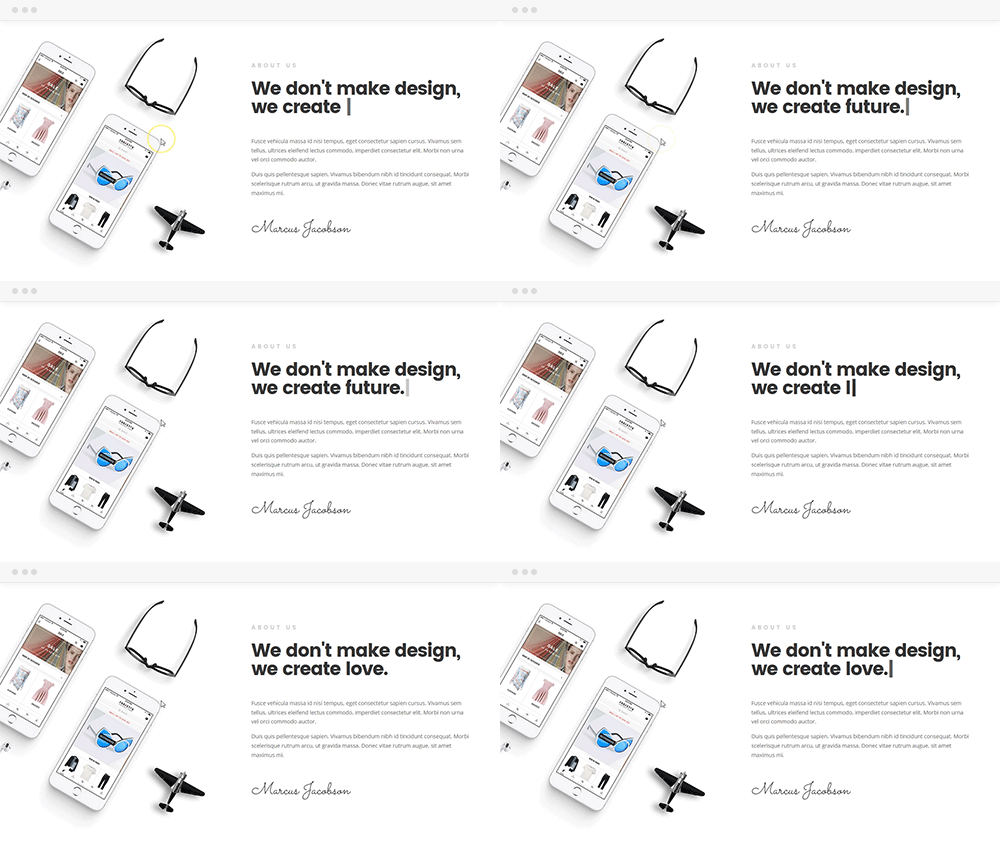
Writing effect in action

Where to find "templates import"

Loma Template

Shore Template

Ava Template

Bold Template

Pile Template
Changelog
1.2.8(29.09.2025)
Changed:
– Plugin renamed to Rife Extensions & Templates for Elementor
1.2.7(21.02.2025)
Fixed:
– typo in php
1.2.6(20.02.2025)
Fixed:
– XSS vulnerability removed
1.2.5(14.09.2024)
Fixed:
– missing license in js library files
1.2.4(14.09.2024)
Fixed:
– missing js library files
1.2.3(14.09.2024)
Tested with WordPress 6.6
Fixed:
– Works with updated Elementor (self-hosted waypoints.js)
1.2.2(30.06.2024)
Tested with WordPress 6.5
Fixed:
– DOM XSS in Widget
1.2.1(04.09.2023)
Tested with WordPress 6.3
Improved:
-changes to match deprecated code in Elementor 3.15
1.2.0(01.03.2023)
Tested with WordPress 6.1
Fixed:
-The plugin CSRF and broken access control vulnerabilities
1.1.10(21.04.2022)
Tested with WordPress 5.9
Fixed:
-Notices thrown with Elementor 3.6.4 on registering widgets
1.1.9(1.09.2021)
Tested with WordPress 5.8
Fixed:
-issue with importing templates where they are deleted by Elementor
1.1.8(5.05.2021)
Tested with WordPress 5.7
Fixed:
-deprecated notices that were displayed since Elementor 3.2.0
1.1.7(1.04.2021)
Tested with WordPress 5.7
Fixed:
-fixed fatal error that can happen on older versions of Elementor with 1.1.6 version(thanks Edwin!)
1.1.6(30.03.2021)
Tested with WordPress 5.7
Fixed:
-possibility to change tag of wirting effect widget(thanks Ramuel G)
1.1.5(15.12.2020)
Tested with WordPress 5.6
Fixed:
-preview of the writting effect in Elementor preview(again)
1.1.4(07.09.2020)
Tested with WordPress 5.5
Fixed:
-preview of the writting effect in Elementor preview
1.1.3(01.04.2020)
Tested with WordPress 5.4
Fixed:
-not needed console log on the frontend
1.1.2(12.06.2019)
Fixed:
-Firing the writing effect when it is used at very bottom of the page
1.1.1(16.05.2019)
Added:
-Compatibility with WordPress 5.2
Improved:
-look of instruction pages in WordPress 5.2
1.1.0(29.11.2018)
Added:
-New template named “Pile”
Improved:
-keyboard navigation through plugin
1.0.1(16.08.2018)
Fixed:
-including scripts only when they are needed
1.0.0(27.07.2018)
-Initial release