

Role Based Pricing for Woo by Meow Crew
Create individual pricing for customers based on their role or account. Works with all types of products along with Import-Export tools
Plugin info
Maintenance & Compatibility
Maintenance score
Stale • Last updated 265 days ago • Support resolved 100% • 5 reviews
Is Role Based Pricing for Woo by Meow Crew abandoned?
Likely maintained (last update 265 days ago).
Compatibility
Similar & Alternatives
Explore plugins with similar tags, and compare key metrics like downloads, ratings, updates, support, and WP/PHP compatibility.
Description
With Role Based Pricing for Woo by Meow Crew, you can create new roles in your WooCommerce store, set personalized pricing for users who have these roles, or set custom pricing for individual users. You can also set purchase rules for each product separately, including minimum/maximum quantity and quantity step. Additionally, you can prevent purchases by non-logged in users and hide prices from them.
As you can see, Role Based Pricing for Woo by Meow Crew is the most complete solution that includes everything you need – from a role design tool and various ways to assign pricing for users, to quantity rules and import-export features. You can manage role-based or customer-based prices using the default WooCommerce Import/Export tool, and it is also integrated with WP All Import.
To find out more about the plugin, read the latest Role-based pricing plugins comparison here – 9 Best Role-based Pricing and Wholesale plugins for WooCommerce [2022 comparison]
Important links:
Premium Version Page | Demo for Plugin Testing | Plugin Documentation
Features:
- Create custom user roles (with the same capabilities that WP regular roles provides)
- Create, activate and suspend pricing rules based on user role or for separate user/users account
- Use flat pricing to create prices based on user role/account (regular and sale prices available)
- Make general pricing rules for whole category/categories or separate products
- Create role-based or customer-based pricing rules on the product level
- Prevent purchase or hide prices for non-logged users
- Customize add-to-cart label and error message for non-logged users
- Display personal prices as a sale price
- Works with: Simple, Variable, Grouped, and Subscription types of products (both virtual and physical), and WooCommerce Product Add-ons
Premium features:
- Use percentage discounts to create prices based on user role/account
- Set minimum & maximum products per one order based on roles
- Set quantity step for each product based on user role
- Import/export role and customer-based pricing via WooCommerce import/export tool
- Import role-based prices via WP All Import
- Use sale or regular price as based price
- Custom tax settings for each role separate from store defaults: disable taxes or hide them on shop and checkout pages
With role-based pricing in WooCommerce, you can create custom prices by user role. This means that users with a certain role will see different prices for the same product than users with another role. For example, you might offer a discount to wholesale customers who buy in bulk, or charge a premium for products sold to non-registered users.
The Role Based Pricing for Woo by Meow Crew plugin contains everything you need to run a successful wholesale or membership business, which often requires special offers for various customer groups. It stands out favorably among other plugins by offering every possible feature you need. So don’t hesitate, and give it a try.
You can find instructions on how to mass import wholesale and role-based prices here – Mass import product prices by user roles in WooCommerce
Installation
- Upload the plugin files to the \’/wp-content/plugins/role-and-customer-based-pricing-for-woocommerce\’ directory, or install the plugin through the WordPress plugins screen directly.
- Activate the plugin through the \’Plugins\’ screen in WordPress
- Use the WooCommerce > Settings > Role\Customer Based Pricing to configure the plugin
- To design general role-based or customer-based pricing and quantity rules go to WooCommerce > Pricing rules
- To create pricing rules separately for each product, go to the product page and find the Role\User pricing tab in the product setup.
Frequently Asked Questions
Review feed
Great plugin with a solid support!
Screenshots
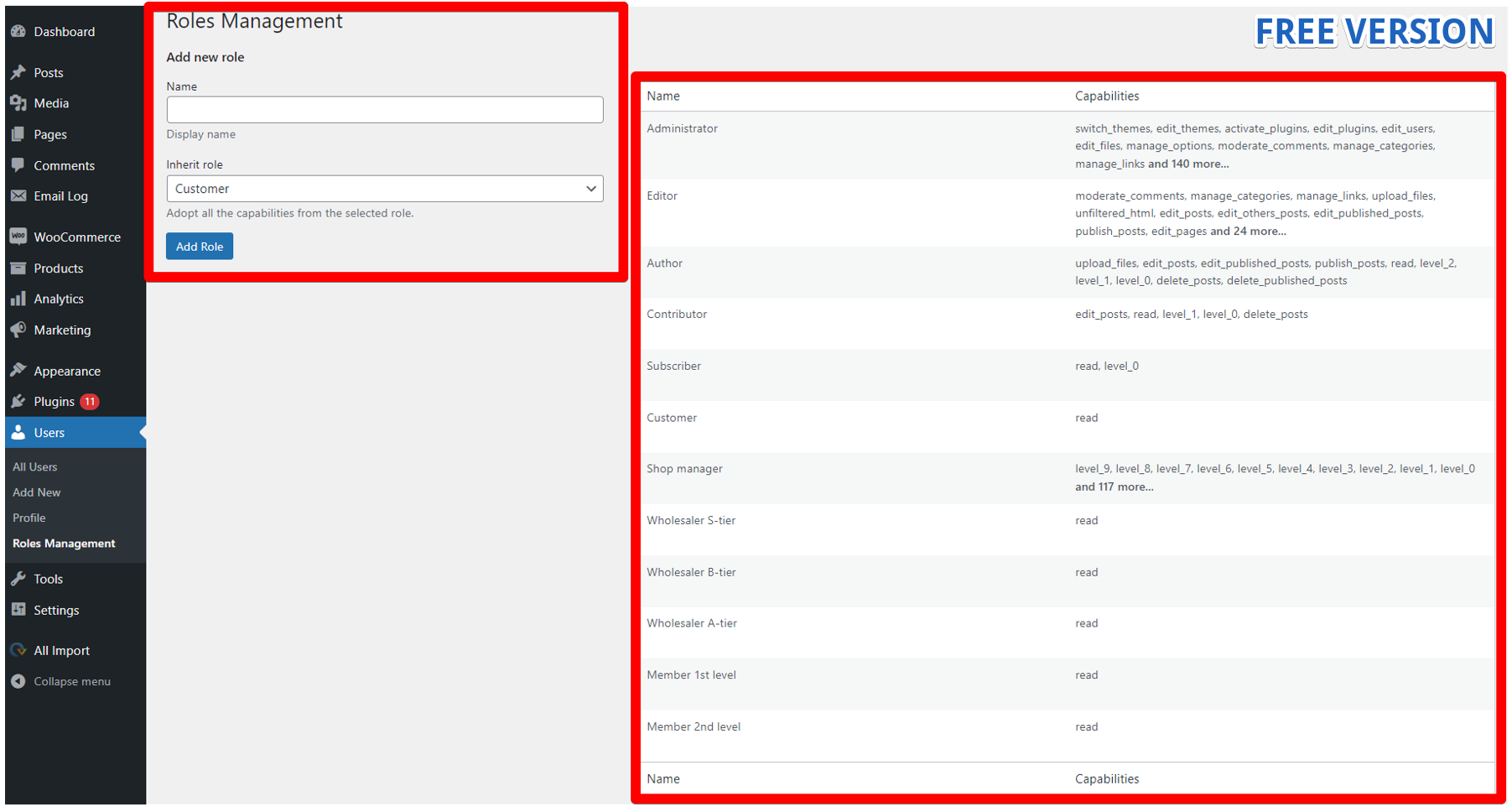
Create custom user role

General pricing rules table

Create Pricing Rule - Percentage discount

Create Pricing Rule - Fixed Prices

Pricing Rule on Product level - Fixed Prices

Multiple rules per product

Quantity rules

General settings of price display

Prevent purchase for non-logged user

Hide prices for non-logged users

Import-Export via WooCommerce regular tool
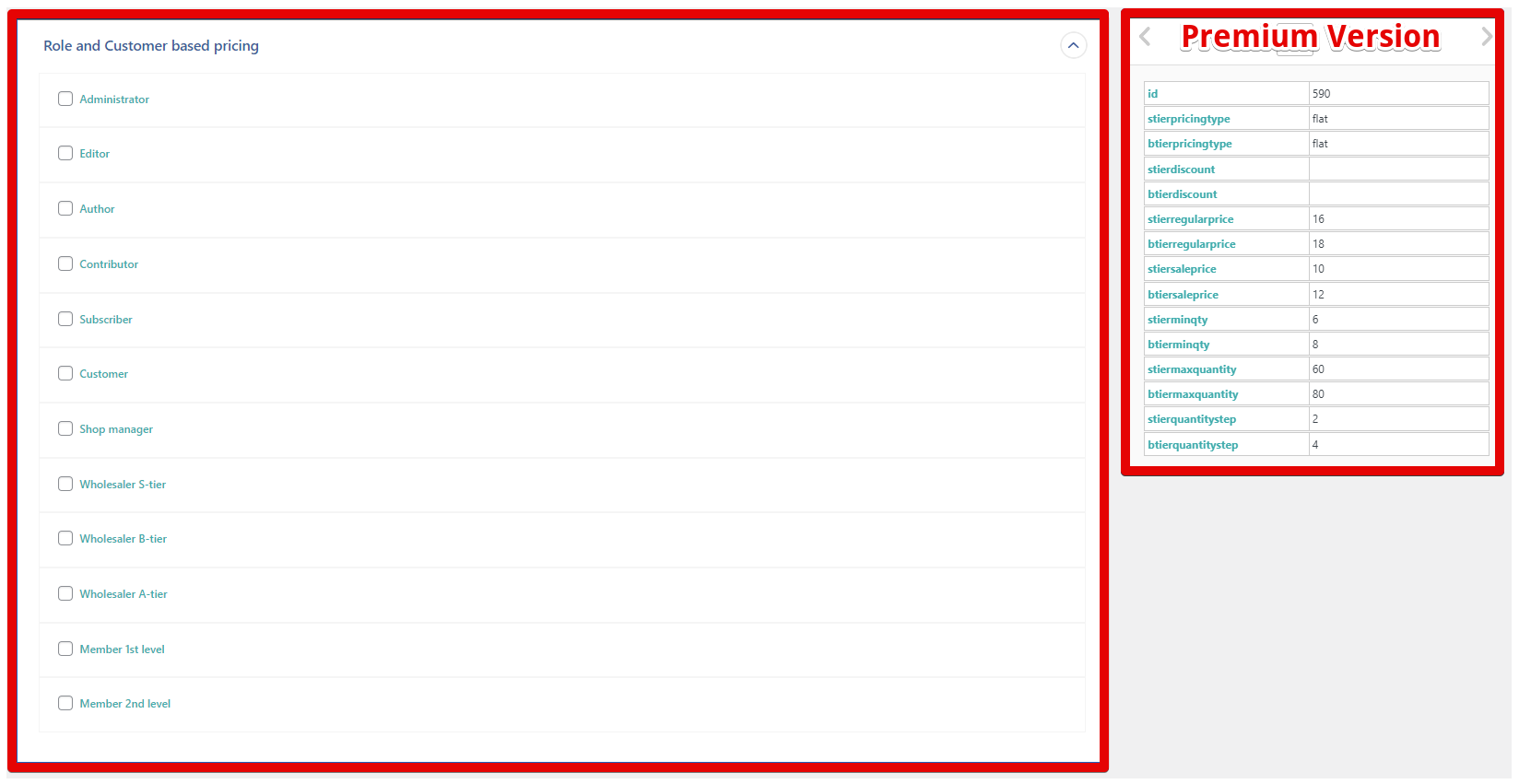
Import Pricing Rules for various User Roles via WP All Import plugin

Taxes settings based on user role
Changelog
2025-07-11 – version 1.6.3
* Update: Update code due to WordPress.org compliance
2025-07-08 – version 1.6.2
* Update: Freemius SDK update to 2.12.1
* Update: Bump WordPress and WooCommerce versions compatibility
2025-04-20 – version 1.6.1
* Update: Freemius SDK update
* Update: Bump WordPress and WooCommerce versions compatibility
2024-11-01 – version 1.6.0
* New: Tax settings based on user role
* Fix: Freemius version update
* Updated: WooCommerce 9.4 version compatibility
2024-09-05 – version 1.5.5
* New: Hook to add compatibility with custom post types
* New: Select regular or sale price to calculate discounts
* Fix: ‘Unsupported operand types’ warning
2024-06-18 version 1.5.4
* Updated: Smart Coupons compatibility
* Updated: Woo and WP version compatibility
* Fix: Updating role-based related values on Woo Import
* Fix: Default values for add-to-cart labels
2024-02-27 – version 1.5.3
* Fix: Compatibility with WooCommerce Product Add-ons price affected on cart\checkout
* Fix: Negative values used in % pricing rules
* Fix: Compatibility with Woo Bundles + other similar plugins
2023-11-16 – version 1.5.2
* Fix: Regular Woo price instead of role-based in some cart types
* Fix: Adjusted characters limits in the selectwoo fields
* Updated: Woo 8.2.2 version compatibility
* Updated: Woo Cart and Checkout blocks compatibility
* Updated: WordPress 6.4.1 version compatibility
2023-09-13 – version 1.5.1
* Update: Compatibility with Learndash courses type of product
* Fix: 0 values set as sale price while importing through WPAI
* Fix: 0 cost when Product Add-ons enabled for subscription-based products
2023-07-25 – version 1.5.0
* Update: Compatibility with WooCommerce Product Add-ons
* Fix: Qty rules work well when price rules aren’t set
* Fix: Negative values can be imported via WooCommerce Import and WP All import
* Fix: Qty rules exporting when no discount\price rule set
* Fix: 0.00 cost can be set as flat price
2023-07-05 – version 1.4.1
* Updated Freemius SDK to the latest version
* Fix: Price calculation for variable product when general rule used
2023-06-20 – version 1.4.0
* Fix: WooCommerce Import – Importing pricing rules w/o product_id
* HPOS compatibility
2023-02-19 – version 1.3.0
* Fix: WP All Import – Terminated Imports due to PHP version issues
* Fix: Woocommerce “Quick edit” action issue
2022-09-14 – version 1.2.0
* Fix: WP All Import: cleanup of role-based rules when pricing rules aren’t imported
* Fix: WP All Import: issue with importing pricing rules for roles with similar slug
2022-07-22 – version 1.1.0
* Fix: Bug with limited 5 pricing rules
* Fix: WP All Import – importing pricing rules separately from other fields
* WooCommerce version support
2022-04-21 – version 1.0.3
* Fix: Appearing errors in admin panel
* WooCommerce version support
2022-03-29 – version 1.0.2
* Security fix
* Bug fixes & minor improvements
* Latest WordPress and WooCommerce version support
2022-02-16 – version 1.0.1
* Plugin translations
* Minor UI improvements
* Latest WordPress and WooCommerce version support
2021-12-28 – version 1.0.0
* Initial release