

Ron Social Page Embed
Display your Facebook page with customizable options via a simple shortcode or widget. No App ID needed.
Plugin info
Maintenance & Compatibility
Maintenance score
Maintained • Last updated 136 days ago
Is Ron Social Page Embed abandoned?
Likely maintained (last update 136 days ago).
Compatibility
Similar & Alternatives
Explore plugins with similar tags, and compare key metrics like downloads, ratings, updates, support, and WP/PHP compatibility.
Description
Easily embed your Facebook Page on your WordPress website. This plugin allows you to display your page’s feed, cover photo, and profile pictures using either a simple widget or a flexible shortcode. No Facebook App ID or API key is required—just your Page URL.
Key Features:
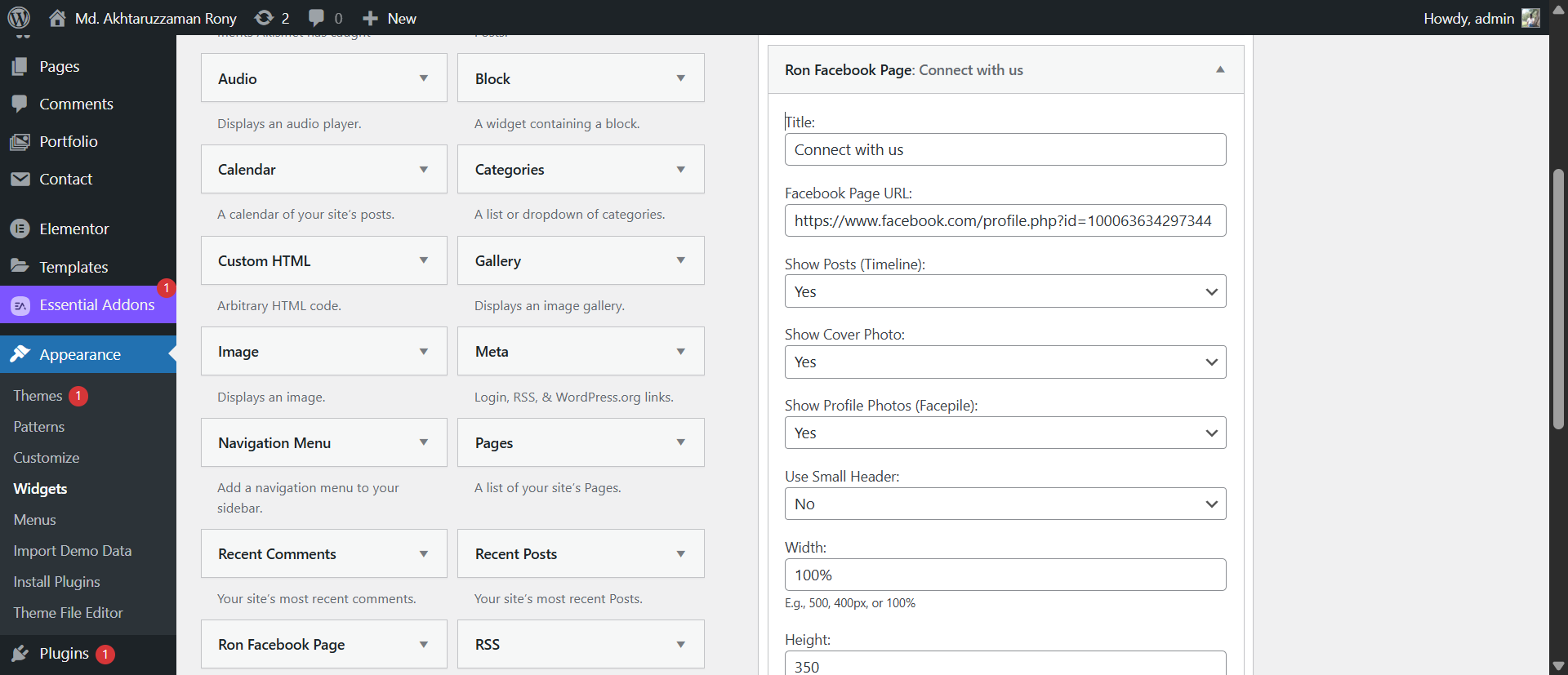
- Widget Ready: Add the “Ron Social Page Embed” widget to any sidebar or footer.
- Shortcode Ready: Use
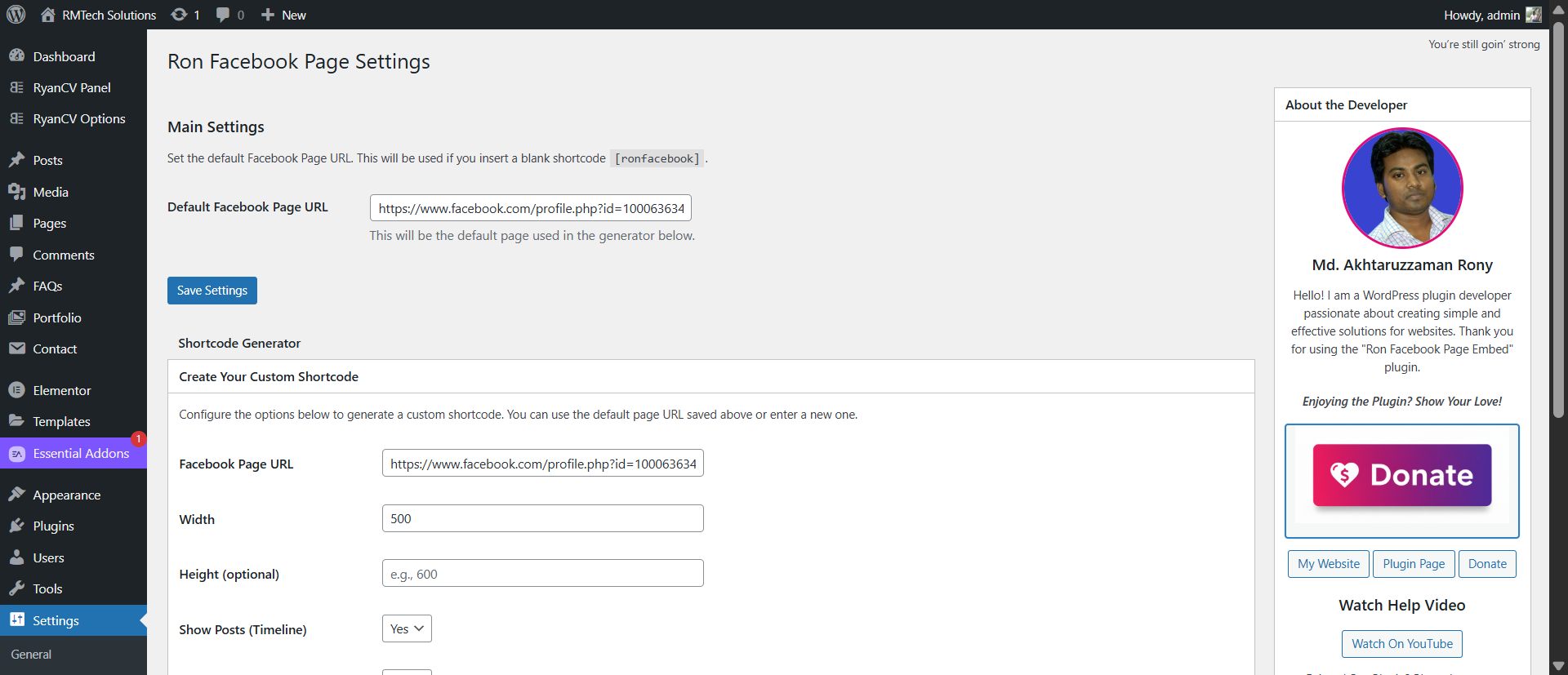
[ronfacebook]to embed anywhere in your posts and pages. - Settings Page: Go to Settings > Ron Social Page Embed to set a default URL and generate shortcodes.
- No App ID Needed: Works right out of the box with just your Page URL.
- Customizable: Show or hide the timeline (posts), cover photo, and facepile (profile photos).
- Flexible Width: Set width in
px(e.g.,500px) or percentage (100%). - Responsive: Automatically adapts to container width (up to Facebook’s 500px maximum).
- Need Help?
- About Author
- Donate link
External Services
This plugin relies on the Facebook SDK to display the social page embed.
* Service: Facebook (Meta) SDK
* Usage: To render the Facebook Page plugin timeline, cover photo, and events.
* Data Sent: Requests are made directly from the visitor’s browser to Facebook’s servers (connect.facebook.net). Facebook may collect IP addresses, browser information, and other data according to their policy.
* Privacy Policy: Meta Privacy Policy
* Terms: Meta Terms of Service
Widget Options:
- Facebook Page URL
- Show/Hide Posts (Timeline)
- Show/Hide Cover Photo
- Show/Hide Profile Photos (Facepile)
- Use Small Header
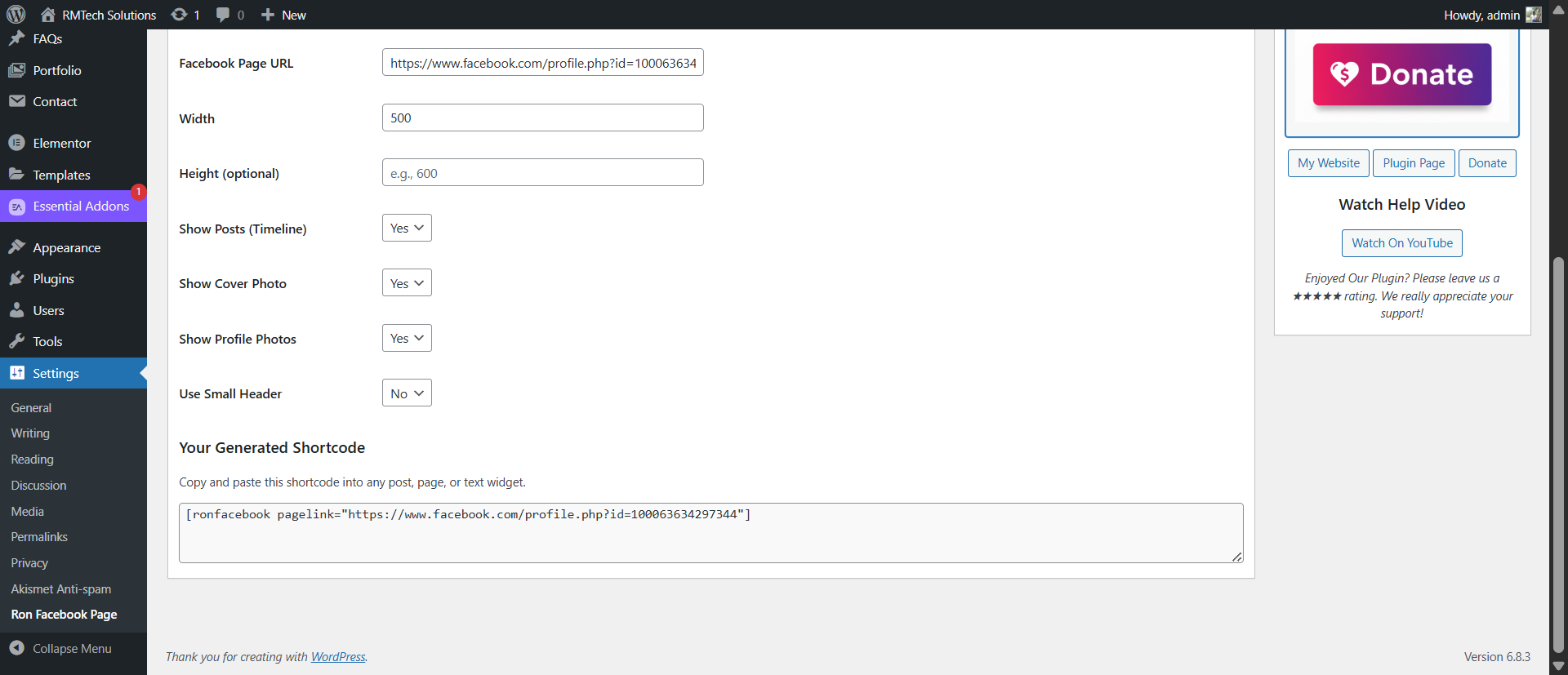
- Custom Width & Height
Shortcode
[ronfacebook pagelink=”https://facebook.com/yourpage”]
Privacy
This plugin does not collect or store any user data on your server. However, it embeds content from Facebook, which may collect data as described in the “External Services” section.
Feedback
Any suggestions or feedback are welcome. Thank you for using or trying one of my plugins. Please take the time to let me know about your experiences and rate this plugin.
Support
Installation
Method 1: WordPress Dashboard (Easiest)
- Navigate to ‘Plugins > Add New’ in your WordPress dashboard.
- Search for “Ron Social Page Embed”.
- Click ‘Install Now’ and then ‘Activate’.
- Go to ‘Settings > Ron Social Page Embed’ to configure your default page URL.
Method 2: Manual Upload
- Download the plugin
.zipfile from the WordPress.org repository. - Navigate to ‘Plugins > Add New’ in your dashboard.
- Click ‘Upload Plugin’ at the top.
- Upload the
.zipfile and click ‘Install Now’, then ‘Activate’.
After Activation
- Go to Settings > Ron Social Page Embed to set your default Page URL and use the shortcode generator.
- Or, go to Appearance > Widgets to add the “Ron Social Page Embed” widget to your sidebar.
Frequently Asked Questions
You have two ways to use it:
- Shortcode: Use the [ronfacebook] shortcode in any post, page, or text widget.
- Widget: Go to “Appearance > Widgets” and add the “Ron Social Page Embed” widget to any widget area (like your sidebar or footer).
No. This plugin works without needing any App ID or complicated setup. You just need the URL of your Facebook page.
The basic shortcode is [ronfacebook]. This will use the default Facebook Page URL you set in Settings > Ron Social Page Embed.
For more control, you can use the full shortcode: [ronfacebook pagelink=”https://facebook.com/yourpage” width=”100%” height=”600″ show_posts=”true” show_cover=”true” show_facepile=”true” small_header=”false”]
- pagelink: The full URL of your Facebook page.
- width: The width of the embed. You can use pixels (e.g., 500 or 500px) or percentages (e.g., 100%).
- height: The height in pixels (e.g., 600). Leave blank to let Facebook decide.
- show_posts: Set to true to show the page’s timeline. Set to false to hide it.
- show_cover: Set to true to show the cover photo. Set to false to hide it.
- show_facepile: Set to true to show profile pictures of people who like the page.
- small_header: Set to true to use a smaller header.
Go to your WordPress dashboard, then navigate to Settings > Ron Social Page Embed. You will find a generator that builds the shortcode for you.
Please check these common reasons:
- Correct URL: Make sure you have the full and correct Facebook Page URL (e.g., https://www.facebook.com/facebook).
- Page Restrictions: Your Facebook page might have age or country restrictions. If a visitor is not logged into Facebook or doesn’t meet the criteria, the page box may not show for them.
- Try viewing your site in a private/incognito browser window to see what the public sees.
- Page Publishing: Make sure your Facebook Page is published and visible to the public.
Review feed
Screenshots

screenshot-1.png
screenshot-2.png
screenshot-3.png
screenshot-4.png
Changelog
1.0.3
- Fix: Added external service disclosure for Facebook SDK.
- Fix: Implemented late escaping in widget form fields.
1.0.2
- Fix: Corrected a PHP syntax error (typo) in the
ronfacebook_options_sanitizefunction. - Fix: Corrected
wp_enqueue_scriptparameters for external scripts to pass plugin checker. - Fix: Updated internal script version numbers.
- Fix: Corrected all escaping issues in the widget form (
ron-facebook-widget.php) to pass plugin checker. - Fix: Renamed plugin to ‘Ron Social Page Embed’ to comply with trademark guidelines.
- Fix: Changed plugin slug and text domain to ‘ron-social-page-embed’.
- Fix: Escaped all echoed strings (e.g., _e, __) for improved security.
- Fix: Enqueued scripts and styles correctly using wp_enqueue_scripts and admin_enqueue_scripts.
- Fix: Moved admin JavaScript to its own ‘admin-script.js’ file.
- Fix: Standardized widget and settings page titles.
1.0.1
- Initial release.