
Rs Christmas Trees
Add nice looking animation effect of falling snow and header and footer trees banner to your Wordpress site and enjoy winter with RS Christmas.
Plugin info
Maintenance & Compatibility
Maintenance score
Possibly abandoned • Last updated 439 days ago • 5 reviews
Is Rs Christmas Trees abandoned?
Possibly abandoned (last update 439 days ago).
Compatibility
Similar & Alternatives
Explore plugins with similar tags, and compare key metrics like downloads, ratings, updates, support, and WP/PHP compatibility.
Description
Add nice looking animation effect of falling snow to your WordPress site and enjoy winter and Christmas.
Simulate snow storm by adjusting the snow falling speed.
This snow falling WP plugin uses jSnow JQuery plugin and no images.
christmas is an easy-to-use Christmas plugin that can add snow, top and bottom Christmas banner to your WordPress website. All the effects are togglable so you can choose the ones you want.
- Upgrade to the Rs Christmas Ultimate Pro Version Now! »
- For more information take a look at the video preview
- Full Documentation for the plugin is available »
Christmas plugin feature:
- Header and footer by gorgeous event images
- Header and footer spacific one
- Show image at top and bottom
- Click To hide image
- Decorate your website by using snow fall
- Snow Effect on specific pages
- Easy to install and configure
- Customize the falling speed for the snow flakes
- Define number of snowflakes
- Define maximal and minimal size of snowflake
- Define maximal and minimal size of fall speed
- Define flake color
- Configurable Snow Z-Index
Installation
The quickest method for installing the Christmas Plugin is:
- Visit Plugins -> Add Plugin -> Search File ” rs christmas trees”
- Click “Install Now”
- Finally click “Activate Plugin”
This section describes how to install the plugin and get it working.
e.g.
- Upload
rs-christmas-trees.zipunzip folder to the/wp-content/plugins/directory - Activate the plugin through the ‘Plugins’ menu in WordPress
- Use the Rs Christmas Trees menu item to configure the plugin.
Frequently Asked Questions
Navigate to the Rs Christmas Trees settings page to configure the plugin.
Review feed
Works great, thanks!
Screenshots
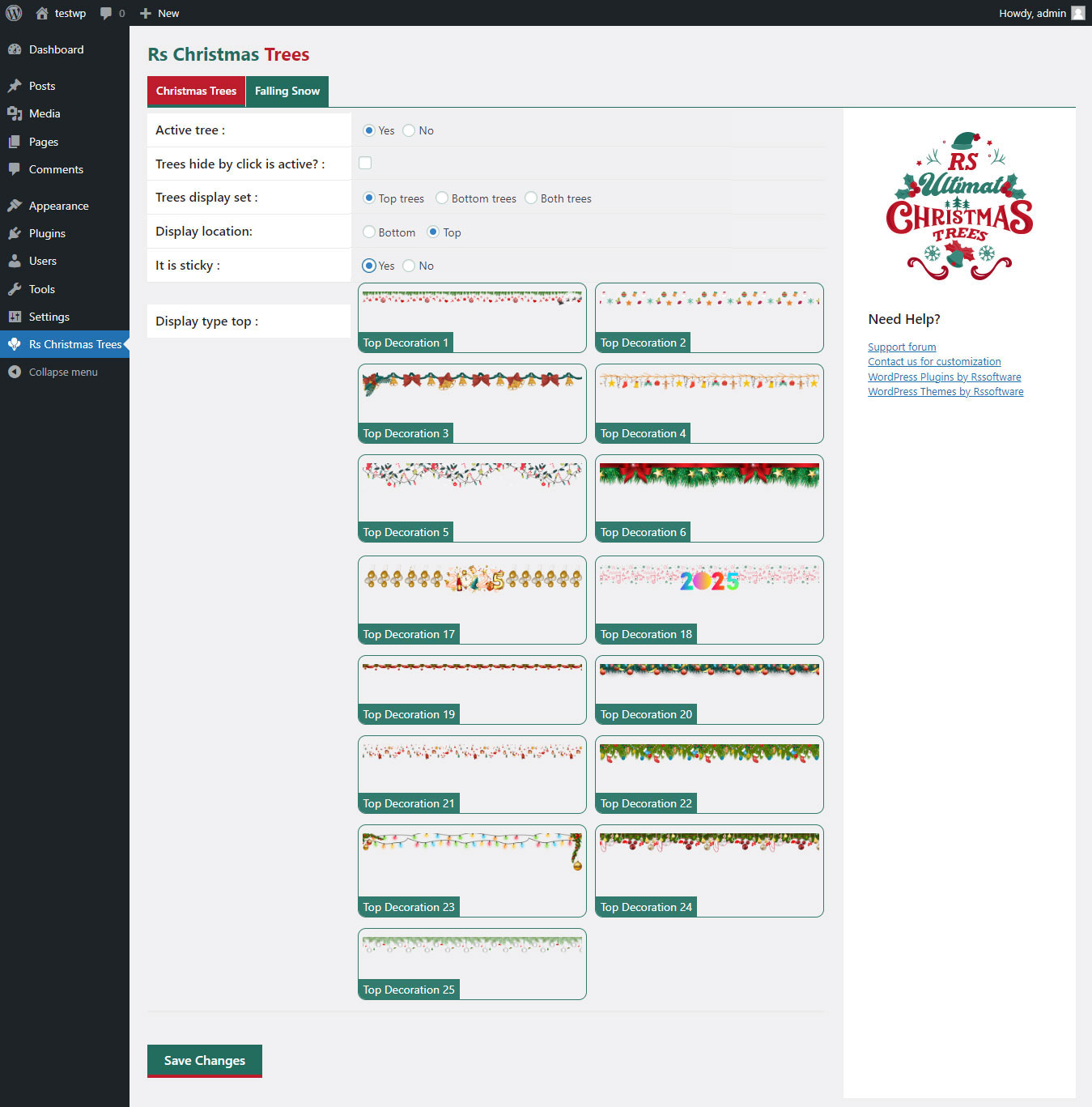
This screenshot Show christmas trees setting.

This screenshot Show Falling snow setting.
Changelog
1.0.0
- Initial release.
1.0.1
- fixed banner potion and repeted issue