

RSS Chimp – Add Featured Images to WP RSS Feeds (Mailchimp, Google News, Feedly)
Add featured images to RSS feeds for Mailchimp, Google News, Feedly and email newsletters. Enhance WordPress RSS feed with thumbnails for better email …
Plugin info
Maintenance & Compatibility
Maintenance score
Maintained • Last updated 123 days ago • 1 reviews
Is RSS Chimp – Add Featured Images to WP RSS Feeds (Mailchimp, Google News, Feedly) abandoned?
Likely maintained (last update 123 days ago).
Compatibility
Similar & Alternatives
Explore plugins with similar tags, and compare key metrics like downloads, ratings, updates, support, and WP/PHP compatibility.
Description
Add featured images to RSS feeds for Mailchimp, Google News, Feedly and email newsletters. Enhance WordPress RSS feed with thumbnails for better email marketing and syndication.
RSS Chimp – Add Featured Images to WordPress RSS Feeds for Content Marketing & Marketing Automation
RSS Chimp automatically adds featured images to WordPress RSS feeds, ensuring compatibility with Mailchimp, Google News, Feedly & automation tools. Perfect for content marketers, bloggers, and businesses looking to enhance RSS feeds for newsletters, syndication & SEO.
This plugin is designed for content marketers, bloggers, and businesses who rely on RSS feeds for newsletters, content syndication, and marketing automation.
RSS Chimp offers maximum compatibility with feed readers and improves the experience of your users who use such programs.
RSS Chimp works instantly after activation and adds blog posts featured images in RSS feeds. It is easily set up and offers advanced users many customizations and settings to customize the RSS feed.
RSS Chimp is forever free and has numerous valuable features despite adding the featured image to the RSS feed. Unlock the premium version and enjoy more powerful features.
Who Uses RSS Chimp?
✓ Email Marketers – Enhance Mailchimp RSS campaigns with featured images
✓ News Publishers – Optimize feeds for Google News & Feedly with thumbnails
✓ Content Marketers – Improve content syndication with rich media feeds
✓ Newsletter Creators – Add post thumbnails to automated email newsletters
✓ Bloggers – Make RSS feeds more engaging with featured images
Free features
➜ Add featured images to the RSS feed with the and tag
➜ Choose between different image sizes to optimize the loading speed and enhance the usability of your WordPress RSS feed
➜ Include the title and description of featured images in your RSS feed
➜ Perfectly integrates with Mailchimp, Google News, Sendinblue, MailerLite, Hubspot, and other services for marketing automation and content marketing
➜ Enable/disable the default WordPress feed
➜ Validate your feed with a quick link directly from the backend
➜ Add an image as the logo of your RSS feed, which will be used by feed readers and marketing automation tools, so that users will quickly recognize your site
➜ Enhance your RSS feed with additional metadata such as copyright information and contact details for the editor or webmaster of the page
Why Upgrade to RSS Chimp Pro?
RSS Chimp Pro unlocks advanced features to enhance your WordPress RSS feed:
✔ Create an Additional Custom RSS Feed – Generate separate feeds for different purposes.
✔ Choose Any Registered Thumbnail Size – Get full control over image sizes in your RSS feed.
✔ Add Custom Text & HTML Before/After Each Post – Personalize your feed for marketing automation.
✔ Customize the Permalink of Additional RSS Feed – Set custom URLs for different feeds.
✔ Define Post Length (Full/Summary) in RSS Feed – Control how much content appears in RSS readers.
✔ Delay Publication of New Posts in RSS Feed – Schedule post delays for strategic syndication.
✔ Add URL Parameters to All Post Links – Track traffic sources with UTM tags.
✔ Hide WordPress Version in RSS Feed for Security – Prevent exposing WordPress version data.
✔ Premium Email Support – Get fast, priority support for troubleshooting.
🚀 Boost Your RSS Feed with Pro Features!
🔹 Advanced RSS customization
🔹 Extra feed control for newsletters & marketing
🔹 SEO-friendly enhancements
👉 Upgrade to RSS Chimp Pro & Get More Control!
Upgrade Now
Support the development of RSS Chimp
You can support the development of the free version of RSS Chimp and make a contribution on Ko-fi.
Installation
- Go to ‘Plugins > ‘Add New’ in the backend of your WordPress site.
- Search for ‘RSS Chimp’.
- Install RSS Chimp with a click on ‘Install now’.
- Activate RSS Chimp in the ‘Plugins’ menu.
Manual installation
- Download RSS Chimp from the plugin directory.
- Upload the folder rss-chimp to the /wp-content/plugins/ directory.
- Activate RSS Chimp in the backend of your WordPress site in the ‘Plugins’ menu.
After activation
- RSS Chimp instantly adds featured images with the tag after the activation.
- Go to the settings pages to change the image size and modify all other options. There you find the option to add the featured image also with the tag.
- You are finished!
Frequently Asked Questions
The image is not available in the correct size. In most cases, this is solved by simply regenerating the thumbnails. Try another image size or regenerate them. For regenerating the different image sizes we recommend the plugin Regenerate Thumbnails.
After activating or deactivating the default feed or your custom feed it is necessary to flush the permalinks. Just go to the permalinks settings page and save it without changing anything.
If you get a fatal error while activating RSS Chimp Pro it is mostly because RSS Chimp Free is still activated. Please deactivate the free version of the plugin and try to activate RSS Chimp Pro again. Now everything should work as expected.
For the free version we provide limited support at the official WordPress support forum. If you are a user of RSS Chimp Pro we provide premium support via email.
Yes! RSS Chimp is fully compatible with Mailchimp’s RSS-to-Email campaigns. It adds featured images using both media:content and enclosure tags that Mailchimp recognizes.
Simply install and activate RSS Chimp. It automatically adds your post’s featured image to the RSS feed. You can then use this feed with Mailchimp, MailerLite, or other email marketing tools.
Yes, RSS Chimp adds featured images in a format compatible with Google News and other news aggregators.
Absolutely! RSS Chimp uses standard media:content tags that work with Feedly, Flipboard, and all major RSS readers.
Yes! With RSS Chimp Pro, you can create multiple custom RSS feeds, each with its own settings and featured images.
Review feed
Screenshots

Easily add featured images in RSS, choose between various image sizes, and enrich the images in your feed with titles and descriptions. (Screenshot from RSS Chimp Free)
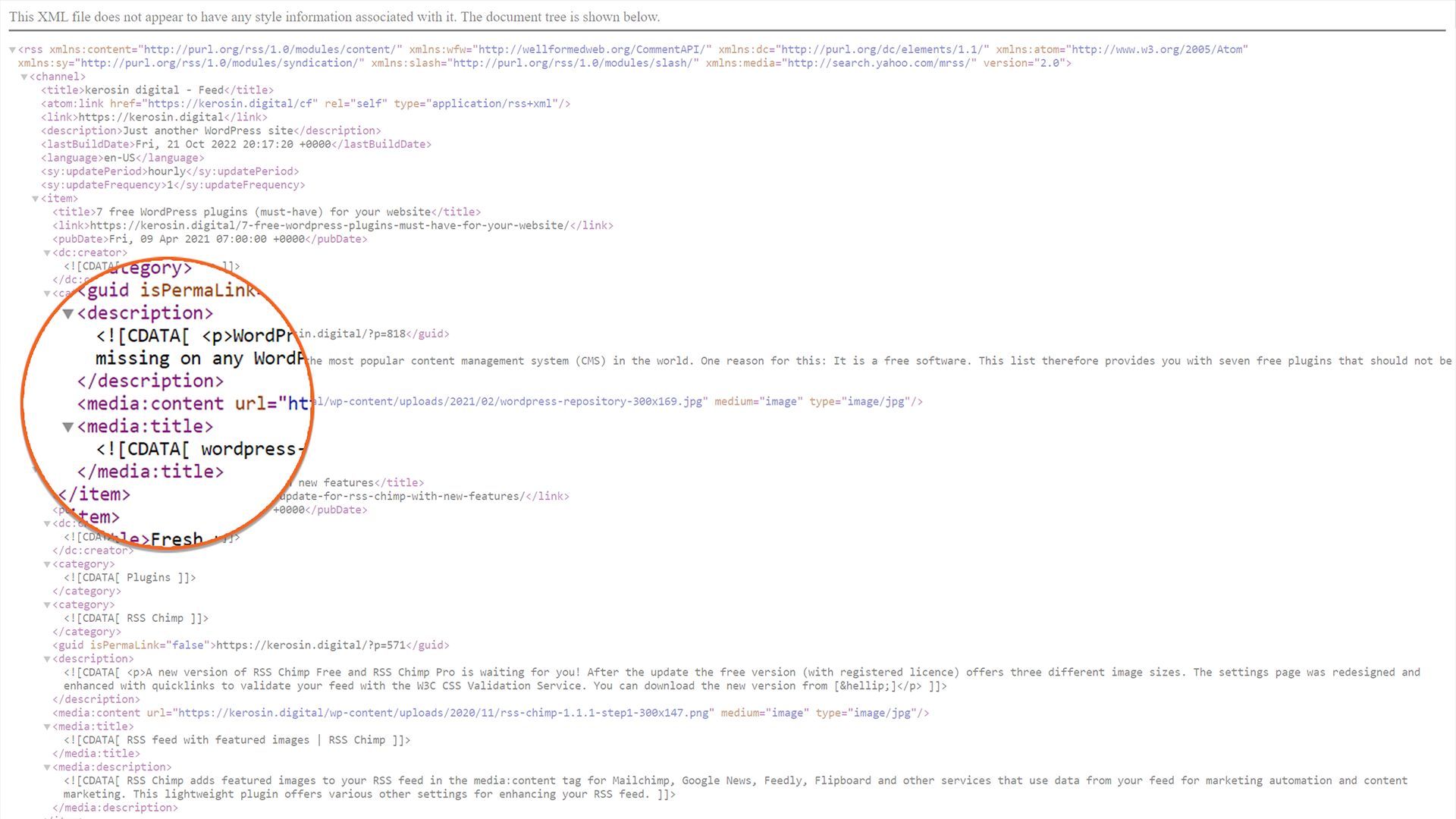
RSS Chimp adds featured images with the tag to your feed. This way the plugin ensures maximum compatibility with feed readers as well as tools for marketing automation and content marketing. Featured images

Besides adding featured images, RSS Chimp also offers other useful features in the free version: Easily add an image as the feed's logo and provide more information about copyright, editor, and webmaster. (Screenshot from RSS Chimp Free)

(Screenshot from RSS Chimp Pro)

Upgrade to RSS Chimp Pro and get a number of other useful features. For example, with RSS Chimp Pro you can delay the publication of your posts in the feed. (Screenshot from RSS Chimp Pro)
Changelog
1.3.0 – 2025-11-30
- Added: Completely reworked function for adding custom feeds. From now on it is possible to create more than one custom feed.
- Added: Lazy loading for all images in the feed
- Added: Object cache for all feeds to improve performance (premium plan)
- Added: Automatic migration system for upgrading from older plugin versions
- Added: Comprehensive input sanitization for improved security
- Added: Automatic cache invalidation when settings are updated (premium plan)
- Added: Safety checks for array access to prevent PHP warnings
- Fixed: Cache implementation to prevent XML corruption in RSS feeds
- Fixed: $_SERVER[‘DOCUMENT_ROOT’] replaced with WordPress native function for better server compatibility
- Fixed: File size calculation now includes proper error handling
- Fixed: Activator now uses update_option instead of add_option for reliability
- Fixed: Unsanitized $_GET parameters in admin context (security hardening)
- Fixed: Potential undefined array index errors in MIME type detection
- Fixed: Missing checks for empty post thumbnail data arrays
- Fixed: Several minor bugs
- Tweaked: Major code refactorings
- Tweaked: Optimized admin script and style loading to improve backend performance
- Tweaked: UI improvements
- Tweaked: Latest version of Freemius SDK
- Tweaked: Declared support for WordPress 6.9
1.2.8 – 2025-02-07
- Tweaked: Latest version of Freemius SDK
1.2.7 – 2025-01-12
- Fixed: Tab navigation for default and custom feed
- Tweaked: Translated various texts
- Tweaked: UI improvements
- Tweaked: Latest version of Freemius SDK
- Tweaked: Declared support for WordPress 6.7
1.2.6 – 2024-06-02
- Added: Flush rewrite rules when the settings are changed
- Fixed: Missing tag under certain circumstances
- Tweaked: Minor UI improvements
- Tweaked: Minor code improvements
- Tweaked: Latest version of Freemius SDK
- Tweaked: Declared support for WordPress 6.4
1.2.5 – 2023-07-05
- Fixed: The file size of the featured images is served properly and all feeds are validating again with the W3C Feed Validation Service (validator.w3.org)
- Fixed: Fatal error when no value was provided for the feed delay
- Fixed: Several minor bugs
- Tweaked: Latest version of Freemius SDK
1.2.4 – 2023-01-26
- Added: Option for also adding featured images with
- Fixed: Several minor bugs
- Tweaked: Latest version of Freemius SDK
1.2.3 – 2022-10-28
- Fixed: Image size in the custom feed is now served as expected.
- Fixed: Error due to duplicate attribute in the feed when Rank Math is enabled
- Fixed: Several minor bugs
- Tweaked: UI improvements
- Tweaked: Latest version of Freemius SDK
- Tweaked: Declared support for WordPress 6.0
1.2.2 – 2022-03-05
- Added: Option to add URL parameters to links in RSS feeds (premium plan)
- Tweaked: UI improvements
- Tweaked: Latest version of Freemius SDK
- Tweaked: Declared support for WordPress 5.9
1.2.1 – 2021-07-21
- Added: Option to include title and description with the featured image
- Fixed: Removed TGM Plugin Activation for better performance
- Fixed: Several minor bugs
- Tweaked: Declared support for WordPress 5.8
1.2.0 – 2021-05-06
- Added: Add RSS channel image
- Added: Define copyright, managing editor. and webmaster for feeds
- Added: Introduced error handling to improve the usability
- Added: Feed delay (premium plan only)
- Fixed: Several minor bugs
- Tweaked: UI improvements
- Tweaked: Latest version of Freemius SDK
- Tweaked: Declared support for WordPress 5.7
1.1.3 – 2020-12-28
- Added: Flush and rebuild rewrite rules upon plugin activation
- Fixed: Plugin deactivation and uninstallation routine
- Tweaked: Declared support for WordPress 5.6
1.1.2 – 2020-11-20
- Tweaked: UI improvements
1.1.1 – 2020-11-17
- Added: New image size
- Added: Quick links for validating the feeds
- Added: Add custom HTML before each post content in the feed (premium plan only)
- Tweaked: Latest version of Freemius SDK
1.1.0 – 2020-08-29
- Added: Additional image sizes
- Added: Add custom HTML after each post content in the feed (premium plan only)
- Added: Option to reset plugin on deactivation
- Tweaked: Translated various texts
- Tweaked: UI improvements
- Tweaked: Declared support for WordPress 5.5
1.0.1 – 2020-06-11
- Fixed: Several minor bugs
1.0.0 – 2019-10-04
- Initial release