

Plugin info
Maintenance & Compatibility
Maintenance score
Maintained • Last updated 163 days ago • Support resolved 50% • 56 reviews
Is RSVP and Event Management abandoned?
Likely maintained (last update 163 days ago).
Compatibility
Similar & Alternatives
Explore plugins with similar tags, and compare key metrics like downloads, ratings, updates, support, and WP/PHP compatibility.
Description
Simple Event Registration & RSVP Management for WordPress
The RSVP Plugin helps you handle event sign-ups easily. It lets people say if they are coming to your event. There are two versions: Free and Pro. The Free version has basic tools to manage one event. The Pro version gives you extra features for bigger and more detailed events.
Here are the premium features available in the paid version of RSVP
- Manage multiple events
- Setup sub-events, for example if you have an event spanning multiple days and you wish to create a separate event on each day
- Provide a calendar invite for events
- Create reminder emails for your attendees
- Generate QR Codes
- Record event attendance with a check-in functionality
- Display attendees list in the front-end
- Setup a Waiting list for your events
- Receive priority support
Installation
- Go to Plugins > Add New.
- Search for “rsvp”.
- Click “Install Now”.
OR
- Download the zip file.
- Upload the zip file via Plugins > Add New > Upload.
Activate the plugin. Look for “RSVP” in the admin menu.
Frequently Asked Questions
The free version includes basic RSVP features for a single event, while the Pro version offers advanced functionalities such as multiple event management, attendance recording, and a better interaction with attendees through notifications and reminders.
You can upgrade to the Pro version by purchasing a license from our website, then folowing the instructions provided in this article.
This can be easily done by adding the [rsvp] shortcode to one of your pages.
Yes, with the help of the Open Registrations option.
Yes, go to the page associated with the RSVP form and add to the query string the following parameters.
- firstName – For the person’s first name
- lastName – For the person’s last name
- passcode – If passcode is enabled and/or required this will need to be added as well
For example if you have a page that is /rsvp for domain example.com your URL might look like – http://www.example.com/rsvp?firstName=test&lastName=test
Please report security bugs found in the source code of the RSVP and Event Management Plugin plugin through the Patchstack Vulnerability Disclosure Program. The Patchstack team will assist you with verification, CVE assignment, and notify the developers of this plugin.”
Review feed
Screenshots
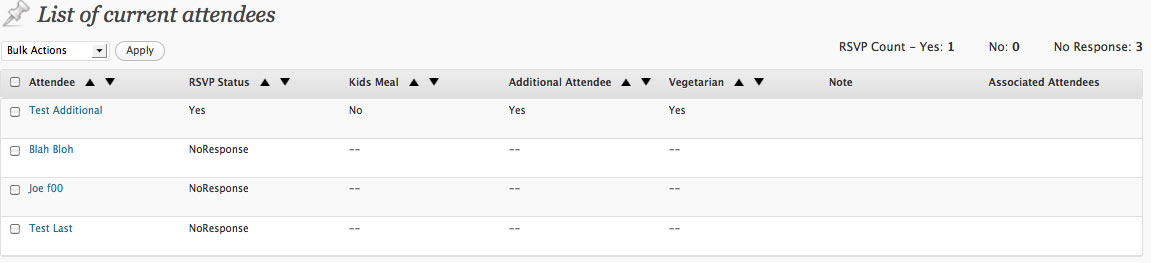
What a list of attendees looks like
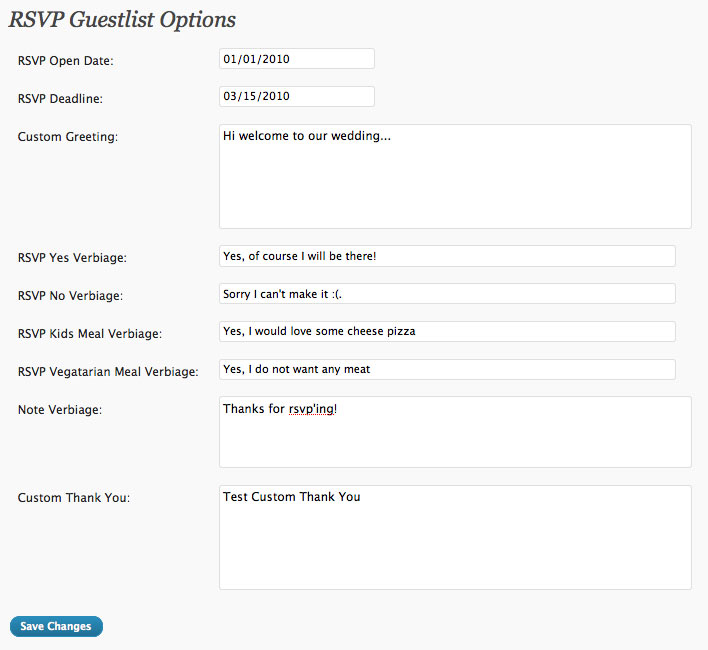
The options page

The text you need to add for the rsvp front-end
Changelog
2.7.16 – 17.04.2025
- Fixed: Load texdomain just in time.
2.7.15 – 09.01.2025
- Fixed: Vulnerability in the admin area
2.7.14 – 03.01.2025
- Fixed: Vulnerability in the admin area
2.7.13 – 18.09.2023
- Changed: Email address is now required to rsvp if there are several guest with the same name. ( #69 )
- Changed: Settings checkboxes transformed into toggles ( #64 )
- Fixed: Hidden radio/checkbox inputs with Go theme by GoDaddy ( #57 )
2.7.12 – 13.06.2023
- Fixed: Add max length to short answer ( #61 )
2.7.11 – 16.02.2023
You can read the complete changelog here